Outlet EventEnds Oct. 26. Limited quantities. No rainchecks.Shop now

Main Content
product image

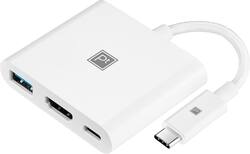
Platinum™ - USB-C Digital AV Multiport Adapter - White

Model: PT-AFACHM
SKU: 6440263
This item is no longer available in new condition. See similar items below
  • Key Specs
    • Connector Type (End 1): USB-C
    • Gender (End 1): Male
    • Connector Type (End 2): HDMI Type A
    • Gender (End 2): Female
  • General
    • Brand: Platinum™
    • Model Number: PT-AFACHM
    • Product Name: USB-C Digital AV Multiport Adapter
    • Color: White
    • Quantity: 1
    • Compatibility: USB-C-Compatible Devices
  • Connectivity
    • Cable Type: USB
    • Product Type: Adapter
    • Connector Type (End 1): USB-C
    • Gender (End 1): Male
    • Connector Type (End 2): HDMI Type A
    • Gender (End 2): Female
  • Warranty
    • Warranty - Parts: Lifetime
    • Warranty - Labor: Lifetime
  • Other
    • UPC: 600603266324

Your connections options can be limited if your computer or mobile device doesn’t have the right ports. Now all you need is the Platinum PT-AFACHM USB-C Digital AV Multiport Adapter—just connect it to your USB-C device to add an extra HDMI, USB-C and standard USB port. With a 4K HDMI output, you’ll have crisp images that help you give an impressive presentation or create a memorable movie experience. And with USB-C power passthrough, you can charge an extra device while connected to a display. This durable design fits in a pocket or bag, so you can take the adapter wherever you go. Expand what your computer device can do with this Platinum adapter.

  • USB-C compatibility: Connects to most USB-C devices (must have DP Alt Mode for HDMI connections) including Windows 10, MacOS, iPadOS and Chrome OS systems.
  • Expand your port options: Adds an HDMI, USB-C and USB-A port to your device.
  • 4K HDMI output: Connect your HDMI-enabled display to the adapter for high-quality video up to 4K at 60 Hz.
  • Mirror or extend your screen: View your screen on a second monitor, projector or TV for a larger image.
  • USB-C with power passthrough: Lets you charge a connected USB-C device while connected to an HDMI display.
  • Charge and sync: Power your device or transfer files using the same adapter.
  • Durable braided cord: Short, 1.6 in. (4 cm) white polyester nylon cord delivers added flexibility.
  • Compact design: Easily store and carry the adapter wherever you go.
  • USB-C compatibility: Connects to most USB-C devices (must have DP Alt Mode for HDMI connections) including Windows 10, MacOS, iPadOS and Chrome OS systems.
  • Expand your port options: Adds an HDMI, USB-C and USB-A port to your device.
  • 4K HDMI output: Connect your HDMI-enabled display to the adapter for high-quality video up to 4K at 60 Hz.
  • Mirror or extend your screen: View your screen on a second monitor, projector or TV for a larger image.
  • USB-C with power passthrough: Lets you charge a connected USB-C device while connected to an HDMI display.
  • Charge and sync: Power your device or transfer files using the same adapter.
  • Durable braided cord: Short, 1.6 in. (4 cm) white polyester nylon cord delivers added flexibility.
  • Compact design: Easily store and carry the adapter wherever you go.
Whats Included
  • Platinum USB-C Digital AV Multiport Adapter
  • Quick Setup Guide
  • Platinum USB-C Digital AV Multiport Adapter
  • Quick Setup Guide

Q: Can this be used for Nintendo switch

A: No it can’t. I just bought one specifically for this and it does not work, the charging is supported but the hdmi isn’t working for me

Q: I have a iPhone 15 I want to connect it to my car stereo A/v this dongle will work?

A: Hi Oscar, Yes, it will work. Ritchie |Platinum Support https:https://www.bestbuy.com/site/brands/best-buy-brands/pcmcat1596746025285.c?id=pcmcat1596746025285

Q: Trying to connect an iPad Pro to a Samsung Smart TV. A "device" is recognized when I connect to an HDMI port but is shows that it needs to power on. I've tried various connection types (PC, iPhone) but nothing works.

A: Hi Kenva52! It sounds like the HDMI port on your Samsung Smart TV is not recognizing the iPad Pro when connected through the Platinum USB-C Digital AV Multiport Adapter. Here are a few troubleshooting steps you can try: 1. Make sure the Platinum USB-C Digital AV Multiport Adapter is securely connected to both the iPad Pro and the HDMI port on the TV. 2. Check the power source for the adapter. Ensure that it is plugged into a power outlet or USB power source to provide power to the connected device. 3. Try using a different HDMI cable to connect the adapter to the TV, as the issue could be with the cable itself. 4. Check the HDMI ports on the TV to ensure they are functioning properly. You can try connecting a different device, such as a laptop or gaming console, to see if it is recognized by the TV. 5. Ensure that the iPad Pro is unlocked, and the screen is active when trying to connect it to the TV, as some devices may not be recognized if they are in sleep mode. If none of these steps work, it may be helpful to contact the manufacturer of the Platinum or Samsung first to further isolate the issue. JC | Platinum Support https://www.bestbuy.com/site/platinum-usb-c-digital-av-multiport-adapter-white/6440263.p?skuId=6440263

Q: I cracked the screen on my Samsung S20, and I was wondering if I could use this adapter to display the screen on an external monitor while also plugging a mouse into it?

A: Hi Hockey6409! Yes, you should be able to use the Platinum™ USB-C Digital AV Multiport Adapter to display the screen of your Samsung S20 on an external monitor. This adapter typically has an HDMI port for connecting to the external monitor, as well as additional USB ports for connecting a mouse or other peripherals. JC | Platinum Support https://www.bestbuy.com/site/platinum-usb-c-digital-av-multiport-adapter-white/6440263.p?skuId=6440263

Q: I have a HP Pavilion x360 - 14m-ba114dx with a USB-C 3.1 Gen 1 (Data transfer only) this product will not help support video output, correct?

A: This supports HDMI Video Output. Dina | Insignia Support | https://www.insigniaproducts.com/contact-us