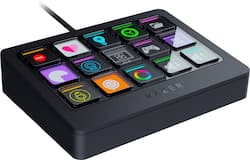
Razer - Stream Controller X All-in-one Keypad for Streaming and Content Creation - Black
Model: RZ20-04790100-R3U1
SKU: 6531754
This item is no longer available in new condition. See similar items below
Customers enjoy the Stream Controller X's ease of use and intuitive software, finding setup simple and functionality straightforward. Many appreciate the product's design and the included stand, which is well-received for its ergonomics. However, some users have noted challenges with software compatibility. Improvements in software functionality are suggested by some customers.
Does it work, yes and very well. However, I had used it less than 20 days after picking it up on 1/6/2024 and went to move it to clean off some accumulated dust to keep it clean and the bottom pad broke the screw holders and stayed in place. Never dropped, hit, otherwise assaulted. Contacted RazerCare and they have given me nothing but the run around for several days. After this, I do not think I will place trust in Razer products ever again. Is it a big deal, not really except when you buy something that is not cheap you expect it to last if nothing else until the warranty runs out! I know I could return it to Best Buy and may still depending on if they deem it warranty or not and I can easily fix it but shouldn't have to just yet. Should have gone with the Elgato I guess.
Posted by LoneWolfGamer
this has provided me additional productivity in my daily tasks. the software takes a little bit of knowing how to program your tasks and buttons but once you get it it, it is a game changer and i am sure im not using it fully to the max. with extra time and need you would be able to make amazing productivity functions with this
Posted by NMAV
First and foremost, the device is solid, with bright and beautiful buttons that are clear and easy to see and use. Razer did a nice job with the design, until I realized that they essentially just repackaged a limited-use Loupedeck device, and that’s where the thrill wore off. The initial install requires the installation of a Razer product that then leads to it installing the Loupedeck configuration app, which is what you’ll use to control the buttons that you interact with. Many of the buttons come pre-configured, including many Twitch actions you’ll commonly use during streaming, and work once you link your Twitch account in the Loupedeck software. The Twitch actions were one of the few packs of buttons that made sense for this device, where there were buttons configured to take you between screens for other actions. But since I don’t stream 24/7, and do a lot of photo and video editing, I was excited to use this for macros for Lightroom, Photoshop, and Premiere Pro. This is where it went off the rails. Razer/Loupedeck comes with several pre-configured macro packs for each of the Adobe products, but don’t have the left & right arrows (like on the Twitch mode) for going between screens of additional actions. Why? Well, Loupedeck’s native device has dials on it that allow you to scroll between the different screens, so arrows aren’t needed. Here, they ARE needed, but not available. So you’ll have to manually create them for each individual screen, sacrificing 2 buttons per screen to add them. Additionally, once you’re in a profile on the device, you HAVE to go back into the Loupedesk program on the desktop to bring you back to the “home screen”. The process is clunky, and that’s being nice. Out of the box, you’ll be able to do very basic streaming actions if you’re using Twitch. There are no pre-created app packages for YouTube or Rumble streaming, so you’ll have to create your own buttons and macros to complete individual steps, and the curve to get up & running there is steep. I think this would have been a better device with a standalone app for doing the configuration. It seemed like Razer wanted to brand something, but didn’t want to create it, so just leaned on Loupedeck’s existing tech to finish their homework. You simply cannot take the functionality of Loupedeck, which relies on buttons and knob navigation, and compress that into a device without said knobs. I really wanted to love this device. I’m going to use it, and I’ll certainly enjoy some of the Twitch features, but for anything past that, I’ll use another (name redacted) device.
Posted by GoalieMedic
The vast majority of our reviews come from verified purchases. Reviews from customers may include My Best Buy members, employees, and Tech Insider Network members (as tagged). Select reviewers may receive discounted products, promotional considerations or entries into drawings for honest, helpful reviews.