Outlet EventEnds Jan. 19. Limited quantities. No rainchecks.Shop now

Main Content
product image

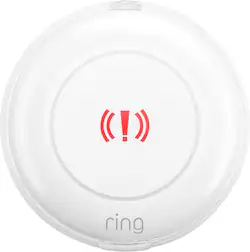
Ring - Alarm Panic Button (2nd Gen) - White

Model: B09NXDQ5YM
SKU: 6521445
This item is no longer available in new condition. See similar items below
  • Key Specs
    • Works With: Amazon Alexa, Ring (Compatible with or able to be connected to other smart devices or applications.)
  • General
    • Brand: Ring
    • Model Number: B09NXDQ5YM
    • Product Name: Alarm Panic Button (2nd Gen)
    • Color: White
  • Compatibility
    • Works With: Amazon Alexa, Ring (Compatible with or able to be connected to other smart devices or applications.)
    • App Compatible: true (The product can be connected to a program or software application on a mobile device, which then receives collected data from the product.)
    • Operating System Compatibility: Apple iOS, Android
  • Environmental
    • Indoor Or Outdoor Use: Indoor (Indicates the appropriate environment product was designed to be used in.)
  • Warranty
    • Warranty - Parts: 1 year
    • Warranty - Labor: 1 year
  • Other
    • UPC: 840268996734

Sound the alarm, notify loved ones*, and request emergency help when you need it with Alarm Panic Button (subscription required, sold separately). You can press and hold the Panic Button for three seconds to sound the siren on your Ring Alarm. Subscribe to Ring Protect, sold separately, to also alert shared users when your Panic Button is pressed with notifications from the Ring App.* Opt into 24/7 Professional Monitoring with a Ring Protect Pro subscription, sold separately, to notify our monitoring center and request emergency responders when your Panic Button is pressed.** BATTERY WARNING: KEEP OUT OF REACH OF CHILDREN. Store spare batteries securely. Dispose of used batteries immediately and safely. If you think batteries might have been swallowed or placed inside any part of the body, seek immediate medical attention.

  • Ring Alarm panic button (2nd Gen): Request help from our monitoring team with the press of a button if you're enrolled in professional monitoring**. Ring Protect Pro subscription, sold separately.
  • Simple installation: Place the button next to your bed, desk, or anywhere you want to feel more secure in your home.
  • Battery-powered: Features portability.
  • Ring Alarm panic button (2nd Gen): Request help from our monitoring team with the press of a button if you're enrolled in professional monitoring**. Ring Protect Pro subscription, sold separately.
  • Simple installation: Place the button next to your bed, desk, or anywhere you want to feel more secure in your home.
  • Battery-powered: Features portability.
Whats Included
  • Ring Alarm Panic Button (2nd Gen)
  • Ring Alarm Panic Button (2nd Gen)

Q: What is the primary function of this Ring Alarm Panic Button?

A: The Ring Alarm Panic Button allows you to call for help in an emergency situation within your home.

Q: How is the Ring Alarm Panic Button powered?

A: This panic button is battery-powered, making it portable.

Q: Is the Ring Alarm included with this panic button?

A: No, the Ring Alarm or Ring Alarm Pro is required but sold separately.

Q: Is this panic button compatible with Alexa?

A: Yes, the Ring Alarm Panic Button (2nd Gen) is compatible with Amazon Alexa.

Q: Does this panic button work with professional monitoring services?

A: Yes, if you subscribe to Ring Protect Pro, you can request help from their monitoring team by pressing the button.

Q: Where can I install this panic button?

A: You can place the button next to your bed, desk, or anywhere in your home where you want to feel more secure.

Q: How would I replace battery

A: Hi Pepper. Good question. To replace the battery in your Ring Alarm Panic Button (2nd Generation), disarm your Ring Alarm and remove the back cover from the device by twisting the lid counter-clockwise until the top line moves to the unlock symbol. Then use a small tool, such as a micro screwdriver, to carefully remove the coin-cell batteries from the casing of your Panic Button. Insert two new coin cell batteries (CR2032), taking care to match + and - symbols with the markings on your Panic Button. Finally, replace the cover securely, twisting it clockwise until it locks in place. We invite you to reach out to our Community if any additional information is needed regarding your question. The Ring Community is our first peer-to-peer community forum, giving our customers the ability to help one another by sharing their feedback and experiences with each other. All the best, Nicole from Ring.