Only @ Best Buy
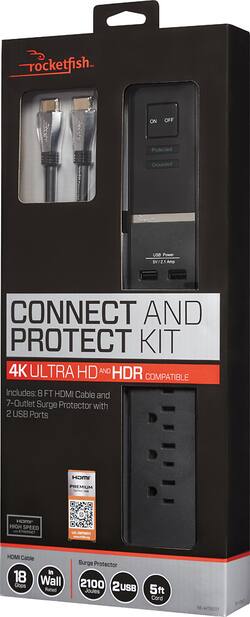
Keep your electronics safe with this Rocketfish surge protector. It has seven outlets, two USB ports and a 5-foot flexible cord for ease of use.
A: Yes, you can plug your computer/tv in the outlet. The Protected and Grounded LED’s you see aren’t buttons; The PROTECTED light on means it’s working. If it doesn’t light, the outlet doesn’t work. The GROUNDED LED lights when a properly grounded AC outlet is detected. If this LED does not light, somethin’s up with your wiring and you SHOULD NOT use it in that outlet.
Q: Is this product a platinum series, which is better monster or rocketfish
A: Moster ultragold and rocketfish 4k are pretty close to being the same, just monster is more expensive. Rocketfish is what I chose. It has a 3-layer cable shielding; 360° metal connector shell; silver content soldering; 24K gold-plated contacts, 18Gbps rating, HDMI Ethernet, 1080p+, Ultra HD 4Kx2K, compatible with 7.1 audio systems. Great product at a decent price.
Q: What's the hardware spec on the HDMI cable included. Is it 2.0, 2.0a or 2.0 b? Thanks
A: Easily connect an HDMI component to your HDTV or projector using this 8' Rocketfish RF-HG08501 in-wall HDMI cable that supports 1080p and Ultra HD 4K x 2K resolution and 7.1 surround sound for crisp visuals and audio.Connects an HDMI component to an HDTV or projector with an HDMI input; 3-layer cable shielding; 360° metal connector shell; silver content soldering; 24K gold-plated contacts. 18Gbps HDMI Ethernet 1080p+ Ultra HD 4Kx2K These are the decriptions i could find about it. As for 2.0 specs I am not sure. Hopefully a bestbuy tech guy can answer that for you.
Q: I DO NOT HAVE 4k HD TV, ONLY SMART TV, IS THE CABLE ONLY WORKING ON 4K TV ?
A: Hello! The included HDMI cable will be compatible with all HDMI devices. The 4K compatibility on this product will allow you to use the included cable with future 4K TV's and signal sources you may purchase in the future. Regards, Daniel T. - Rocketfish Support
Q: What is meant by "in wall" for the HDMI cable?
A: It is used for home theaters and through or "IN WALL" installations of cabling systems for tv's and entertainment devices. If you wire free air (inside the room) then a regular HDMI cable will work. For all inside wall routes you should consult the electrical code to determine the correct classification.The major difference is the size of the wires and the condition of the insulation (flame resistant etc). If your house is burning down because the flames started in a cable raceway and you used the wrong cable in accordance to code then the insurance will fight the claim and you get nothing.
Q: Is the electrical plug a slim line or a standard plug for the wall.
A: Yes it is a slim plug.
Q: Can I somehow mount the surge protector behind the TV? I have a wall mounted 65" TV. Thanks!
A: I mounted them behind 3 of my tv's using zip ties. Unless you look behind tv you will never notice them. I also used zip ties to mount the smaller Comcast cable box behind tv.
A: My best guess is that your outlet is wired wrong. I just moved into a house and have been gobsmacked out how many of the switches and outlets weren’t properly grounded. This can lead to fried hardware at best or it can lead to electrocution at worst, as the circuit breaker won’t ever trip to kill an overloaded circuit plugged into this device. Get yourself an outlet tester, or, kill the outlet power at the breaker and look in the outlet, or, hire an electrician to take a look at the outlet. Either way, test and repair if needed ASAP.