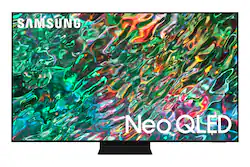
Dive into our most brilliantly intense 4K experience, powered by Quantum Matrix Technology. By using precision Mini LEDs to create a wide range of color and contrast, rich details are revealed. Marvel at all that emerges from your darkest and brightest scenes thanks to 14 bit processing for deep blacks and over a billion shades of color. From daytime sports to movie night, your picture amazes in any light with AI processing that expertly upscales content to 4K and refines your Smart Hub and sound.
Q: What is the differance between QN90A & QN90B??
A: Hi Hoss - Thanks for asking! Our 2022 QN90B Neo QLED adds new features like Real Depth Enhancer which increases depth and dimension on screen to bring content to life, and EyeComfort Mode that automatically adjusts the amount of blue light to help keep your eyes more comfortable. For gamers, you’ll gain Motion Xcelerator Turbo+ enhancements like HDMI 2.1, Game Motion Plus and 4K@120Hz support on all ports (up to 144Hz for PCs on 43 & 50" QN90B), and additional settings adjustments with Game Bar 2.0. You’ll also get built-in Dolby Atmos audio for an enhanced cinematic surround sound experience. ^Gina
A: None of the Built in Speakers work well in Flat TVs. They want to sell Speaker Systems costing good $$$$. The speaker on my New Samsung sounds horrible. Sorry Samsung. With the Newest technology in sound you would think they could install some decent mini speakers into thousand dollar TVs?
A: Ken - You can press the TV Controller button (beneath the Samsung logo on the TV) which will prompt an on-screen menu; press again to move through the options and press and hold to select. ~ Samsung Specialist
A: Robert - Yes, the QN90B is a Bluetooth enabled Smart TV. You can download the Paramount+ app directly from this TV's App Store. ~ Samsung Specialist
Q: will a bose bar work with this tv?
A: William - The QN90B features HDMI, Optical, Bluetooth, and Wi-Fi connectivity; if your Bose soundbar features/supports any of the same connection types, it sure will work with this TV. ~ Samsung Specialist
A: undefined