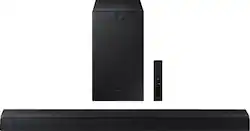
Elevate your experience with virtual 3D surround sound.
Q: Is this sound bar and subwoofer totally wireless to hook up?
A: Hi JohnR! The HW-A550 Soundbar is Bluetooth enabled, and can wirelessly connect to your TV and any other devices that are also Bluetooth enabled. The A550 subwoofer will need to be connected to a power source but will pair wirelessly with the soundbar. ^Tim
Q: What wattage is the sound bar
A: Both of these questions are misleading from what you are asking, I think. The total power of the entire system is 410W, but the subwoofer by itself is 250W (according to another answer from Samsung), which means that the soundbar itself is only rated 160W - which then begs the question of how many speakers are within the soundbar itself to know what each speaker is rated to get a true understanding of effective power compared to a dedicated sound receiver system, which I don't know.. This sort of information should be easily found in the overview information or, at the very least, the specification section on this item, but Samsung/Best Buy omit even the total wattage rating, let alone specifics, to make it harder to directly compare it to other products, which I find very disingenuous.
A: Hi Tommy! Press and hold the SOUND CONTROL button for about 5 seconds to adjust the sound for each frequency band. 150Hz, 300Hz, 600Hz, 1.2kHz, 2.5kHz, 5kHz, and 10kHz are selectable using the Left/Right buttons and each can be adjusted to a setting between -6 to +6 using the Up/Down buttons. (Make sure the Sound mode is set to “STANDARD”.) ^Tim
Q: Can I add speakers to this later? Like if I get a rear speaker kit in the future?
A: Hi JP! The HW-A550 is compatible with the SWA-9100S wireless rear speaker kit by Samsung found at the following link from Best Buy: https://www.bestbuy.com/site/samsung-2-0-channel-wireless-rear-speaker-kit-with-surround-sound-black/6456117.p?skuId=6456117 ^Tim
Q: How do I synch my sound bar to my Samsung tv remote?
A: Hi JoeBob! By deafault, you can adjust the HW-A550 Soundbar volume using a Samsung TV’s remote control. If this is not working you can try the following steps. 1) Turn Off the Soundbar. 2) Push up and hold the WOOFER button for 5 seconds. Each time you push the WOOFER button up and hold it for 5 seconds, the mode switches in the following order: “Samsung-TV Remote” (Default mode), “Off-TV Remote”, “All-TV Remote”. The LED indicator status changes each time the mode is changed. Alternatively, connecting the soundbar to the TV via HDMI ARC will allow you to use the TV remote to control the soundbar. Should you need further assistance, please contact Samsung Support at 1-800-SAMSUNG. ^Tim
Q: Will this Samsung sound bar work with my LG 70 inch tv?
A: Hi Ray! The HW-A550 features three ways to connect to an external device: HDMI (ARC), digital optical audio, and Bluetooth wireless audio technology. If your TV is compatible with one of these three audio connections, you should have no issue connecting the soundbar to your TV. ^Tim
Q: does the system come with an optical cable and do you need one if you are also using an hdmi cable
A: It comes with an optical cable. You can plug an HDMI in directly in the standard port or the eARC port. If you use the HDMI, you won't need the optical cable.
Q: How many watts is the subwoofer?
A: Hi Jbrock30 - The Rated Output Power of the HW-A550 subwoofer is 250W. ^Gina