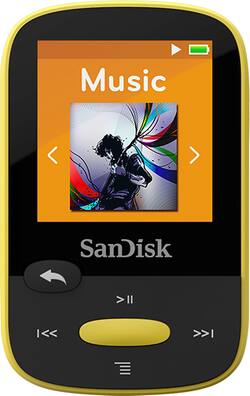
Stay entertained during your workout with this SanDisk Clip Sport MP3 player, which features a 4GB* capacity for storing music and audio books. The 1.4" LCD display with 128 x 128 resolution offers a clear view and helps simplify operation.
A: If you have a mini USB on your MP3 player you can connect it to an AC USB power adapter and plug that adapter into the wall.
A: Yes you can! When you open the radio, press the bottom button. It'll bring up a menu with Add Preset, Auto Presets, View All Presets, and Recording. Scroll down to Recording and press the center button. Press it again on Record Now.
Q: Can I sort by artist and genre?
A: Yes you can sort
Q: Just bought , earphones only work on one side. How do I get the FM radio function to work?
A: If you use the player regularly and the earphone connector gets yanked out it can damage the contacts and may only work on the one side. You might also try your headphones on another device to make sure that isn't the problem, and lastly make sure the headphones are able to push in all the way, some are slightly angled and that bit of plastic may need to be filed down. As for the radio push left or right to the radio tab and push the middle button. use the left or right (station up or down respectively). The receiver is not of great quality so if you are indoors you may not get a good signal. I work in a warehouse and because of the metal I don't get a signal at all.
Q: how do you download music. and can the music be free
A: I downloaded music that I had ripped to my laptop using my own CDs and the program Window Media Player
Q: Work in car?
A: I use it in my Honda Civic and it works well :)
Q: Will the SanDisk - Clip Sport 4GB* MP3 Player play chapters from an audio book in sequential order
A: Yes, it works very well. I use it to listen to audio books all the time.
Q: Does the screen stay on the entire time or does it blank out after a few seconds?
A: It has a 25 hour rating for battery life with a single charge. It will enter sleep mode after short periods.