Rating 4.5 out of 5 stars with 727 reviews
4.5- Color (218)
- Ease of use (199)
- Price (58)
- Setup (42)
- Compatibility (27)
- Connectivity (33)
- App (16)
- Hub (8)
- Response Time (4)
- Scheduling (3)
Customer Images
The vast majority of our reviews come from verified purchases. Reviews from customers may include My Best Buy members, employees, and Tech Insider Network members (as tagged). Select reviewers may receive discounted products, promotional considerations or entries into drawings for honest, helpful reviews.
- Rated 4 out of 5 stars
Interested in making your home "smart"? Jump in.
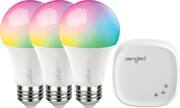
I was interested in diving into the "smart home" scene and this kit fit the bill. This Sengled Element kit brought all the necessary items to set up a Smart Bulb network including the smart hub, 3 daylight (yellow) led smart bulbs as well as all the needed cables. After connecting the smart hub to my network and downloading the smartphone app I was greeted with a mandatory firmware update for the hub that had no indication of when the process was complete. Luckily everything went smoothly and I had the bulbs up and running in minutes. As mentioned earlier the kit comes with 3 bulbs, but it is expandable (up to 64 bulbs) and you can assign multiple bulbs into rooms so they all power on/off at the same time if you want them to. The smartphone app isn't very visually stimulating but it is very feature filled giving you detailed information about the bulbs. The smart led bulbs actually have built in dimmers, so using the bulbs you can have mood lighting for no additional cost! I expected this smart home bulb kit to have a locked down approach in terms of playing friendly with other brands, but I was pleasantly surprised to see a large list of vendors and accounts in the smartphone app. I had my Google Home and Alexa accounts linked in no time and was glad to see so much openness in a consumer product. TLDR: Smart hub + 3 led bulbs (yellow light), works with Google and Alexa voice commands, smartphone app is feature filled. This is a great starting kit for smart home lighting. Feel free to ask me any questions about this bulb kit.
This review is from Sengled - Smart LED A19 Starter Kit - White
Posted by elzeus
- Rated 5 out of 5 stars
I love it
I am using it a lot. Very useful practical. Excellent product
This review is from Sengled - Smart LED A19 Starter Kit - White
Posted by gmanzano
- Rated 5 out of 5 stars
The Little Hub Works
This is not my first venture into smart light bulbs. I have others, including some that work directly with Alexa with no hub intervention. But this package was easy to set up and get working. Plug in the hub into one of the Ethernet connections on your router; turn all the bulbs on; download and install the Sengled Element Home software on your smartphone; open the app, and follow the instructions. The only hitch I ran into is that the three bulbs found and identified in the app are named Bulb 1, Bulb 2 and Bulb 3. I had two of them in the dining room lamps and one above the kitchen table, and since each installation was going to be in a different group, I had to physically unscrew two of the bulbs and exchange their location. I was not able to switch them on and off to locate which bulb was where before defining the location: they could only be controlled as a unit. But once the location was defined, then the lights could individually be turned on and off. I then added the Sengled Element Home skill to Alexa and established control over the bulbs in that app. And my commands to turn them on and off were instantly obeyed. The bulbs have a nice, pleasant, soft color temperature, and the brightness for each bulb can be fully adjusted within the Element Home App. The hub does not require a physical Ethernet connection once set up. If you want to move it away from the router and use wi-fi, you simply unplug the power to the unit, wait a minute, move it to the desired location, and power it back on. Somehow the app locates it and you are back in business. Just keep it within the wi-fi range of your router, and you are set.
This review is from Sengled - Smart LED A19 Starter Kit - White
Posted by mobilelawyer
- Rated 5 out of 5 stars
Great value in color light bulbs
Pros Competitively priced No flicker even at lowest setting Ramps gradually between settings Includes bridge if you don’t have a smart hub Compatible with Zigbee HA smart hubs like SmartThings Quick response time Tracks energy usage when using Sengled Hub Has an option to be wireless or hardwired Cons Using with third party hub limits some features Sengled app is confusing Sengled hub only allows 3 schedules Included instructions are vague Includes ethernet jack but setup defaults to Wi-Fi Ranges is very short when using Sengled hub With smart bulbs becoming more commonplace, more manufacturers are adding color smart bulbs to their product line. The Sengled Element Color Plus 3-pack with hub is one of the latest offerings from Sengled. Although it includes Sengled’s own wireless bridge, the bulbs are compatible with several smart home hubs that support the Zigbee HA protocol. The design of the bulbs looks just like a standard soft white bulb when off. They come already paired with the included hub although the instructions are very vague on this. It tells you to search for Sengled Element Home app and not much else. Sengled does have a YouTube channel with some very helpful videos. Options vary based on the smart home hub you use but, in the end, you sacrifice some features when adding them to your hub instead of the included one. If you decide to use the included hub you will find you gain the ability to group the bulbs and control them as if they were one. You also gain the ability to monitor power usage and hours on for each bulb while restricting yourself to only 3 schedules a day. The included app feels a bit confusing and unrefined as well. Another downside is you lose integration with other smart hubs and only have integration with Google Assistant and Alexa. It isn’t hard to reconfigure the bulbs for either option so it might be best to first test using with the hub as they are set up from the factory and then try connecting them with your smart hub to see which has the features you value most. For anyone with an existing compatible smart hub you will most likely be better served skipping the Sengled hub. To pair with a new setup, a quick factory reset can be issued by turning your light switch off and on 10 times. The instructions don’t say this, but their YouTube channel does. Hopefully in the future Sengled will add more features to their apps for other smart platforms which would add further value to the product. Regardless of how you choose to control them the overall behavior is the same. On and off controls are instant with no ramp or down in brightness. Once the command is issued the bulbs respond quickly. When changing brightness or color for bulbs that are already on the bulbs instead ramp to the different brightness or color. The different between methods feels less refined but still does the job just fine. Ideally a configurable ramp rate would be better as gradual ramp of brightness can give users the ability to create a more sophisticated lighting setup. Overall color reproduction is good but, just as any other colored bulb, darker colors are hard to produce with most color shades being from medium to bright. Some colors, such as turquoise, are harder to create and can sometimes appear white. Others, such as orange appear slightly off but still acceptable. More basic colors such as white, blue, red, and yellow come out looking very nice and distinct. The bulbs can be adjusted down to 1% brightness without any sense of flicker or buzz. Without measuring equipment, it is hard to verify but the 1% brightness seems a lot more like 10 or even 20% brightness which is still good. Overall dispersion of light is very even with no detectable hot spots and the feeling is very similar to the even glow of an incandescent bulb. Sengled seems to have done a nice job with this kit. Long term reliability and support are hard to determine but if first impressions mean anything they have a bright future if they continue to improve. Although the hub and app are a little rough around the edges, the same could be said with even more mature smart products. Even with some interface oddities the overall product works reliably and there is something to be said about offering a kit that has more color bulbs and a hub for less than competitors without feeling distinctly cheap.. Combine that with compatibility with several other smart hub platforms and it becomes much easier to see the value in these bulbs. If you are in the market for some color changing light bulbs and are willing to give a lessor known company a chance to save some money the Sengled Element Color Plus bulbs can be a good fit.
Posted by CraigB
- Rated 5 out of 5 stars
Wide range of color selection and dimmable options
Haven't used any of Sengled products before, so was curious to see how this compares to the ones in the market. Installed one in the bedroom primarily to use it as night/TV lamp and one in the living room to use it as a daytime lamp. Installed one in the office room as well. Pros (out of 5 stars) Seamless integration with Samsung Smart things and Google home (should work with amazon echo as well).Works well for the Zigbee range. Was able to control the lights using google assistant voice commands. Working on setting up routines (like red when CO alarm triggers and white when motion sensor triggers, etc) for lights to automatically turn on and turn off with other sensors - 5/5 Definitely impressed by the selection of colors (good, bright and vivid) and dimmable range (using Scenes option on hub app). Matches with the competitor product (that has similar selection) that I have been using for the last 3 years. I especially like the sunrise color option that gets triggered with my wake up alarm at mornings. I liked (for reading) the white light that has a little blue cast on it (60W with 6500k) for my office room - 5/5 Price is relatively cheaper (~25% cheaper) to the well-known branded ones in the market and offers similar options and selection on color and dimness. The bulbs itself are cheaper (could go cheaper to light up a big house with 12 rooms ;-) ) if you want to add more to the hub. Can't comment on reliability yet for the price offered, so will have to test it for couple months to rate it higher than 4 - 4/5 Doesn't get hot! This was a big concern on a cheaper one that I bought and had to discard as it posed a fire hazard. Cons (room for improvement) Price can go cheaper, still in the lower price range compared to branded ones Don't believe it can be used outdoor/patio. Wanted one that can withstand outdoor temperatures and moisture - None in the market so far Wish they had the strip light that can go with the hub, don't have to buy a different brand to complete the home kit Wish it came with a remote for non-app users (for kids) Definitely worth the money if you are looking to light up a big house (64 units max) for lower cost. Will update this review after couple months of use and test it out on other 3rd party hubs
Posted by TechGeek