Rating 3.6 out of 5 stars with 155 reviews
3.6- Ease of use (52)
- Bluetooth (9)
- Design (9)
- Setup (8)
- Point Mode (4)
- Battery Life (19)
- Compatibility (14)
- Size (14)
- Price (7)
- Touch Screen (3)
Customer Images
The vast majority of our reviews come from verified purchases. Reviews from customers may include My Best Buy members, employees, and Tech Insider Network members (as tagged). Select reviewers may receive discounted products, promotional considerations or entries into drawings for honest, helpful reviews.
- Rated 5 out of 5 stars
Cool new remote from the future!
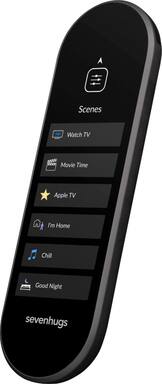
My husband and I love gadgets and we're also control freaks, so when we saw the Smart Remote video we were dying to try it. So far so good! We're really enjoying it. Here are some of my observations as one of the first people to try it: - The remote itself is beautiful. I really love the way it looks. And when you hold it in your hand you can really feel the quality. - We mostly own products that Smart Remote supports, but we’ve got a few smart lights and switches that aren’t yet available (IKEA Trafri and Lutron). The current list of compatible smart home devices is bit limited right now, but Sevenhugs says they’ll be adding more devices every month. I'll be eagerly awaiting their Samsung SmartThings integration. - I’ve setup a few universal remotes in my time and this one was by far the fastest and easiest remote I’ve ever set up. The Smart Remote app does a really nice job and it took about 10-15 minutes from start to finish. - We successfully replaced 6 remotes with Smart Remote (woohoo!): TV, cable box, Roku, Blu-ray player, audio receiver and CD changer. A couple of the buttons on our TV and audio receiver were missing, but we were able to add them with infrared learning. We were also able to edit the controls and remove a couple buttons we didn’t need. That’s one of the nice things about a touchscreen remote—everything is customizable! - Smart Remote’s AV Scene feature makes it super simple to control our entertainment center. You just create a scene for each media player you want to watch and all the options appear in a list on Smart Remote. From there, all we need to do is just tap what device we want to watch. Smart Remote will turn on our TV, AVR and whichever media player we selected and switch all the inputs. Really like this one-touch control feature. - Point Mode makes me feel like Harry Potter (at least a little :-). Being able to just point at what you want to control is super cool and also pretty darn convenient. Really innovation tech! - The Room Sensors that make Point Mode possible need to be placed high on your walls and they need to be visible. They aren’t very noticeable on our white walls, but they will stand out a bit if you have dark color walls. Seems like a small price to pay for having the latest and greatest technology though. - Controlling smart lights and plugs is easy and is actually quite a lot of fun now, especially when using Point Mode. The UI is really well done and makes it really fun to play with your lights and try new colors. - If you use Spotify, you’re gonna love the Spotify integration on Smart Remote. It's super convenient to just browse and launch playlists without needing to pull out my phone. - The battery only lasts a day and overnight charging is pretty much required. Small price to pay for everything else this remote does well though.
Posted by techgal
- Rated 5 out of 5 stars
One Remote To Rule Them All!
Like most people, I’ve got a basket with 5 or 6 remotes sitting on my coffee table and it seems ridiculous to have so many controls. I’ve tried Harmony and other options in the past, but had issues with setup and could never get my wife comfortable with using a remote with a lot of buttons. So, I’ve been waiting for a new solution to appear. Also, I recently convinced my wife to try out a few smart home products like smart bulbs in various room in our home, but I’m the only person who typically uses them. She doesn’t always keep her phone with her and hasn’t really taken to using voice control yet. When I talked with my wife about solving our TV and lighting challenges with Smart Remote, she really liked the simple control screens and was open to trying it. After a few days of using Smart Remote now, we’re sold. Turning on everything connected to the TV is super easy. All we need to do is just tap the Roku or cable TV button in the menu and Smart Remote does the rest. My wife is even using our TP-Link smart lights thanks to Smart Remote with Point Mode. She was a little reluctant at first to install sensors on our walls, but it couldn’t be easier to control things now with the proper setup. Just point at the TV or the lights and tap...it works like magic! I’ve also been using Smart Remote to stream Spotify to my Bose speakers, which has been a really nice bonus feature. It’s like having the Spotify app on your remote. I can browse playlists and select music to play, control volume and skip tracks. The only thing it’s missing is the ability to type in searches like you can in the Spotify app. Hopefully they’ll add that functionality soon. A couple other things to be aware of: - The battery life seems pretty short, so you’ll need to get in the habit of charging it up every night. - Point Mode is really handy when you have some smart home devices spread around the room, but you won’t be able to point and control individual devices connected to your TV. If your devices are close together, you’ll need to manually swipe to select which one you want to control. Smart Remote isn’t perfect, but it has surpassed my expectations. Definitely nice to finally have a remote that eliminates clutter and makes controlling things pretty easy and intuitive.
Posted by HomeWizard
- Rated 4 out of 5 stars
Unique and Beautiful but Not Smart Enough.
Sevenhugs smart remote that plans to control your entire connected home. The remote is nicely built with a responsive touch screen. Setup was a breeze once the remote is charge connect it to your WiFi, download the app from (Google Play or Apple store) and your good to go. During setup the remote will try to find connected devices on its own, but you also have the option to add them manually. Once you have your devices setup you will create Scenes of your choice. You swipe left or right to toggle through your functions and others, like diming your lights you swipe up or down. The remote is not that big, some people may not like that, me personally it felt great in the hand, due to it's size functions are easily reachable with your fingers. One neat feature that this remote has is the point and control, in which you aim at specific device and the remote will automatically switch to the controls that is associated with that device. I do love that feature but it will take some time to set up. There are 3 included sensors that has to be positioned throughout your room and they have to be in certain locations to mapped your room properly. Why is this feature so good because instead of scrolling though the remote to find the device all you have to do is point at it to bring it up automatically on the screen. Now that been said this feature will have some issues with stacked up equipment such as cable box, Blu-ray, gaming consoles, etcetera and that’s because they are on the same line of sight, regardless you move up or down. This is a smart remote but it also has its limitation, it mostly controls smart home devices that are Wi-Fi connected. In my case I use z-wave light switches and plugs, connect it through Samsung Smartthings hub, neither the light switches or the hub are compatible with this remote. According to their website they are working to integrate the Smartthings hub. I also have Phillips hue light and they work flawlessly. If you have a Nest thermostat at the time of this review it is still not compatible. You will also find hard to control things that are behind cabinets since the remote doesn’t have separate IR blaster like the Logitech Harmony Elite. Another things that his remote lacks is a microphone for voice commands. When the remote is placed on the charging base it looks beautiful, but it does have a flaw. The remote charging base uses a USB-C connection which is good, but that single connector is the only thing holding the remote in place, any wrong hard move and I’ll see that USB-C connector getting damage, plus in the dark it may be little hard to find. I believe this remote has potential once it becomes fully functional, and if they only had added IR capabilities to the charging base this will definitely be a contender against the Logitech Harmony Elite. Overall this a very nice sleek, easy to use universal remote with unique features that will get the job done in a modern way, but at not at this price range. In the box it comes with the remote, charging base, 3 sensors, manuals and the power brick (Europe version comes with universal plugs). I rate this a 4 because there is no 3.5 stars which in my opinion is what it deserve as of now , and that's due to the lack compatibility, functionality, and the high price for what it does. Pro: Design Point Control Feature Responsive Touch Screen Ease of Use Cons: Price Not compatible with smart hubs Hard to control devices behind cabinets Not compatible with Z-wave or Zigbee No Mic
Posted by Wishkid
- Rated 5 out of 5 stars
Excellent product
I tried a bunch of other remotes but this one is by far the best. I love the elegant design and the screen is very responsive. Love the point mode too. Not only it replaces all my remotes, but I can even select my Spotify playlists which is very cool. I'm still discovering all the capabilities of this remote.
Posted by Samhi
- Rated 4 out of 5 stars
Magical idea and a great start
PROS - Quick setup - Beautiful screen - Unique point and click feature CONS - Short battery life - Questionable stand design - Lacking integration I’ve long thought that the holy grail of home automation was an experience that was contextual and personal – besides voice control this is the closest that we have come, and it is indeed very magical! To be clear, the Smart Remote by sevenhugs is not just another universal remote control, but it does integrate several of the aspects used their competitors along with their own unique approach. I’m going to talk about everything from how I setup the remote and features to things I would like to see. Let’s get started! HARDWARE The hardware is very straight forward – there are no physical buttons here. The front of the remote features glass with a color touchscreen. The resolution isn’t going to win any awards, but it gets the job done and looks great. The back has a slightly grip rubber texture with small recessed area to natural rest your fingers that makes it very easy to hold. Overall, I found it very comfortable to use. The battery most likely due to the display never lasted more than 24 hours – I would be sure to put the dock in an accessible location. The dock is an unassuming black puck with the USB type C connector that points vertically at a slight angle. This is slightly scary as the remotes only support when docked is provided by this single connector and there is no other mechanical part keeping the remote up. I can foresee this being a problem, especially in households with children. It only takes once, and you could be left with your jack broken off your dock. The magic point and click aspect require 3 other white puck shaped device to be adhered to your walls in the room that your using the remote in. The pucks are battery powered and come with 3M Command Strip adhesive to aid in the installation process. There are some specifications that need to be adhered to such to ensure the point and click functionally works as intended. Pucks must be on different walls, never the same wall, must have a view of each other, and a view of the dock. That is a lot, and it did take some thought before I decide where to place each one in my apartment. SETUP + SOFTWARE The setup is dead simple and should be for a universal remote that promises to make your smart home and entertainment life easier. You plug in the remote and connect it to your home’s Wi-Fi. After that you do most of the configuring from the app. When you select what TV/AV equipment you want to setup it will prompt you to interact with the remote if it needs help deciding what specific TV model or A/V receiver you have. The setup is very fluid and easy to follow. Next if you have any smart home hardware or services you can connect those. I setup my Philips Hue lights, TP Link switches, Apple TV, Sonos speakers, and Nest Thermostat. They are always adding new support for devices (Nest is the newest addition). Setup typically involves signing in with that specific account or searching your Wi-Fi network for the devices – either way it is super easy. Once you have your TV, A/V, and smart home tech added you can begin grouping and configuring your hardware. They offer several scene options to tackle typical scenarios – you can have an A/V scene or Home scene. Home scenes allow you to have a single button to perform several actions like when you arrive/leave home or want to have a movie night. When creating a home scene, you are asked to complete the action on the remote. This is easy enough, but when you have tons of lights and other hardware it can be slow scrolling through every single item. A better option to tackle this would be doing it all in the app. If you aren’t controlling individual lights, I would suggest grouping lights to make creation of home scenes easier. To control multiple A/V hardware you can setup an A/V scene – this will allow you to select what hardware you want to turn on and what inputs they should be set to. Additionally, once specifying your A/V configuration you can create or tie in an existing home scene to control lights or other smart home functions in conjunction with your A/V scene. Overall the process is simple and easy to follow, but it does get noticeably more bulk for homes that have a ton of smart home appliances. Now comes their killer feature – contextual point and click. After setup of your devices and scenes you can unlock the magic. The setup of this is easy - click and hold down on any item from the remote and it will ask you to hold the remote around 6” from the object and set the location. After doing that, whenever your remote is in point and click mode you can simply point at that object and the remote screen will change to whatever that object is. It works very well and once you set everything up it’s a truly magical experience. At some points it does require recalibration, that involves spinning the remote in a figure 8 pattern in addition to pointing to each of the reference points as they light up. Overall, I’ve been very satisfied with the remote, they offer a unique and fun approach to the traditional universal remote environment with their unique point and click capability. It’s easy to setup and offers many services and third-party support that is steadily improving.
Posted by camdenk