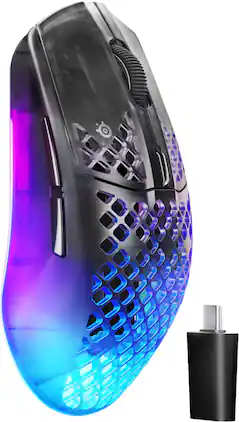
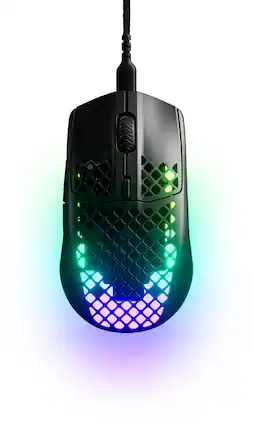
The SteelSeries Aerox 3 Wireless Gen 2 combines 4K wireless polling, ultra-fast 1.2ms clicks, a TrueMove 26K optical sensor, dual 2.4GHz and Bluetooth connectivity, AquaBarrier protection, RGB lighting, and long‑lasting battery life up to 200 hours all in an ultra‑lighweight 68g design for uncompromising competitive play.

The SteelSeries Aerox 3 Wireless Gen 2 combines 4K wireless polling, ultra-fast 1.2ms clicks, a TrueMove 26K optical sensor, dual 2.4GHz and Bluetooth connectivity, AquaBarrier protection, RGB lighting, and long‑lasting battery life up to 200 hours all in an ultra‑lighweight 68g design for uncompromising competitive play.

Aerox 5 Wireless combines dazzling RGB with industury-leading design. Victory is in your hand with a lightning-fast 74g build shielded from dust and splashes with AquaBarrier. Easily connect with lag-free Quantum 2.0 Wireless enjoying superb 180-hour battery life, aiming using ultra-precise, 1-to-1 tracking with the TrueMove Air sensor.

Logitech G partnered with top esports athletes to create The Fastest, Fully Customizable Click. Equipped with the Haptic Inductive Trigger System, the advanced HERO 2 sensor, and the robust LIGHTSPEED wireless. PRO X2 SUPERSTRIKE is a revolutionary PRO mouse delivering The Winning Click.

Immerse freely and fully with the Razer Cobra HyperSpeed—a lightweight, symmetrical wireless gaming mouse. From its dynamic 4-zone Chroma lighting to 9 customizable controls and next-gen optical switches, light up your game and play with no limits.
| Pros for SteelSeries - Aerox 3 Wireless Gen 2 RGB 26K Optical Gaming Mouse with AquaBarrier Protection - Dual 2.4GHz/Bluetooth for PC/Mac - Wireless - Shadow | |||
|---|---|---|---|
| There were no pros for this product— | Weight, Overall Performance, Battery Life, Design, RGB | Overall Performance, Weight, Feel, Noise Level, Button Feedback | There were no pros for this product— |
| Cons for SteelSeries - Aerox 3 Wireless Gen 2 RGB 26K Optical Gaming Mouse with AquaBarrier Protection - Dual 2.4GHz/Bluetooth for PC/Mac - Wireless - Shadow | |||
| There were no cons for this product— | Connectivity, Scroll Wheel, Software, Lag, Sensor | There were no cons for this product— | There were no cons for this product— |
The vast majority of our reviews come from verified purchases. Reviews from customers may include My Best Buy members, employees, and Tech Insider Network members (as tagged). Select reviewers may receive discounted products, promotional considerations or entries into drawings for honest, helpful reviews.

I am a casual gamer. I’ll play an FPS here and there, and some other days I’ll dive deep into a story-driven game. But when I do play, I enjoy being comfortable, and that starts with my peripherals. I have been using the Aerox 3 Gen 2 for a couple of days now, and it has seriously been one of the most comfortable mice I have used. This mouse also has a myriad of customizable features that any serious gamer would enjoy. I did find some minor downsides, and I will cover these in this review. This is my review of the SteelSeries - Aerox 3 Wireless Gen 2 Gaming Mouse. *TLDR at the bottom ====================== IN THE BOX/SET-UP In the box, you get a braided USB-C to USB-A cable, a USB-C extension adapter, and a 2.4GHz wireless dongle. Set up is all plug-and-play. I did go wired first to fully charge the mouse, but as soon as it was fully charged, I moved over to the wireless dongle. The SteelSeries GG software is optional, but I highly recommend it for a more granular control over the mouse’s settings. The software is also where firmware updates can be downloaded and installed. These updates can be installed wirelessly, which is something I don’t see very much. ====================== DESIGN: This Aerox 3 Gen 2 sports a honeycomb look. This is the first mouse of its kind that I have used, and while I thought it looked strange at first, it has quickly grown on me. I noticed that the honeycomb design has reduced my hand sweat, which is neat. The design also reduces the mouse’s weight. One of the design choices that I did not like was the size of the wireless dongle. It is on the larger side, but I understand that this was likely a design choice to keep the mouse lightweight. Still, it's not the most lightweight mouse I’ve used, but it’s lightweight enough for my liking. Finally, I do dislike that the lettering at the bottom is harder to see in certain lighting. Sometimes I find myself switching to the wrong input. ====================== STEELSERIES GG: GG is the software that is used to customize the Aerox 3 Gen 2. This is an app that needs to be installed, but it would be nice if this software were moved into a web app instance to allow customization without having to install the app. Regardless, the software is easy to use and navigate. GG offers granular control over the mouse’s settings from the polling rate, acceleration/deceleration tuning, precision tuning, etc. I didn’t get to play around with every single setting, but there were a couple of settings/features that I was intrigued by. The first one was the 3D Aim Trainer tool. It's currently in Beta as of 04/2026, but the tool assists you in finding the optimal mouse sensitivity setting for your mouse. This is done by putting you through these shooting trials where you need to hit targets in a specific order at different distances. This is only for shooter games. As a result, I decided to try this out with Battlefield 6. The trials are about 15 to 20 minutes or faster if you are great at shooters (I am decent). The initial result was not ideal. The recommended mouse sensitivity settings for BF6 were way too low for my liking. I decided to give the trainer another run, and this time, I used a higher DPI. It had still recommended a low mouse sensitivity, but it was closer to something I was more comfortable with. Anyways, while the tool is neat, I would use it as a recommendation, but not something you must abide by. The RGB lighting is also unique on this mouse, and it’s configurable in GG. Three layers can be configured: Active, Reactive, Idle. The Active RGB layer becomes active when your hand is off the mouse. The Reactive layer becomes active when the mouse is in use. Finally, the Idle layer becomes active when the mouse is sitting idle(timing can be configured). Overall, there are a myriad of customizable options with this mouse, which I love! ====================== COMFORT/USE/BATTERY: In terms of comfort, the Aerox 3 Gen 2 is extremely comfortable and ergonomic. I’ve gamed for hours at a time and did not feel an ounce of discomfort. On top of that, the honeycomb design has been great for reducing my hand sweat. One setting I played around with was the polling rate. I set the rate to 4000Hz. And honestly, the mouse did feel more responsive. I’m not sure if it was because I was playing better, but the subsequent BF6 matches after updating the setting felt great. I was winning more. The downside of setting the polling rate this high is the extremely high battery usage. Just keep that in mind. Battery life is highly dependent on the mouse’s settings. I did stress test the mouse these past couple of days. As a result, battery life wasn’t the greatest. I have had to charge the mouse once so far. But if you go light on the RGB settings, polling rate, etc., I am confident that this mouse’s battery can go for dozens of hours. ====================== CONCLUSION/TLDR: Overall, the Aerox 3 Gen 2 has been an excellent gaming mouse. I really enjoyed the granular level control that SteelSeries offers with the mouse’s settings. I found the mouse extremely comfortable and ergonomic. While it's not the lightest mouse I’ve used, I found that the weight was adequate for my liking. If you are serious about gaming and granular level control in a gaming mouse, I wholeheartedly recommend you give this one a try!
BarackObama Posted
This Aerox 3 Wireless Gen 2 is a decent upgrade from the previous 2022 edition. The main difference is the increased polling rate to 4000 Hz when connected to a PC/Laptop via 2.4 GHz mode and an upgraded Truemove 26K optical sensor with lift off distance adjustment as well as some enhanced looks. It has the same aqua barrier IP54 rating and 68 g weight. It feels different though like it has a slightly better coating to the exterior and I really like the change to the scroll wheel it is way more quiet and it just has a better look and texture to it. Same mechanical switch clicky buttons which all feel great. This mouse can go up to 26,000 DPI with maximum speed of 400 IPS, maximum acceleration of 40 G, and choosing between 1 or 2 mm lift off distance. There are 6 programmable buttons, USB-C connection three ways to connect via bluetooth, wired, or 2.4GHz modes. When connected to the cable the maximum polling rate is 1000 Hz. This mouse is compatible with PC, Xbox X|S, PS5, Android, and IOS. The battery life is claiming to last up to 120 hours @1K up to 35 hours @4K and up to 200 hours via Bluetooth with RGB off. I have used the Gen 1 2022 with my MacBook M1 for a long time and it worked flawlessly but this Gen 2 I had a few issues getting it setup correctly, ran into some differences with the Steelseries GG software and figured out at least one of my issues which was that when I had it connected via bluetooth the mouse was very laggy and slow I had to go into my Mac mouse settings and turn off pointer acceleration and now it works perfectly. My main issue with this mouse is mostly software related as my old mouse I was able to create two profiles, one default and one Bluetooth for the bluetooth profile with the Gen 1 I was able to turn off the RGB lighting but the settings on the software are different with the Gen 2 and I was not able to create another profile that would fix that issue when connected to bluetooth everything goes to default no matter what I did so it just has the breathing RGB default lights that I don't care for but it still worked fine and not that big of a deal but it is different and I would hope this could maybe get fixed in a future update with Steelseries GG. When I connected the mouse to my PC it worked right away and I had zero issues with my acceleration or DPI settings and there was a lot more in the Steelseries GG software that I was able to customize the mouse settings for and the 3D aim trainer worked on the PC but not the Mac. Overall this is a very good mouse, it's simple and compact and I really like the subtle changes to this mouse compared to the older version mostly the texture and scroll wheel. The only thing I dislike about this mouse is the bottom of the mouse on the Shadow color is white and not all black like the Gen 1 is, it is very hard to read the bottom of it and seeing which mode you are selecting. I believe it makes the RBG more noticeable perhaps and you can see the inside PCB better which is kind of cool but I really would have preferred an all black bottom and black PTFE skates.
BLK3WLD Posted
I've tested a lot of mice over the years and this Aerox is definitely growing on me as an easy to use mouse with plenty of features added through their software. The basic setup is as easy as with any mouse. No matter what kind of connection you're going to use, it's pretty plug and play. The transmitter connects as soon as you flip the switch on the mouse to 2.4ghz mode. You can also connect via bluetooth or you can just use a USB-C cable to use it in wired mode. Surprisingly (to me), the wired option doesn't offer you the greatest polling frequency in the software. The mouse feels nice to use if you enjoy this style of mouse. It's very light weight and easy to move. All of the buttons have fairly firm clicks but without being hard to click by any means. Tracking is as you'd expect from a mouse in this price range in these days. Everything works great and is quite comfortable if you prefer lightweight, flatter style mice. The software does do a good job of setting this mouse apart from some others. It doesn't feel crazy bloated or anything. It allows you to use it without creating an account (by missing out on some non-mouse related features so no big deal). Lighting can set configured in 3 separate zones on the mouse with a lot of built in options and a good deal of customization. It's nothing incredible but I usually set my RGB to some fairly simple breathing animations so it's more than enough for me. There are a lot of other options you can customize in the software. As you'd expect, you can set each button to do whatever you want. Configure a macro for each button. Or set up a specific key you want to press. The only odd thing I could see was the inability to set a button as being held down while the mouse button was held down. The closest I could get was to toggle hold, otherwise all of the options involved repeatedly pressing the button instead. There are power management features to help save battery life. You can even enable them automatically when the battery gets low. Then there's more advanced options like being able to set the angle in which you hold the mouse to define what "up" means. Very cool stuff. One of the biggest downsides to the software (and something I hope gets improved in the future) is automatic profile switching depending on what app/game is in the foreground. It looks like the software is in a transitional period where they're retiring (or just retired) an older version of this for their newer "quickset". Navigating the options for this isn't very great. I tried to add a game by filename and I could never tell if it was fully added. It does do a good job detecting most of your games you have installed via Steam and such so you won't always have this issue. But I also found that the profiles just didn't switch automatically all the time. Battery life was pretty ok. Nothing spectacular but also nothing crazy bad. Things will obviously depend on your usage but I will say that at least once in my testing, my mouse died overnight while my computer was off, so they could probably stand to do some more work on sleeping the mouse when it's not connected to anything. I don't have an exact count on how many hours I got out of the battery but I could estimate that it lasted me 5 days of fairly heavy usage before completely dying. The great news is that it really doesn't take a long time to charge it back up to 100% again so as long as you remember to plug it in every so often, you should be good to go. All in all, I like the mouse. It's comfortable to use. The software is pretty good and doesn't feel like it's bloating up my system. There are a couple of smaller issues with the software I hope get resolved but nothing is a gamebreaker. If this style of mouse is your cup of tea and you're looking for a good lightweight option, give this one a try.
swemoney Posted