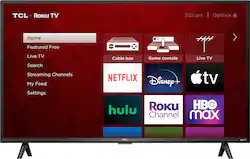
The TCL 3-Series is the simply smart way to enjoy endless entertainment. Enjoy over half a million movies and TV episodes available to stream plus sports, news, music, kids and family, food, science and tech, fitness, foreign language and so much more. Start streaming free TV right from your home screen or browse 250+ free live channels with the Live TV Channel Guide to find what to watch next. Your favorite broadcast TV, streaming channels, gaming console and other devices are front-and-center within a simple, customizable home screen. There’s no more flipping through inputs or wading through complicated menus. The super-simple remote—with about half the number of buttons on a traditional TV remote—puts you in control of your favorite entertainment and includes one-touch shortcuts to popular channels like Netflix.
Q: What is the width of the stand?
A: For this 40 inch TCL Roku TV, the feet spacing to fit on a stand is 30.5 inches. Hope this helps! Thank you, TCL Customer Support
A: The Standby LED can be turned off by going to Home>Settings>System>Power>Standby LED>Off. Hope this helps! Thank you, TCL Customer Support
A: Our TCL Roku TVs do not currently support Bluetooth. However, you can download the free Roku app on your smart phone or tablet to use voice search, voice control, and experience private listening. To enjoy private listening you simply click private listening in the app, and attach headphones to your smart phone or tablet. Or you can use the 3.5 mm headphone jack in the back of the TV to connect standard headphones. Hope this helps! Thank you, TCL Customer Support
Q: Can this tv receive "over the air" broadcasts?
A: This TCL TV has a coaxial located on the back of the TV near the other inputs. By connecting an antenna you can receive over-the-air channels. However, the reception depends on the signal strength. Hope this helps! Thank you, TCL Customer Support
Q: Does this tv have a sleep timer
A: There is not a physical button for it, but there is an option for it. Simply press the asterisk (*) button on your TCL Roku TV remote while watching content, highlight the sleep time option, and choose how long you want to set it for (30minutes-3hours). Hope this helps! Thank you, TCL Customer Support
Q: is there a brightness control ?
A: There are options available to adjust the settings to better fit your personal preference. You can access the Options menu on the TV by pressing the asterisk (*) button on your remote while watching content. Brightness is one of the available settings. Hope this helps! Thank you, TCL Customer Support
Q: Can a DVD player be hooke uo to this TV
A: This TCL TV features various inputs that can be used to connect external devices like a DVD player. Hope this helps! Thank you, TCL Customer Support