Black Friday is hereShop new DoorbustersShop now

Main Content
product image

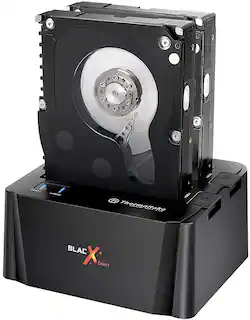
Thermaltake - BlacX Duet Hard Drive Enclosure Docking Station - Black

Model: ST0014U-C
SKU: 9062073
This item is no longer available in new condition. See similar items below
  • Key Specs
    • Drive Form Factor: 3.5 in.
    • Operating System Compatibility: Mac, Windows
    • External Interface: USB
    • Internal Interface: SATA
  • General
    • Brand: Thermaltake
    • Model Number: ST0014U-C
    • Product Name: BlacX Duet Hard Drive Enclosure Docking Station
    • Color: Black
    • Material: Plastic
  • Compatibility
    • Drive Form Factor: 3.5 in.
    • Operating System Compatibility: Mac, Windows
  • Connectivity
    • External Interface: USB
    • Internal Interface: SATA
    • USB Generation: USB 3.0 (The specification (generation) of the USB standard. Generations are backwards compatible with previous specifications (provided that those devices have the necessary adapter to accommodate the connection type).)
    • Number of Bays: 2 (Each bay, or enclosure, holds an individual drive.)
    • Maximum Capacity (per Bay): 6 terabytes
  • Power
    • Power Source: Plug-in
    • AC Adapter Included: true (An external power adapter is included for operation.)
  • Warranty
    • Warranty - Parts: 3 years
    • Warranty - Labor: 3 years
  • Other
    • UPC: 841163061121

Read and write to two 2.5" or 3.5" SATA hard drives or solid state drives at once with this Thermaltake BlacX ST0014U-C docking station, which offers a hot-swappable design to ensure rapid file transfers via the USB interface.

  • Fits two 2.5" or 3.5" SATA hard drives or solid state drives: For compatibility with a variety of drives.
  • Hot-swappable design: Streamlines the process for rapid exchanges.
  • Plug and play: LED activity indicators let you monitor the status of your hard drives.
  • Compact design: Dissipates heat and exhaust efficiently.
  • Windows and Mac OS compatible: For simple use with your existing computer.
  • Fits two 2.5" or 3.5" SATA hard drives or solid state drives: For compatibility with a variety of drives.
  • Hot-swappable design: Streamlines the process for rapid exchanges.
  • Plug and play: LED activity indicators let you monitor the status of your hard drives.
  • Compact design: Dissipates heat and exhaust efficiently.
  • Windows and Mac OS compatible: For simple use with your existing computer.
Whats Included
  • BlacX Duet Hard Drive Enclosure Docking Station
  • USB cable, AC power adapter
  • BlacX Duet Hard Drive Enclosure Docking Station
  • USB cable, AC power adapter

Q: Does it works for window 10?

A: It will work with windows 10

Q: is there any SATA cable included with this product?

A: This is a docking station. It comes with a USB cable to connect it to a PC. It does not include a SATA cable. You will not need a SATA cable to use a drive since the drive will snap straight down into the dock provided the drive is standard SATA. I hope this helps.

Q: Can I use this to transfer files from a hard drive that was removed from a bad PC and transfer those files to a new pc?

A: So long as the file system is intact and the drive is not physically damaged, you should be able to pull data from the drive. If the drive is damaged, or the tables are corrupt, please leave data recovery to an expert.

Q: Wil the thernaltake blacX work with IDE drives?

A: Mine does not work with IDE drive. The connectors on the drive don't match - mine has SATA connectors only. I have a bunch of IDE drives collecting dust - I have seen some hard drive adapters for IDE to SATA for sell on Amazon but never purchased one.

Q: This Thermaltake - BlacX Duet Hard Drive Enclosure Docking Station holds 2 SATA HD's . Can I copy from one HD to the other to make a backup HD?

A: Dear Customer, You can drag and drop the data from one HDD to other. If you try to clone the HDD. You will need 3rd party cloning software. Best Regards, Thermaltake USA Customer service Toll free: 1-800-988-1088 M-F 9:00AM ~ 5:30PM (P.S.T.)

Q: Is this device backwards compatible with USB 2.0?

A: Yes, I have plugged it into the 2.0 and a 3.0 USB port it worked equally as well on both the 2.0 is just not as fast is about the only difference if I wasn't out to get optimum speed I would not have noticed it was on the 2.0 as it functions just the same as it does on the 3.0 port.

Q: How do I know if my hard drive is compatible or SATA?

A: Any relatively new hard drive will be SATA. This format has been around for some time now. However, to be sure, note the connections: SATA has two small cables that connect it to a computer. The older style had one long connector and a smaller power connector.