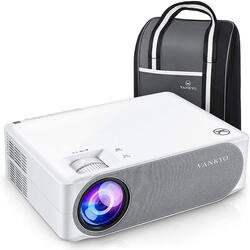
Equipped with native 1920x1080 resolution, 5000:1 contrast ratio and 50,000 Hours lamp life, VANKYO Performance V630 is an exceptional home cinema and office projector conveys the truest color and imparts the deepest feelings upon the viewer.
Q: what is the lumin spec on this projector?
A: 423 lumens I.e very low https://www.projectorreviews.com/vankyo/benq-th585-vs-vankyo-v630-comparison-review-page-2/
Q: Can this projector be used outside?
A: Yes it can, but you have to make sure its nice and dark out In order to get the best picture possible!! It works great
A: yes! We use our fire stick to watch movies and shows on the projector and it works perfectly. You can also use the included usb cable that powers the fire stick. Plug the usb into the 5v usb input and the micro end into the fire stick and boom! 1 less cable. I have mine about 20 ft away. Just need to adjust the screen size accordingly. It projects the whole screen at 120in but i had to set it to a smaller aspect ratio but the picture quality is still great.
A: I bought an Aluratek - Bluetooth Audio Receiver and Transmitter from Best Buy. It’s very small, and works perfectly to connect with my Bluetooth soundbar. We use ours for football games and movies, and the sound is always in sync with the video. MUCH easier than running wires!
Q: Can I stream from my phone to the projector? Via cable or blue tooth?
A: Yes, you need the adaptor for your phone to HDMI and it works great.
Q: Does this connect to speakers via bluetooth?
A: No it's not Bluetooth, but you can buy a Bluetooth audio transmitter to make it Bluetooth. I bought a Aluratek brand for 30 dollars plugged it up into the 3 5mm aux input or headphone input , pair it with your soeakers, & Bam now a Bluetooth Projector. Also works with any non Bluetooth device
A: Yes, it has a carrying case, so you can take it with you, we use on camping trips and out in the back yard.
Q: Can I hook a DVD player to it?
A: If the DVD player has HDMI out, just plug the HDMI cable from it into an HDMI input on the protector. If DVD player uses the composit (yellow for analog video) + red and white output, (for left and right audio) then connect the yrw cable from the DVD player to the included yrw to AV adapter and plug the headphone lookin end into the AV port on the back of the projector. Either way, make sure to change the input on the projector's menue to HDMI or AV, and have both devices powered on.