Rating 4.5 out of 5 stars with 70 reviews
4.5- Installation (23)
- Ease of use (18)
- App (12)
- Keypad (6)
- Battery Life (5)
- Auto Unlock (9)
Customer Images
The vast majority of our reviews come from verified purchases. Reviews from customers may include My Best Buy members, employees, and Tech Insider Network members (as tagged). Select reviewers may receive discounted products, promotional considerations or entries into drawings for honest, helpful reviews.
- Rated 5 out of 5 stars
it just works
im not real tech savvy, this is easy to install, get going, and operate. it has made my life a bit more simple, im going to grab another for my front door!
Posted by MattyG
- Rated 5 out of 5 stars
Easy to get working
Super easy to install and get working with Alexa. I’m a bit hesitant about its plastic parts, but so far even with a rougher lock it hasn’t been having any issues.
Posted by sstalley
- Rated 5 out of 5 stars
Very easy installation and convenient
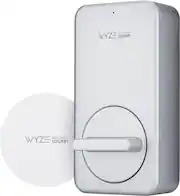
This product gets retrofitted that goes on the back of an existing deadbolt. The smart device (replacing the inside thumb-turn) and the existing deadbolt and outside cylinder keyed housing are on the inside. The outside will have the existing cylinder lock, which works with its original key(s). I like my first smart lock for my front door so much that I am getting two more, one for the door leading to my garage and one for another door in my house. I have both the Wyze Lockin and the Wyze keypad. The kit comes with everything included (except a smartphone) to make any deadbolt a smart device. It consists of the four Duracell batteries, the retrofit knob box, screwdriver, Wyze Gateway, lineup metal plate to attach the device to the existing deadbolt, and three different adapters to match most deadbolt types. If none of the provided adapters don’t work with your deadbolt, contact Wyze, and they will send you one for your deadbolt. The lock polished aluminum cover has a nice and clean look. The Wyze Lockin lock connects to the Wyze Gateway to connect to the house WiFi; the lock doesn’t connect directly to the WiFi. This included gateway needs to be plugged into an outlet near the lock and also where it can receive a WiFi signal. The installation is super easy, and this is possible thanks to the Wyze app that guides you through the entire process. Its installation wizard is one of the best wizards I have used. The whole process is broken down into simple to follow steps, and the cool thing is the option to select “Show me how” that will pop up a YouTube video on how to do a specific step. The Wyze app is straightforward and includes incredible features you can do with the smart Lockin. You get instant notification and history when it is locked, unlocked, locked, or unlock with the keypad. The activity notification is instant. I have the option to give access to anyone in my household and set/ deactivate temporary access for guests. The auto-lock feature is one of the reasons I wanted this lock, mainly because my teenage child frequently forgets to lock the door when his friends leave the house. Now with this Wize Lockin, I can rest assured that the front door will not be left open. When activated, the device detects the door position and automatically locks the door when it is closed, and the options are: At once, or minutes (1, 5, 10, 30, or 60 minutes). If set to lock automatically, there is a setting/method (called Trash Method) on the app that allows users to temporarily disable the auto-lock so when someone leaves the house for a few minutes, you won’t be accidentally lockout. In Trash Mode, to temporarily disable auto-lock, one must slowly manually unlock, lock, and finally lock the door. The lock will beep, confirming that Trash Mode has temporarily activated, and the door will not automatically lock. Most of the app settings, lock, and unlocking can be performed remotely (away from the house), but a few require the smart device using Bluetooth to be near the lock. Auto-Lock, Alarm Settings, Volume, and Calibrate settings are only allowed with the smartphone near the lock connected via Bluetooth. For security reasons, I don’t use the auto-unlock sensor feature that unlocks the door when you approach it with your smartphone; I don’t want the lock to open by accident when I am near the door with my phone. A warning with the auto-lock feature, make sure you leave the house with your phone or your keys. You can also get the Wyze Keypad to avoid accidentally getting lockout. What I like the about the product are: (1) I get instant notifications when the door locks and unlocks. (2) It automatically locks when it gets closed. (3) Battery life is very good. (4)I can share access codes. Overall, this is great to have attached to any deadbolt and is very convenient.
Posted by SimpleLiving
- Rated 5 out of 5 stars
Functional and Great Door Lock
This Smart door lock is great for being 100% automated. Installation was a breeze and set up went off without a hitch. In the box comes with everything you need to get you up and running. Lock itself, Gateway, mounting hardware and all the necessary adapters including 2 AA batteries. I replaced my Kwikset lock and realized that the lock only replaces the inside part and leaves the outside completely original. I downloaded the App and went to add the lock and it takes you step by step to install it. The tape included held the outside in place while I installed the back with the door closed. The metal plate has holes that will auto align to any lock out there to make your life easy. Included are 4 different adapters for all brands of locks. Once installed you slap on the Wyze itself, tighten the screws in to hold the lock in place and pop in the batteries and you are done. Literally took me only 15 minutes from start to finish. From there, the lock worked manually perfectly. Then it was on to the Wifi set up. Using the app, you set up the Gateway to log into your network for online capabilities and then it will connect to the Door Lock itself and finish up. The app lets you calibrate the lock to know when the door is open, closed, ajar etc. You can also lock and unlock from the app as well using Wifi or normal Cellular Data. If you want to keep your aesthetic look of your lock and handle combo, this is for you. Solidly built and super easy to use. I've been enjoying the convenience of just leaving my keys in my pocket and doing everything with my cell phone.
Posted by Woo151
- Rated 3 out of 5 stars
Great For Securing An Office Or Storage Closet.
I've used the WYSE lock and gateway bundle for almost two days. The first thing I would like to mention is that it is not a lock. It's more of a smart adapter that turns an existing deadbolt lock into a smart lock. Overall, I would say it is not an impressive product but it's not disappointing either. I wouldn't feel comfortable using it on a primary exterior door lock for my home. However, I would feel comfortable using it on a storage closet or office door. Somewhere where security isn't a life-or-death matter. The reason for that is because the hardware that attaches the deadbolt to the door is such a small piece of metal. Also, the screws that attach the locking mechanism to that same piece of metal are ridiculously small. You should be able to see my point from the pictures. Installation of the smart adapter and gateway were simple. The box included an appropriate adapter for my deadbolt, as well as a few adapters for other deadbolts. The WYSE app provided straightforward installation instructions and quickly paired the smart adapter to the gateway and the home WIFI. The only hiccup I ran into was calibrating the lock. However, after the third attempt it worked. After it was fully set up, the lock did a great job of opening and closing my deadbolt. It also sent me an alert to notify me when my door was opened. With all that said, I am torn between giving this lock a rating of 3 stars or 4 stars. If I were to install this in an office or storage closet, it's a 4-star device. But to protect my home, 3 stars.
Posted by buckbabes