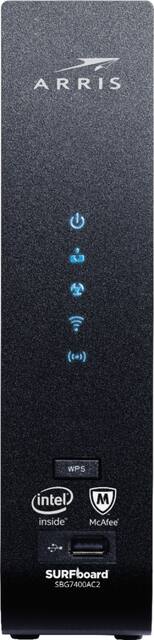
ARRIS - SURFboard AC2350 Router with 24 x 8 DOCSIS 3.0 Cable Modem
Model: SBG7400AC2
SKU: 6228640
This item is no longer available in new condition. See similar items below
Customers highly value the SURFboard AC2350's ease of use, performance, and quick setup. Many appreciate its strong WiFi signal and wide range, finding it provides reliable internet access throughout their homes. While some mention the router's larger size, the positive feedback on performance and ease of use outweighs this concern. The affordable price point is also frequently cited as a significant advantage.
My current Xfinity COMCAST internet speed package is 150mb. Due to recent and unexpected monthly expenses, I have been cutting corners wherever I can. Purchasing this wireless router will shave the monthly rental fee and I am not "giving away" my money for the next 18 months. In addition, there are some features that allow more control over the user(s) as well as assigning broadband speed. As previously mentioned, my plan is 150mb but I am now reaching 176mb. A little extra goes an extra mile . If I decide to up my plan's speed to 1gb, this model will allow it. The set-up with Xfinity was a breeze; have ready the model and MAC address on hand to make the activation run smoothly. Price is descent and will recover the investment throughout the period of my contract.
Posted by Robert
I purchased it to replace Comcast modem for internet speed 150. It is giving me almost same performance as the Comcast one that I had. I am happy with this product.
Posted by Diana
PROs: - Simply outstanding wireless AC performance--wireless speed-test results finally match wired! - Auto-config app actually made it easy to start surfing when replacing an existing wireless router with this all-in-one - Built-in McAfee protection provides some measure of security and assurance online--webpage intercepts tell user what's going on and gives option to override - Wireless coverage seemed stronger in more distant areas of the house compared to AC1900 router this unit replaced - Front-panel WPS button makes password-free connection of new wireless clients simple and quick - Some relatively useful configuration options in the router menus and informative displays in the ARRIS app for network scanning/awareness…for a beginner with little interest in serious network configuration effort or someone simply looking for a [mostly] plug-and-play experience, this unit is a winner! CONs: - Built-in security is a bit of a bait-and-switch…you can’t control a number of truly advanced security options without downloading a second app and there’s no option to configure them in the in-router menu at all. - USB port is on the front of the unit??? There’s no way to neatly share a USB-attached device unless you hide the router itself behind furniture or under a desk - No power or LED on/off switches – a minor inconvenience to be sure, but an inconvenience nonetheless--reboot and LED on/off (they are BRIGHT!) controls are accessible from within the admin interface inside the router itself - Some cryptic and unexplained options in the router menu—some additional documentation in the box would be welcome I replaced a sold performing but aging Arris cable modem and the venerable ASUS RT-AC68U wireless router with this all-in-one unit…average Speed Test results (18 trials total) between the two indicated an almost 100 Mbps speed increase to the client using the new Arris modem/AC router with wireless speeds matching those on the laptop I wired directly to the modem (approx. 250 Mbps, the top level of performance possible on my current ISP contract). The initial modem setup app was actually quite useful at getting the wireless modem set up to mirror an existing wireless router. **NOTE** this may not be case for everyone, but for me, it took more than the automated “active a new modem” feature from my cable company to get this unit online; I actually had to call my ISP company and give them the modem’s MAC address—from there, it was smooth sailing with newly upgraded AC speeds that definitely made things feel a little zippier when downloading Steam games or buffering 4K Netflix & Amazon movies. Now then…McAfee Home Security may be built in (and the web filtering does start working without intervention), but you can only access/configure it from a smartphone or tablet (not on the Windows store at all!) using a SECOND app that must be downloaded and installed. At least, that’s what the instructions said I needed to do…similar to other reviews in the App Store (can’t speak to Google Play), I can’t log into the app despite having a functional McAfee account that I can verify right on the McAfee site itself. Without this second app, there’s simply no way to configure some advanced security features and parental controls. If you don’t care about such things, this really isn’t a big deal; but the de-coupling of the McAfee features from the router interface itself does cripple some of the more advanced security options until/unless you’re able to get the Total Home Security function working on your phone or tablet. If you can get past this issue (which may be minor or major, depending on your situation), this is definitely a solid modem/wireless router that really does deliver some satisfyingly fast AC wireless speeds.
Posted by WyldeBlue
The vast majority of our reviews come from verified purchases. Reviews from customers may include My Best Buy members, employees, and Tech Insider Network members (as tagged). Select reviewers may receive discounted products, promotional considerations or entries into drawings for honest, helpful reviews.