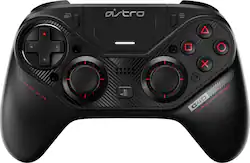
Astro Gaming - C40 TR Wireless Controller for PlayStation 4 and Windows PC
Model: 940-000184
SKU: 6315948
This item is no longer available in new condition. See similar items below
Customers consistently note the C40 TR Wireless Controller's excellent build quality, comfortable design, and extensive customization options as significant strengths. Many appreciate the responsive buttons and satisfying weight, enhancing the gaming experience. However, some users report experiencing stick drift and find the controller's price to be a significant drawback. The size of the controller has also been a point of contention for some customers.
The C40 is a great controller but its not perfect. A majority of the complaints for this controller is that it can not turn on the PS4 via wireless. It's because Sony doesn't allow that access to 3rd party manufacturers. The only reason SCUF can do this is because it uses genuine DS4 motherboards on their controllers. Some people need to research before complaining. I've had a drift issue with my right module even after the firmware update. I took apart my controller and cleaned the conductors with Isopropyl Rubbing Alcohol and it worked flawlessly afterwards. It's been a month since that occurred with no issues even up until now. My main issue with this controller is the outer rubberized layer of coating. After using it everyday the top layer is peeling. Its a shame because the build quality is amazing. This shouldn't be happening so soon. My previous SCUF controller with the rubberized shell of 3 years shows no signs of wear or tear. For those of you familiar with Plasti Dip it's of the same quality. Maybe the next updated controller will be better but overall I'm satisfied with my purchase.
Posted by Envy
This controller was tested on a PS4 Pro and PC by a multi-console owner. ---SETUP--- The ASTRO C40 controller works out of the box with the PS4 without the need to update anything, though it is recommended that you connect it to a PC or Mac and update the firmware. If you want to customize your controller, you do need a PC to download the free software. ---FEATURES--- The key feature of this controller is that you can swap the D-PAD and left thumbstick with each other, making the left and right thumbsticks be offset, similar to an Xbox One controller. Additionally, you can customize two extra buttons that are below the controller (UL and UR) to function as any of the face buttons or triggers. Each trigger has a switch that allows you to shorten the distance required before a full press. Another switch allows you to change between 2 pre-programmed profiles on the fly. It features wired or wireless use and there is no light bar, like all original PS4 controllers have. ---PERFORMANCE--- I currently own well over 10 controllers for various platforms. The most common problem with third party controllers is that the D-PAD and face buttons always feels unresponsive. I’m happy to say that this is the first third party controller that feels as good as the original. Arguably, the gaming community prefers the weight and offset thumbsticks of the Xbox One controller. Though it doesn’t come out of the box like that, I was able to swap the D-PAD and left thumbstick in under 1 minute. After that, I played Apex Legends on PS4 and PC using the controller, and I was more comfortable with the Astro controller than the original PS4 controller. To test the D-PAD, I popped in Mortal Kombat X, and it was just as responsive as I wanted it to be. There is a touchpad, a menu, and a share button on the Astro that all work as they should. If you are worried about this controller not feeling as good as the original PS4 controller, then you can rest assured that this will feel great in your hands and on your gaming sessions. ---EXPECTATIONS--- The product meets my expectations but a few hiccups prevent it from achieving the coveted 5 stars. To start with, if you are using this with your PS4, there is no app on the PS4 to customize the controller. As a multi-console owner, the Xbox One Elite Controller (XOEC) can be customized from the Xbox itself without needing a PC. Next, this controller only has 2 giant extra customizable buttons where the XOEC has 4 paddles. I prefer the paddles from the XOEC because the can be removed and won’t interfere when unneeded. The Astro C40’s under-buttons can’t be removed and are located where most gamers rest their middle fingers, so you might accidentally press them. Another thing I noted was that the Astro C40 controller can’t turn on your PS4 wirelessly, even from standby mode. I had to use my older controller then switch to the Astro after the USB dongle was recognized by the PS4. Every time you want to switch the D-PAD and thumbstick back, or if you want to swap out types of thumbsticks (convex vs concave), you need to use the included hexagonal screw removal tool, unlike the XOEC which doesn’t require a tool because everything on that is magnetic and can be swapped in seconds. Also, though the Astro C40 controller charges with a micro-USB cable, the entrance of the cable was made in such a way that if it needs replacing you will probably have to buy another cable directly from Astro because of a tunnel entrance to the connection. ---SOFTWARE--- The software on PC is easy to use and understand. After connecting your Astro C40s to a PC, the drivers are automatically installed and the software recognizes your controller. Customizing profile 1 and 2 is a breeze and helps tremendously with remapping face buttons to the under-buttons. In games like Apex or Call of Duty, you can now reload without losing sight of your target. Other games, like Bulletstorm, don’t have customization of buttons within their menus. I created a profile specifically for this game and I was able to change running to UL (under left) and made my experience of that game much more enjoyable. ---VALUE--- The price for the Astro C40 controller is 50 dollars more than the XOEC. It is definitely a steep investment, but one that is well worth it if you game often and like having a competitive edge. ---APPROVAL--- I highly recommend this controller for gamers who want to train for competitive gaming and get that edge needed to come out on top. This controller has a great feel in terms of weight, has amazing customization options, and has a response time that’s just as good as the original. Despite a few flaws, it’s worth getting it.
Posted by Trobadour
I bought this controller about 3 months ago and it is hands down my least favorite controller I've ever used. I love my Astros headset, but the controller was a flop. Does it have great features? Yes it does with the whole computer thing and customizations but there is one major issue that makes me want to throw the controller at a wall or sell it for a double double at in-n-out. Stick Drift. Astros software has a "fix" for stick drift but it does not work! I take great care of my controller, it is never dropped or abused and I play maybe 10-15 hrs a week fortnite mainly. When I am done, it goes right back in it's nice little shell case. Being a first person shooter player, I need analog sticks that are not going to move if I dont want them to. I have had a scuf fps pro for 2 years and it was amazing. I've had a scuf impact controller and that was amazing. I decided to give astro a shot with their new controller and in less than three months, I cant even shoot straight because my screen is being moved when I'm not even touching the controller. I never write reviews at all, not once in my life, but if I can save 215 bucks after tax for someone then I'll be happy. Much love peace out.
Posted by ShyOCR
The vast majority of our reviews come from verified purchases. Reviews from customers may include My Best Buy members, employees, and Tech Insider Network members (as tagged). Select reviewers may receive discounted products, promotional considerations or entries into drawings for honest, helpful reviews.