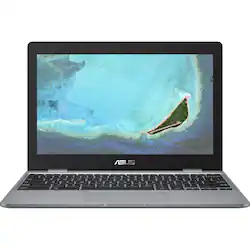
ASUS - 11.6" Chromebook - Intel Celeron - 4GB Memory - 32GB eMMC Flash Memory
Model: C223NADH02GR
SKU: 6302580
This item is no longer available in new condition. See similar items below
Customers recognize this 11.6" Chromebook as easy to use and appreciate its compact size and light weight, making it portable and convenient. Positive feedback highlights the keyboard quality, long battery life, and excellent value for the price. Many find it ideal for students or basic home use.
The vast majority of our reviews come from verified purchases. Reviews from customers may include My Best Buy members, employees, and Tech Insider Network members (as tagged). Select reviewers may receive discounted products, promotional considerations or entries into drawings for honest, helpful reviews.
This laptop is a great value for the price. Build Quality - This is one of the places where the ASUS Chromebook C223 really shines. For $229, you're getting a fairly sturdy chassis with little keyboard flex, but the hinge is very sturdy, taking two hands to open the laptop. Display - This is not one of the places where the ASUS Chromebook C223 really shines. The screen is 1366x768, and the panel is terrible. It's difficult to find an angle in which the color is most accurate, and if it's just a little bit off, the colors wash out entirely. Peripherals - The keyboard is quite nice, actually. It has a not too mushy feel and I was able to get up to my usual 95WPM on it. The trackpad is alright. It has a nice feel, and it supports all the ChromeOS gestures, but it's a bit small, and the click is rather uneven all the way around. The webcam and mic are not very good. If you intend to purchase a Chromebook for Skype, Messenger Video Chat, or anything where you need a camera, this is not the chromebook for you. Try something like the ASUS Chromebook Flip C302. The speakers are just phenomenal. They get very loud without being tinny, however there is little bass and they're downward firing. That's great to find on a $200 laptop. Lapability - This is judging how well it works as a LAPtop, and it's very lapable. If you have the display at the right angle for your viewing. It doesn't get too hot unless you're charging it while you use it. Charging - The device charges through USB Type-C, and the experience is very nice. They give you a fairly lengthy cord out of the box that isn't detachable from the brick, but there's no brick in the middle of the cord. Charging the laptop takes about an hour if you aren't on it, and I don't recommend using it while you charge it. For some reason, the device gets terribly slow, and eventually just stops working, which I'm not sure whose fault it is -- ASUS or Google. When it's finished charging, you'll get about a day's use out of it. It was around 6 to 8 hours for me, depending on what I was doing, from learning to code to streaming movies and videos and everything in between. I/O - The ASUS Chromebook C223 sports two USB Type-C ports on either side of the unit, both of which accept a charge, but neither of which are Thunderbolt 3 (It's 200 bucks. What do you expect?), and the left side also houses one USB 3.0 port for the mouse you'll probably end up getting (although USB Type-C mice are becoming more popular), a microSD card slot, and a 3.5mm headphone jack. General Use - This Chromebook runs about how you would expect. It slows down a bit as you open more and more tabs, but after a few seconds it gets used to what you're doing and smooths back out. It also supports the Google Play Store, allowing you to download your favorite apps from your Android phone. It has a few bugs, but the aren't specific to this laptop. You'd find the same ones on the top-of-the-line Pixelbook from Google. In conclusion, you're getting some very good bang for the little buck you're spending. Every issue here is forgivable by the price (besides the charging issue -- if you didn't read it, see the Charging section of this review), and some things about it are similar to that of high-end chromebooks. If you're a kid in high school on a tight budget who needs to be able to type papers, a parent who is looking for a device to give to their children, or just someone with little needs from their computer, this is the right choice for you. I am very happy with my purchase.
Posted by Jacob
Just getting into Chromebooks. This is a basic unit, I probably should have gone with touch screen but I am learning the different things with it. I like the size and ease of handling. I purchased a gumdrop cover to protect it and it works well.
This review is from ASUS - 11.6" Chromebook - Intel Celeron - 4GB Memory - 32GB eMMC Flash Memory - Gray
Posted by Teleri
I've been using Chromebooks for many years ... it was time to go with a 4GB model and a new battery. This unit will be on Google's Auto Update Policy until June 2024 ... now one of the most important things you need to consider when buying a "new" Chromebook (how long will Google provide updates). Fit and finish is great, screen quality is fine for the price, keyboard and touch pad are fine and work well. Battery charge is typically 8 to 9 hours of use. A very nice budget Chromebook for everyday use.
This review is from ASUS - 11.6" Chromebook - Intel Celeron - 4GB Memory - 32GB eMMC Flash Memory - Gray
Posted by goodharbor