Form Factor: 75% (The size, arrangement, and physical configuration of the product.)
Keyboard Technology: Magnetic hall effect (Type of technology that detects a key press.)
Key Switch Behavior: Linear (Refers to the mechanisms under the keycaps on a keyboard that enable you to type faster and more precisely. Linear switches move straight up and down without any sound or bump. Tactile switches provide a noticeable bump in the key press, and no sound. Clicky switches provide a bump in the key press and "clicky" sound.)
Connection Type: Wireless, Wired
General
Brand: ASUS
Model Number: M703 ROG FALCATA/HFXV2/CA/PBT
Product Name: ROG Falcata 75% Wireless Magnetic Hall Effect RGB Ergonomic Gaming Keyboard with Hot-Swappable ROG HFX V2 Switches
Color: Black
Features
Lighting Type: RGB
Customizable Lighting: true
Numeric Keypad: false
Touchpad: false
Keyboard Type: Gaming
Palm Rest: true
Spill Resistant: false (Designed to resist some degree of accidental liquid spill. The level of spill-resistance is indicated by the product manufacturer, but the degree of protection may not be guaranteed after normal wear of the product.)
Keycap Material: PBT
Functions
Form Factor: 75% (The size, arrangement, and physical configuration of the product.)
Keyboard Technology: Magnetic hall effect (Type of technology that detects a key press.)
Adjustable Tilt Function: true
Key Switch Type: ROG HFX V2
Key Switch Behavior: Linear (Refers to the mechanisms under the keycaps on a keyboard that enable you to type faster and more precisely. Linear switches move straight up and down without any sound or bump. Tactile switches provide a noticeable bump in the key press, and no sound. Clicky switches provide a bump in the key press and "clicky" sound.)
Rollover: 9-key (Refers to the number of keys that can be correctly registered when pressed simultaneously. Rollover may be referred to as n-key rollover (KRO) or anti-ghosting.)
Multimedia Keys: true
Actuation Distance: 0.1mm-3.5mm
Actuation Force: 32g-49g
Connectivity
Connection Type: Wireless, Wired
Wireless Connectivity: Bluetooth, Radio Frequency (RF - 2.4 Ghz/Low Latency) (The manner in which a device sends data to another device over a short distance without the use of wires or cables.)
Wired Connectivity: USB-A
Cable Length: 6 feet
Compatibility
Operating System Compatibility: Windows, Mac
Plug and Play Operation: true
Power
Rechargeable Battery: true
Battery Chemistry: Lithium-ion
Batteries Included: true (Indicates whether the product comes with the required batteries for its operation.)
On/Off Switch: true
Dimensions
Product Height: 3.39 inches (The out of box height of the item. Height is measured as the vertical distance from the bottom of the item to the top as it would be primarily used or placed.)
Product Width: 16.3 inches (The out of box width of the item. Width is measured as the horizontal distance from one side of the item to the other as it would be primarily used or placed.)
Product Depth: 9.92 inches (The out of box depth of the item. Depth is measured as the distance from the front of the item to the back as it would be primarily used or placed.)
Product Weight: 4.17 ounces (The out of box weight of the item.)
Mouse
Mouse Included: false
Warranty
Warranty - Parts: 1 year
Warranty - Labor: 1 year
Other
UPC: 199291055995
ROG Falcata 75% split gaming keyboard with hot-swappable ROG HFX V2 Magnetic Switches and ROG Hall Sensor; featuring Rapid Trigger toggle, intuitive control and multi-function wheel, tri-mode connectivity with ROG SpeedNova 8K wireless technology, Zone Mode, four-layer dampening and detachable silicone wrist rests.
Versatile Split-Keyboard Design: Suits different gaming setups, allowing players to use the left keyboard module, freeing up space for their mousing hand
Hot-swappable ROG HFX V2 Magnetic Switch: Refined keystrokes with customizable 0.1–3.5mm actuation and 0.01mm-step precise tuning
New ROG Hall Sensor: Exceptional precision, accurate input detection, reduces electrical noise and interference, and increases magnetic flux limits for superior performance
Intuitive Control: Instantly adjust actuation point, Rapid Trigger sensitivity, volume, media, and keyboard lighting with the multi-function wheel and button
Superb Connectivity: ROG SpeedNova 8K wireless technology, wired USB, and Bluetooth connectivity supports up to five devices simultaneously; wired and wireless modes offer up to 8K polling rate
Enhanced Typing Experiences: Integrated four-layer dampening absorbs pinging noises and offers a more cushioned typing feel
Rapid Trigger Toggle: Convenient switch for the fastest typing response and key repeat
Detachable Silicone Wrist Rests: Two pads perfectly complement the keyboard's unique tilt-incline angles for unparalleled comfort
A: The ASUS ROG Falcata keyboard is officially supported on Windows 11. While basic functions like typing may work on macOS via USB or Bluetooth, advanced features such as RGB customization and software controls require Armoury Crate, which is only available on Windows.
Sponsored
Compare similar products
ASUS - ROG Falcata 75% Wireless Magnetic Hall Effect RGB Ergonomic Gaming Keyboard with Hot-Swappable ROG HFX V2 Switches - Black

ROG Falcata 75% split gaming keyboard with hot-swappable ROG HFX V2 Magnetic Switches and ROG Hall Sensor; featuring Rapid Trigger toggle, intuitive control and multi-function wheel, tri-mode connectivity with ROG SpeedNova 8K wireless technology, Zone Mode, four-layer dampening and detachable silicone wrist rests.
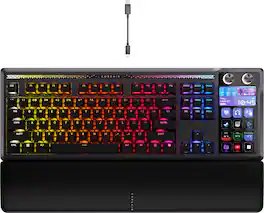
GALLEON 100 SD fuses iconic Stream Deck technology into a high-performance mechanical keyboard, giving you precise, real-time command of your entire gaming setup all from one device. Customizable shortcut keys and dials help you react faster without breaking focus, whether you're executing complex in-game combos or controlling apps like Discord and Spotify. Keep tabs on everything from hardware stats to your favorite Twitch channels on a fullcolor 5" LCD screen. The keyboard also delivers serious gaming performance with lightning-fast 8,000Hz hyperpolling, FlashTap SOCD, and smooth MLX Pulse switches. It’s more than just a keyboard—it’s a new era of input.
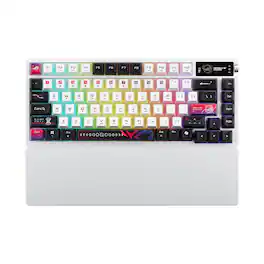
ROG Azoth X is a 75% wireless gaming keyboard with DIY-level customization and premium features keyboard. It features a metal top cover, south-facing PCB, silicone gasket mount, FR4 positioning plate, and five-layer dampening for a smooth, cushioned keystroke feel. Hot-swappable, pre-lubed ROG NX switches V2 ensure consistent, responsive typing, while three-sided translucent keycaps enhance aesthetics.
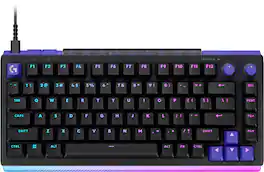
The Logitech G512 X 75 is the ultimate expression of legendary gaming performance. It features DUAL SWAP technology, giving you the best of both worlds, TMR Analog speed or mechanical feel. Experience extreme precision with True 8K data speeds and customizable 0.1 mm actuation. Unlock advanced control with RAPID TRIGGER and MULTIPOINT ACTION. Built for comfort and durability with an integrated gasket design, the G512 X 75 delivers the power to dominate.
Pros for ASUS - ROG Falcata 75% Wireless Magnetic Hall Effect RGB Ergonomic Gaming Keyboard with Hot-Swappable ROG HFX V2 Switches - Black
Customers are sayingCustomers are delighted by the ROG Falcata 75% Wireless Keyboard's superb build quality and interesting ergonomic design. Users also appreciate the linear switch performance and versatile connectivity options. The keyboard's RGB lighting is a welcome addition for those with other ASUS components, and the battery life is excellent.
This summary was generated by AI based on customer reviews.
Build Quality (23)
Ergonomics (22)
Switch Performance (12)
Connectivity (8)
RGB Lighting (6)
Rated 5 out of 5 stars
Absolutely incredible!
The keyboard's comprehensive feature set is impressive, encompassing Hall effect switches, rapid trigger, speed tap, and an 8000Hz wireless polling rate. The split keyboard design enhances user comfort, a feature that quickly becomes indispensable. The build quality is of a high standard. A notable advantage is the minimal reliance on Armoury Crate, with driver updates being its primary function, while Gear link provides alternative configuration options. While some users have noted a sharpness in the space bar design, this does not appear to be a universal experience. This keyboard is highly recommended for consideration.
Posted by skygunner27
Rated 5 out of 5 stars
Amazing keyboard! Definetly recommend trying it
Such a great keyboard. I love the fact that I can adjust the angles howver I want, whenever I want. The pain I've had with my wrists is going away using this keyboard. I love the fact that you can adjust the trigger points (I'm no FPS gamer), but allows me to adjust the typing experience how I want it. Quiet clicks too! I recommend only getting it on sale though, the MSRP is a bit steep.
Posted by DuckVision
Rated 3 out of 5 stars
Great product concept, poor execution
First, as much everyone else hate the armory crate, I hate the gear link as well, as it never saves ur setting, everytime i try to make a change and save, it automatically reverse it back a few seconds later. Without a always on 8Khz input, the battery saving mode(even tho I'm always using it wired), has significantly way more input latency compared to a normal 8khz mechanical keyboard(like their own strix flare II animate I'm using together). Also, the wired connection is not stable sometimes, everytime I start/restart my PC, there's a chance it doesnt recognize the keyboard(im using a rog X870E Crosshair Hero motherboard, it would recognize all my other ROG peripherals, just not this one sometimes). And per HE magnetic keyswitches, they feel extremely mushy, and even worse than those Kailh red/gateron white linear switches, just subpar typing experiences even in games. In Wuthering Waves, an action combat RPG, it's so hard to realize if a key is sucessfully pressed or not... So far i wouldn't recommend it, and probably not the upcoming Azoth HE 96 which uses the same switches. The worst part is that this switch, ROG specifically co-designed with TTC, that is so limited in terms of functions(comapred to Kailh and Gateron HEs, heck, even Glorious HE with the click bar is better than this).
Posted by Ryle
Rated 5 out of 5 stars
A Competitive Edge - Solid - Cool
The ASUS ROG Falcata 75 came nicely packaged, mostly cardboard, which I like, with everything inside wrapped neatly and organized. You get the two keyboard halves, detachable silicone wrist rests, a few different cables, a dongle extender, and a USB-C adapter. There are even some cool stickers. Right away you can tell this isn’t just another keyboard. The box is heavy, the parts are heavy, and it all feels solid before you even plug it in.
Setup did require a few different steps and the documentation was not very helpful with tiny print and confusing diagrams, but you should be able to get it figured out. Luckily, the keyboard is pretty much plug-and-play with the included dongle and/or cable. To connect via Bluetooth you do need to read that part of the instructions, which tell you to hold the function key and the number seven at the same time for 3 seconds, but it doesn’t say you need to hold the function key on the right keypad, which took me a few tries to figure out. Other than Bluetooth you can connect using the dongle, or the included long USB-C cable. ASUS included multiple cable lengths, 2 for connecting the keyboard halves and 1 for charging and connecting to the computer. I do wish one of the cables to connect the 2 halves was extra long so you could really spread the halves out, like even running them onto chair armrests for the ultimate comfort setup, but I don’t think they’d work with a cable that long.
The main selling point is the split design. That’s the feature that makes this keyboard stand out. You can angle the halves however you like, give your mouse more space, and line up your wrists in a way that feels way more natural than a standard board. Gaming with WASD feels great because I can push the right side back and keep the left side close. Typing on a split keyboard does take some practice, but honestly, I’ve been waiting for something like this for years, and I picked it up quickly. When I was younger, and learning to type, I used to practice with pretend keypads in each hand, now that’s real!
This is my first Hall Effect keyboard and it’s going to take some getting used to. The keys are extra sensitive.. If you brush against them, you’ll trigger inputs you didn’t mean to. You have to type with your fingers at attention. Sloppy typing won’t cut it here. But once you get the feel for it, the switches are smooth, fast, and accurate. Rapid Trigger and Speed Tap are absolute game-changer features for gaming. They make inputs fire quicker than any other keyboard I’ve ever used. If you’re into competition and shaving off those last milliseconds, this is the tech that gives you the edge.
The Gear Link software is another big win. You don’t download anything, you just open it in your browser. Ba-da-boom, ba-da-bing. Change your lighting, remap your keys, set macros, or adjust actuation points right there. It’s simple, clean, and it works. Honestly, I wish every brand did it this way.
Not only is the Falcata a standout gaming keyboard, I think it’s going to work great for daily use. The build quality is top tier. Aluminum on top, solid plastic underneath, no flex issues, just pure stability. It feels extremely solid. The control hub feels great with its scroll wheel and button, and the LED sidebar that lights up when you’re adjusting volume or lighting is a cool little touch. The battery life has been excellent too. I’ve been using it daily with RGB on, and it feels like it just goes forever without needing a charge. The lights are so fun to watch and really make my whole setup feel more immersive somehow. The wrist rests are smooth and comfortable, and I like that they’re detachable for easy cleaning. The overall design is sleek, all-black with RGB that pops, and it looks awesome on my desk..
Just a few nitpicks: I’m going to miss having a number pad since I use the 10-key often, but hopefully I’ll get used to working w/o it. The home row bumps could stick out a bit more for finger placement, they feel pretty smooth, and I wish the halves connected w/o the cable.
Overall, this is just an awesome keyboard. Expensive, yes, but if you want a premium build, cutting-edge switches, split ergonomic design, and features that give you a true advantage in gaming, this is it. Perfect for competitive gamers, tech lovers who want something flashy and different, or anyone who just wants a keyboard that feels as premium as it looks and is.
Posted by Orion
Rated 5 out of 5 stars
Relief for the Wrists
I spend a very large portion of my time sitting with a keyboard in front of me, and once in a while, when I'm doing something where I'm not typing for a given amount of time, I notice that my arms and wrists are resting in a natural and comfortable state, which just so happens to line up better with a split keyboard than a traditional one. Then as soon as I need to start typing, I watch my wrists snap into a bend and think, "I really need to try out a split keyboard".
That's where this Asus Falcata comes in. This is my first experience using a split keyboard, and wow, does it make a difference in comfort, although that does come with a caveat, at least for someone like me. Almost everything about this Falcata is different from what I'm used to, so this review will be from that perspective.
Going to an ergonomic split keyboard for the first time is a weird feeling, and one that I'm still getting used to. My arms and wrists have never been more comfortable while just sitting at my desk. I can start typing away instantly too since my hands at rest are already in the correct position, no more bending my wrists uncomfortably. You can especially feel this after long stretches of typing. The caveat is that it's taking some time to get used to typing with my hands in this different position. The main rows of letter keys aren't as much of a problem as the further away keys are, especially the backspace key for me. I keep accidentally hitting the slash key instead. I have no doubt though that this will get better as I get more experienced with this style keyboard.
You can't talk about keyboards without talking about the keys themselves, and this is another area that is completely different than what I'm used to. For many years now I've been using a keyboard with "clicky" style switches, whereas this Falcata is a linear switch. Not having that tactile feedback is another thing I have to get used to. That said, these aren't your typical linear switches, they're hall effect switches, something else that is completely new to me. If you're going to make a switch to a different switch, having this feature is the way to go. The biggest issue I'm having with adjusting is that I keep 'side-swiping' un-intended keys. With my old clicky style switch, this wasn't much of a problem because those keys wouldn't get enough pressure to actuate them past the tactile mechanism. These switches are much more sensitive. With the hall effect though, and the web interface Asus has for managing keyboard functionality, makes it extremely easy to adjust how much travel each individual key has to go before hitting the actuation point. Again, each INDIVIDUAL key! This is kind of a game changer for me. This means I can keep minimal actuation distance on the harder to reach keys, and a longer distance on the keys I like to 'hit with confidence'. But also, those keys that I tend to side-swipe more often than others? I can set the actuation point further down so that when I do side-swipe them, they won't actuate.
That takes me to another great feature that I absolutely love, the web interface. Asus did away with software you have to download and just created the web based Gear Link tool. I always hated having to download software just to manage an accessory and hope others follow Asus's lead on this. Plus you never have to worry about keeping the software up to date either. Asus made it really easy to connect to the device through the web tool also, and the user interface is fairly intuitive. I was able to dive right in and start making different adjustments. It also let me easily re-map a couple keys to the way I'm used to.
With everything setup, this keyboard has been handling all my use cases with ease. Of course this is primarily geared towards gamers, and for that it has some great features, like my favorite which is the speed tap that makes moving around in games so much smoother! Another great feature is the fact that you can use just the left half of the keyboard by itself! For games where you're mainly using WASD, just disconnect the right half and now you can keep your mouse hand naturally closer! You don't have to be a gamer to use this keyboard though either. I use it for software development as well as video editing. The fact that this keyboard isn't set in a permanent split position is great too. When I am video editing, I'm not using the keyboard in a traditional way, it's more about key short-cuts. So for that, I found it easier to just move the 2 halves together. While the halves aren't magnetic or attach physically, the rubber base, and overall weight, holds them firmly in place.
I also need to mention the proprietary cable to link the 2 halves. I've seen other reviews hate on the fact that it's proprietary, even though they use a usb-c style connector. I don't think this is really that much of an issue. They do include 2 of these so you at least have one back-up in case you lost one, but honestly, even if you game with only the left half, there's no reason to remove the cable from the right half, and if you don't game, you'll probably never remove the link cable, so it's not like a charger cable that you could more easily misplace.
Another feature I'm enjoying thoroughly is the multi-function button and wheel along the left side. You can easily manage the lighting effects or event the overall hall effect sensitivity through this wheel without having to connect through a web browser. You could also control media playback with it, but my favorite part that I always keep it set to is the audio control. I love how easily I can control audio volume without even thinking about it, and the wheel is within reach where it's still comfortable and easy to get to and use.
Last couple things I want to talk about is battery and connectivity. I love that this keyboard gives you every option. You can keep it wired directly, you can use the usb wireless receiver (which is conveniently stored along the top of the right half), or you can use bluetooth. I started out using the usb wireless receiver. Response time was mostly good, but I did have a stretch where i was experiencing severe lag. I don't know if that's the keyboards fault, or the fact that I plugged the usb receiver into a usb hub that's embedded into the back side of one of my monitors, but it was frustrating. I was also keeping watch of the battery, which I noticed was draining at a noticeable rate. With how much I'm sitting at my computer, I felt I would have to plug it in every few days, so I opted to just keep it wired to make things easier. You can imagine I no longer experienced any issues with responsiveness.
One thing to take note about the battery, each half has it's own, and using the 'fn + z' key combo will show you the general charge levels of each half using the number row key lights, but when connected to the Gear Link tool, it only shows one level. So when I first plugged the keyboard in to charge it, after a while Gear Link showed it to be at 100%, but if you checked manually with 'fn + z', you'd see only the left half (which gets priority in charging) was at 100, while the right half was only around 60-80%. Hopefully this is an easy update for Asus to make on Gear Link, which still shows to be in Beta.
Overall it's an excellent keyboard and has made life simpler in many ways, and more comfortable and ergonomic. I do wish there were some way to add different options for key switches, but I'm not sure that's possible given the hall effect, which I guess does make up for that in a way. It's also not cheap, but you do get what you pay for. Finally when it comes to my rating, the only thing that brings it down for me is the fact that it's taking some time for me to get used to not just a split keyboard, but the keys themselves. If I were someone that prefers linear switches, this keyboard would be a 5 out of 5 star rating all day, and that's why I decided to give it just that. If I were to base it on personal preference, I might knock off a star, but I don't believe that would be fair, but at the same time I wanted to share my full experience for those who are coming to something completely different like I did.