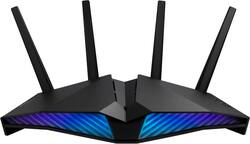
ASUS - RT-AX82U AX5400 Dual-Band WiFi 6 Gaming Router with Life time internet Security - Black
Model: RT-AX82U
SKU: 6428132
This item is no longer available in new condition. See similar items below
The vast majority of our reviews come from verified purchases. Reviews from customers may include My Best Buy members, employees, and Tech Insider Network members (as tagged). Select reviewers may receive discounted products, promotional considerations or entries into drawings for honest, helpful reviews.
Customers are impressed with the RT-AX82U's ease of use, range, and performance, frequently citing positive experiences with setup and strong signal strength. Many appreciate the improved coverage and speed offered by the WiFi 6 capabilities. While some users experienced connection issues or found the price high, the overwhelmingly positive feedback points to a generally well-received product.
I spent almost 4 weeks researching several+ different models of routers. I wanted something that would replace my dependable but aging AirPort Extreme. It needed to be easy to deploy, provide dependable wifi signal range throughout my modest size house, stout enough for tv streaming, secure for my daily home office activities, and intuitive for any troubleshooting or expanding I may encounter - attributes similar to my AirPort Extreme. Product reviews for both the product & its manufacturer needed to be consistently good across the board. The ASUS RT-AX82U ticked all the boxes. I am delighted with my decision as install & setup went without any issues. All of my devices auto-connected & I was good to go within 15+ minutes. The only thing left to confirm is this router’s longevity. Time will tell. Btw, I was impressed with the ASUS RT-AX82U’s packaging. It was clear to me ASUS is proud of its product by showcasing it in visually outstanding as well as robust packaging. That said, I am confident I made the right decision. Several hours later as my day winds down, wifi signal is strong through out my house. My iPad signal indicator remains @ full strength no matter where I am in my house. Ookla’s Speedtest app shows a nice bounce in my broadband speed as well. I am certainly not a tech expert. But I know enough to do basic tech stuff. Even my neighbor was pleasantly surprised to see how quickly & efficiently I got things up & running. And btw, it's been one month since I deployed this router and signal strength is excellent, range is wonderful & dependability is very good. Thanks ASUS for a good experience!
This review is from ASUS - RT-AX82U AX5400 Dual-Band Wi-Fi 6 Router - Black
Posted by SteveO
I highly recommend this router to anyone who is in the market for a router and for someone who does not want to spend over 300 dollars for a router. The router took a few minutes for the initial setup. Soon after the initial setup, you are presented with many features, ranging from novice users to advanced users. I really enjoy the range of this router. At approximately 50 feet away, I am still connected at 51 Mbps download, 77 dBm, which is enough to operate at that distance. Now if you are within range of 25 feet, you'll have the 5 GHz connection and will have no problem operating to your internet service speeds. One of the features I enjoy using is the Open NAT feature to where to can allow video games to operate in an Open NAT, which ensures less lag for the best online gaming experience. The Open NAT takes about a minute to get setup and is very self explanatory to any user. You also able to quickly Enable or Disable the Open NAT feature with a click. This router is also great with the Aura RGB. There are several presets to the types of glow and colors that would be suitable for anyone with interests to the lights. So far this router has been very dependable for the first month and will update if there should be any new updates or issues.
Posted by Cnl12
My century link C4000 modem stopped working. I have century link fiber with claimed speeds up to 940Mbps. I was told I could only use their modems. I originally purchased the TP-Link Archer AX3000 4-stream gigabit wifi 6 router. The TP-Link setup was much easier that the ASUS RTAX82U. At the startup page for the TP-Link I just selected Century Link as the provider and it automatically selected the PPPoE and VLAN tagging ID to 201. With the ASUS router I had to select PPoE then go to another menu and select 201. I think this will confuse the average customer. The ASUS router has great area of coverage. I tested the 2.4GHz channel all the way out the sidewalk with 3 bars on my phone. This is great for my Wyze cameras that run on 2.4GHz. I got full download and upload speeds! The router also looks nice. The other benefit of ASUS is they continue to provide security updates. The price is a little high off sale but it does come with a good warranty.
This review is from ASUS - RT-AX82U AX5400 Dual-Band Wi-Fi 6 Router - Black
Posted by sundevilchemist