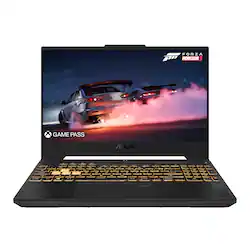
ASUS - TUF 15.6" Gaming Laptop - Intel Core i7 with 16GB Memory - NVIDIA GeForce RTX 4070 - 1TB SSD - Mecha Grey
Model: FX507ZI-F15.I74070
SKU: 6535503
This item is no longer available in new condition. See similar items below
After doing some research on laptops, I was looking for something that could fairy reasonably replace my desktop build (not exact as the Desktop runs a 16 core / 32 thread CPU, and an RTX 3090) at least good enough that the tradeoff between mobility and performance would balance out. My price limit was $1500, and Macs were out, because their gaming capabilities are weak overall, and they cannot emulate Windows Server operating Systems. Maybe in the future all that will change, but for now it’s a Windows world. I wanted the device to be upgradeable, as I didn’t want the machine to be stuck at whatever generic specs Best Buy had in stock, so I wanted a 2nd Drive slot and removable RAM sticks, as well as Wi-Fi and BT Upgradeable options. I decided to give the budget friendly TUF FX507ZI4 Best Buy configuration (more on that later, as that is a turnoff for some). I do not usually do this much testing, but there were so many questions regarding the laptop, that I decided to see if I could answer them. I used a noise level meter for the sound, my LG C2 OLED to verify the HDMI Port, while using HWINFO to find the panel model and specs of the LCD. Everything else that was tested was purely using web resources or scripts I personally wrote. _____________________________________________________________________________________ Best Buy Configuration • Single 1 TB M.2 Drive • 16 Gigs of RAM (DDR4 3200) • Intel AX201 Intel Wi-Fi / BT 5.2 LE Module (Wi-Fi 6 Dual Band) My Hardware Upgrades • Secondary 2 TB M.2 Drive (Samsung 980 Pro) • 64 Gigs of RAM (DDR4 3200) • Intel AX210 Intel Wi-Fi / BT 5.3 LE Module (Wi-Fi 6E Tri-Band) Most of the troubleshooting and testing were done before upgrading anything. _____________________________________________________________________________________ The Issues I ran into really centered around power efficiency as I couldn’t figure out how a CPU with 8 Efficiency Cores, 6 Performance Cores, and 6 Virtual Cores, had such poor battery life on a 90-Watt Hour Battery when the GPU was set to use Nvidia Optimus and switch between GPUs (probably the biggest battery you will find in a laptop) I was getting less than 4 hours on battery and the performance was stuttering a lot at times. Digging in, I started to try different settings in the Armory Crate and the first success I had was tweaking the core configuration of the CPU (but I found a more permanent solution) … _____________________________________________________________________________________ Below are the configurations I tried and the results, all of which had the Discrete GPU (RTX 4070) enabled. I am basically looking for the best battery life I can get for everyday office and coding apps (Word, Excel, PowerPoint, Outlook, Chrome, Edge, VS Code, or Visual Studio) as gaming will be plugged in most times. 6 P-Cores, 8 E-Cores = Less Than 4 Hours of Battery Life 4 P-Cores, 4 E-Cores = 6 Hours of Battery Life 5 P-Cores, 5 E-Cores = 5 Hours of Battery Life 6 P-Cores, 2 E-Cores = 5 Hours of Battery Life 6 P-Cores, 0 E-Cores = 10 to 11 Hours of Battery Life The next two I tested were with the Discrete GPU disabled (ECO Mode). 6 P-Cores, 8 E-Cores = Less Than 9.5 Hours of Battery Life 6 P-Cores, 0 E-Cores = 8.5 Hours of Battery Life _____________________________________________________________________________________ This really doesn’t make any sense, but for now I think I’ll just keep the CPU running on full settings and utilize the ECO Mode to disable the discrete GPU when not plugged in and gaming. It is just easier to sacrifice the extra 1 to 1.5 hours of battery so I don’t have to reboot the machine to park the E-Cores. The other issue, Speakers are not very loud and that’s kind of an issue, although it isn’t the worst I’ve heard and I do tend to use the laptop with headphones, it clearly does not live up to those found in the MacBook Pro that’s for sure and I have yet to find a PC with that quality anyway. Fortunately for me, when gaming this isn’t an issue as the laptop is pretty much docked and I use a pair of higher quality PreSonus monitors. These were really the only issues I ran into with the laptop and one is a pretty easy fix through Armory Crate. _____________________________________________________________________________________ Another method I used to optimize the laptop was to create Armory Crate profiles and tie them to the various types of apps and games where I wanted the laptop to run on max or silent profiles. By doing this it will change the settings to performance for gaming and Silent energy efficient setups for Office Applications and the like. The laptop was tested with these settings, so they factored in to the optimal battery life of the unit. _____________________________________________________________________________________ A little bit of information regarding the hardware… LCD Panel - AU Optronics LCD Panel that is capable of roughly 93% sRGB, 144 Hz, and 300 Nits of Peak brightness (That is plenty bright enough for most use cases, some might want better but this is the bare minimum) Discrete GPU – RTX 4070 with 8 Gigs of RAM and up to 8 Gigs of System RAM allocated for use. The laptop uses Nvidia’s Advanced Optimus with a Mux Switch for better battery management. Ports – HDMI 2.1 (4K 120 Hz Compliant) and Thunderbolt 4 (Works for both Power Delivery and Display Out) are the most notable The HDMI Port is fully 2.1 Compliant and capable of 4K at 120 Hz, and it has a full Thunderbolt 4 port that can be used to power the laptop as well as outputting to a display at resolutions greater than 4K. Fan Noise Levels – Silent Mode 39 decibels, Performance Mode 46.5 decibels, and Turbo Mode (under full load) 57.5 decibels. Wi-Fi - delivers between 400 and 500 Mbps download speeds and between 200 and 300 upload speeds on a 1 Gig fiber connection. Primary Disk Speed – 3701.52 Mbps Read Speed and 2641.74 Mbps Write Speed The lid is made of metal and beveled for increased durability. The bottom is a rigid plastic that also feels very good, and the keyboard has very little flexing so it’s very pleasant to type on for long periods of time, even if the 10 key does leave it slightly off centered. The hardware is coated for resistance to antimicrobial elements and Viruses, considering the recent Pandemic, this is actually a very good idea. _____________________________________________________________________________________ One word of caution, Asus requires the laptop be open when running graphics intensive games and applications, as doing otherwise might void the warranty. Now regarding the Best Buy spec for the laptop… Best Buy has been rumored to work with these OEMs (Original Equipment Manufacturers) to configure the laptops that reduce cost and optimize profit, and while they’re not usually bad laptops, they tend to be slightly different specs compared to the models you’ll find in other retail outlets. _____________________________________________________________________________________ I would love to see Asus fix the CPU optimization issues and maybe upgrade the speakers in future models, but overall, I’m happy with the basic functionality of the machine because it is very good at gaming and very fast for everything else when you need it to be. Could the screen be better? Sure, it could, but I’m not disappointed with it as it is and 300 nits is fine for day-to-day work (Besides, my external display is a higher resolution OLED with a thousand nits of peak brightness). Anyway, there are no perfect laptops, and this one will take some tweaking to get it tuned how you want it to. I don’t find the tweaking all that bad and honestly the tools seem adequate to get the job done. In the end, if you’re not into gaming, don’t want to tweak the laptop to get the best battery life, and you’re good with money, then you’re probably somebody that would want a MacBook Pro over this. If you’re a PC Gamer, or somebody looking for a powerful midsized laptop that won’t bankrupt you, then this is a very good option for the price and I’m not so sure you’ll find anything better for under $2000.
Posted by Realist
The ASUS TUF 15.6” Gaming Laptop is a powerhouse that strikes a perfect balance between performance, durability, and affordability. With its robust hardware specifications, including an Intel Core i7 processor, 16GB of RAM, NVIDIA GeForce RTX 4070 GPU, and a spacious 1TB SSD, this laptop is tailor-made for gamers and content creators alike. Performance Equipped with an Intel Core i7 processor and 16GB of memory, multitasking is seamless, even with resource-heavy applications like video editing software or AAA games. The NVIDIA GeForce RTX 4070 brings exceptional graphics performance, supporting ray tracing and high frame rates on demanding titles. Whether you’re gaming in 1080p or pushing it to the limits with creative tasks, this laptop handles it all with ease. Design The “Mecha Grey” color and rugged build emphasize its gaming-oriented aesthetic while maintaining a professional look. The military-grade durability (MIL-STD-810H certification) ensures it can withstand daily wear and tear, making it a reliable choice for both travel and at-home setups. Display and Audio The 15.6-inch display is vibrant and crisp, featuring a high refresh rate that ensures smooth visuals during fast-paced gaming sessions. The narrow bezels further enhance the immersive experience. Audio quality is also impressive, with DTS:X Ultra technology providing clear and punchy sound, perfect for both gaming and multimedia use. Storage and Connectivity The 1TB SSD provides ample storage for games, media, and work files, with lightning-fast read/write speeds ensuring quick boot times and file transfers. Connectivity options include multiple USB ports, an HDMI output, and Wi-Fi 6 for fast and stable internet connections. Cooling and Battery Life The laptop features an advanced cooling system with dual fans and anti-dust technology, keeping temperatures in check during intense gaming marathons. Battery life is decent for its category, lasting around 5-6 hours with moderate usage, but a gaming laptop is typically used plugged in for maximum performance. Conclusion The ASUS TUF 15.6” Gaming Laptop delivers exceptional value for gamers and professionals looking for high-end performance without breaking the bank. Its powerful specs, rugged design, and thoughtful features make it a standout choice. If you’re looking for a laptop that can handle both intense gaming and heavy multitasking, this is a fantastic option. Rating: 9/10 Pros: Powerful performance, excellent display, rugged build, ample storage Cons: Battery life could be better (expected for gaming laptops)
Posted by SamanthaP
Purchased almost 8 months ago when it hit a sale price of $1k. Besides one other laptop, you won’t find anything with a mobile 4070 hitting that price point. It was absolutely a steal. A mobile 4070 can handle a lot of recent games on ultra settings at 1080p around the 120, if not 144, Hz mark. And because it’s a 40-series, you bet I’ve tried out ray tracing in Control and Cyberpunk. Don’t expect it to run like a dream with ray tracing, and at 1080p I feel like good graphical effects can about cover what ray tracing accomplishes. That said, if you’re okay with the fans running full tilt and frame rates skipping around the 90-120 range, this laptop will admirably handle ray tracing in a way you wouldn’t believe a mid-tier “mobile” graphics chip could. (Gotta leave that DLSS off though if you care about reaction time. It just generates junk frames that made it harder to move quickly in FPSs.) I’ll also give a shoutout to the ports situation with HDMI, USB-A, USB-C, RJ-45, and even TB4, not that someone purchasing a budget gaming laptop would shell out for a TB4 dock. Especially when you’ve got all those ports! As a side note, the power situation with this laptop is best described as “big.” The 240W power brick that comes with it is nearly the literal dimensions of a brick (which tells you about its power consumption) and the battery in this thing is actually pretty massive. I think it’s 90Wh, and the max battery size allowed on planes is 100Wh, so it’s about as big as they come. Still, battery life ain’t great. This was designed like a motorcycle: fast but doesn’t handle idling well. Even mild activities with the full panel of “battery saver” settings activated, I’d estimate this lasts me 5hrs. But let’s be real. This thing is a compact desktop workstation. Don’t fight it. Just embrace it. Downsides? Three. First, the screen is fairly dim and kinda pale. Usable in a daylit room, but def gonna close any shutters near the screen. No HDR, and colors are more… “laid back.” Like, they definitely showed up for work in the screen today, but aren’t really feeling it. Second, this thing can’t pass for a business laptop. If your only interest is for CAD, you will have to swallow some pride using this in a professional setting. Removing the stickers and adjusting the rainbow strobing vomit keyboard backlights help, but… Third, this laptop has “CAUTION: HIGH FRAMERATE ZONE” printed on the palm rest. No, it’s not a sticker. Yes, this deserved its own point. I’m embarrassed whenever I notice it while alone. It’s like having a misspelled tattoo; you didn’t put it there, but you’ll bear the shame.
Posted by TheHC
The vast majority of our reviews come from verified purchases. Reviews from customers may include My Best Buy members, employees, and Tech Insider Network members (as tagged). Select reviewers may receive discounted products, promotional considerations or entries into drawings for honest, helpful reviews.