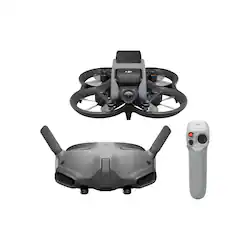
Avata Pro-View Combo Drone with Motion Controller (DJI Goggles 2 and DJI Motion Controller) - Gray
Model: CP.FP.00000110.01
SKU: 6514602
This item is no longer available in new condition. See similar items below
Customers enjoy the Avata Pro-View Combo Drone's ease of use, exceptional video quality, and intuitive motion controller. Many appreciate the included propeller guards and the compact size, making it suitable for various environments. However, some users point out the relatively short battery life as a drawback. The placement of the SD card slot is also cited as inconvenient by a few customers.
The vast majority of our reviews come from verified purchases. Reviews from customers may include My Best Buy members, employees, and Tech Insider Network members (as tagged). Select reviewers may receive discounted products, promotional considerations or entries into drawings for honest, helpful reviews.
DJI did not disappoint with this drone release. The camera is fantastic, the new goggles are awesome, and the motion controller is shockingly intuitive- I see the flight advantages to using a regular controller, but for sheer enjoyment and ease of use, I’m a huge fan- especially if you are relatively new to drones in general. I’ve found 3rd party stabilization software to be the way to go over the built in settings. FPV goggles screen quality is incredible, but clarity of signal is definitely effected when out of sight lines/objects inbetween. Battery life is incredible for the genre, but it may surprise cinematic/traditional drone users. I have two batteries and they charge very fast using a MacBook Pro charger. Also highly recommend getting a Velcro strap to better secure the battery in the event of a tumble. I have some ND filters on the way (3rd party, DJI doesn’t have stock) and will be looking into a regular controller for added functionality- or I may just keep working on my head tracking skills. All in all… blown away with the results of the final video product and all around feature set. I think DJI nailed it.
Posted by NightGolf
After watching lots of cool videos on YouTube that showed FPV drones doing amazing things and capturing incredible footage I decided that I wanted to give this a try. I started doing tons of research and initially decided to build my drone. I also started spending lots of time using simulators to try and get the hang of flying a drone without crashing it. I thought I would get the hang of it quickly since I’ve been gaming all my life but honestly, I am terrible on the 2-stick radio controllers. I then saw video reviews of the Avata and thought that this would be easier. I needed zero practice with the controller and on my first flight I flew easily and my recordings were incredible. The one handed controller doesn’t give you the precision that the 2-stick controller do but it’s SO easy to fly. I’m going to keep practicing in the simulators but for now I’m having a blast flying FPV and I have yet to crash my Avata.
Posted by JoeA
When you fly the Avata, it’s best to be sitting down or leaning against something solid. Much like a game played with VR goggles, the Avata goggles make flying a drone a highly immersive experience. As you corner sharp and change altitude, you may find yourself falling over if standing. Seriously. It’s the closest experience to piloting an aircraft, flying like a bird or as a Superhero you can get from the safety of the ground. You can’t help but panic and tighten up when flying past a roof ledge, or when you crash the Avata. It feels so real. Despite the lack of the G Forces, your brain registers what it sees as if you are there in the drone. If you get motion sickness, these goggles may not be for you. Any drone that weighs more than 8.8 ounces (250 grams) requires registration with the FAA in the USA for outdoor flight. At over 14 ounces, the Avata like most every other drone out there must be registered at the FAA DroneZone. Currently this involves a basic knowledge "TRUST" test and a $5 registration fee/tax if you are flying for fun. If you plan to fly commercially to make money, the FAA has a more extensive test to receive certification for that. You must print out and carry the FAA certificate that you receive while flying your drone. Once registered, you must also label the drone with your FAA Registration number and your legal to go. You may also want to add a label with your contact info in case the drone crashes or fly’s out of range. You may be lucky to have a kind person let you know they found it. Odds are likely slim, but better than none if you make it easy. Also, once you have the drone, controller and goggles paired and connected to your smartphone via your phones charging/data cable, you need to install the DJI app so you can activate the Avata. Until you activate it, your range is extremely limited. Be sure to read each screen presented and not just click through them. There is some valuable information on a way to replace drones that are damaged or fly away. A firmware update may also be available. A phone or tablet is not needed to fly the drone. It is needed to update the firmware. You can also tether the phone to the goggles to show others what you are seeing in the goggles. The goggles are not heavy and do not stick out far like some others. No top strap is supplied for use over the head, and I did not feel the need for one. They are comfortable enough for a few flights. A softer fabric cushion as found on some VR headsets would be a desirable choice for those looking to pick up extra batteries to extend outings. Most eyeglasses will not fit in the headset, but for most there is no need with the built in and easy to use diopter adjustment. Letting others try the Avata gets old as you need to adjust the lenses for each person, and then back for yourself. But it’s also a good excuse for not sharing this expensive drone with new and casual users. If your vision cannot be corrected by this adjustment, you can get lenses made using the wo included lens frames. The Motion Controller works well. A virtual joystick to go with the VR like goggles, much like those on VR headsets or an old Wii console. The Motion Controller is very intuitive and precise. I could fly obstacle courses with no lag in response and slowly navigate up through a tree past some amazingly tight spots. The Motion Controller supports two of the three flight modes: Normal and Sport. However Manual Mode (AKA: ACRO Mode) is not supported. If you want to do flips or other ACRObatics, you will need to get the more traditional twin stick DJI FPV Controller 2 which allows Manual Mode on the Avata. I am skeptical how adept the Avata would be in acrobatics with its four props so close together. I hope to try this someday. On a very gusty day I managed to get the Avata flipped upside down in flight and the props all stopped. Not sure if this is a safety feature? Any chance of recovery as it tumbled to earth were dashed without power. Fortunately, a soft shrub broke the fall, and no damage was done. My attempts to flip it again all failed without manual mode. I do not have an FPV controller to use Manual mode. A front facing obstacle sensor is not included. I tried to be careful and avoid crashes at first. But while zipping through some obstacles, I did manage to hit a pole, a tree, barely missed a squirrel, then went on to hit a bird feeder, crash into and get tangled up in a bush, and then while skimming a corn field at top speed during the ‘Golder Hour” of light, the Avata augured in with summersault bouncing off the ground after hitting one particularly tall stalk. It felt so real and dramatic I braced myself! Finding a small grey drone in a corn field as the sun is setting was a challenge! I may add an air tag to it to help as a backup. Maybe some fluorescent orange stripes too. Throughout all these mishaps, the drone emerged dirty, grass stained, but otherwise unscathed. It’s one tough chassis! After each crash with no damage, I became braver flying faster and cornering harder. By the way, the prop guard works really well and is most welcome! Amazingly, I have not needed the two spare props the Avata came with, yet. Props and a new prop guard are available as spare parts for a reasonable price. I may get some spares to have on hand… Unfortunately, at the end of the day, the SD card would not read, it kept coming up that the SD card needed a format. Perhaps the shock of one of the crashes caused it to corrupt. Sadly, several flight recordings with no doubt spectacular slaloms and crashes were all lost. The Avata has 20GB of internal storage, enough space for one flight. The Avata also supports up to a 256GB microSDXC card. Be sure you get a fast “High Endurance” SD card capable of keeping up with the demands of 4K video. Cheap cards will fail to keep up and quickly wear out and fail. Shooting 4K video quickly uses up storage. A 256GB card should hold about two hours of the highest quality 4K video. Lowering the frame rate and other settings can help extend the time recorded, but you really won’t want to as the 60fps 4K video looks so good. You can easily toggle recording on/off with a button on the Motion Controller to avoid recording the trip out and back to save some minutes. I don’t see the 256GB limit as a real problem since in actual use the Avata can only fly for 10-12 minutes on a full charge with a new battery. Once the battery level drops to 20%, the Avata automatically heads to Home for a landing. I never saw more than 13 minutes flight time. But most of my flights include high altitude climbs, all out drag races, or exhilarating slaloms around trees. A 256GB card should be enough space for several complete flights. Swapping the SD card in the Avata is no easy task thanks to it being in the well of one of the propellers. It takes some careful positioning of the propellor to open the cover and swap the SD card without damaging the propellor. Next to the SD card is also the USB-C port. I hope I never need to use it. Be sure the cover is securely closed so it does not pop open and get in the prop’s way during flight. Otherwise, you may have a major in-flight failure bringing things toa sudden end. I don’t think DJI could have picked a worst place. After my crash in the cornfield, I opted to get another SD card to insert into the goggles. Now that I have two SD cards, I’ll use the one in the goggles as primary SD card since it’s much easier to swap out and consider the card in the drone as a backup should the signal get some interference or fail. The Avata can go from full speed to a full stop almost instantly. When viewing with the goggles, it seems like it has alien UFO technology, or air brakes. When stopping suddenly, the Avata does pitch its nose up dramatically. The gimble keeps the picture steady and level, but you will see the chassis come into view on each side of the screen on the default wide angle view during a hard stop. While I appreciate the protection the chassis supplies the gimble and camera, it would be nice if the chassis could be moved out more or the camara pushed forward some to see only the scenery when making such dramatic stops. The camera is slow to adjust when flying between sun and shade, such as under trees or into a garage. The picture gets washed out for a few seconds until the camera adjusts. Also, from high up the grass and bushes take on a strange texture and start to look fake. Considering this drone is aimed toward fast moving action cinema, these are not likely a big problem for most customers. Some of this may be able to be adjusted for with the many camera settings available or in post-production. The 4K camera captures fast action with no discernable blurring unless super wide angle is used, the picture and colors generally look clear and true to life. Of course, lighting changes with weather and time of day which can play a role here. Optional filters including a polarizing filter are available that snap on to the camera lenses which can help for serious cinematographers. A carrying case or backpack is not included. Transporting and safely storing the drone, goggles, controller, battery, and cables is a bit much with two small boxes. You’ll want a case or backpack designed for this or something with several compartments to keep the gear from banging into each other. I found a few practical uses for this sporty drone. With its down looking sensors, I could measure how tall trees are in my yard by hovering level with the tree and checking the height above take off point in the display (take off at the same height as the tree’s base), inspect trees for ‘widow makers’, check my roof’s condition after a windstorm, see if my gutters need a cleaning, really any inspection task that involves leaving the safety of the ground. While you may tell your significant other this drone allows you to do these mundane tasks from the safety of the ground, the re
Posted by MrBill250