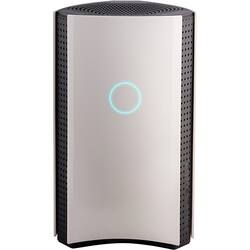
Bitdefender - BOX 2 Smart Home Cybersecurity Hub - Black/White
Model: BIT940800F153
SKU: 6156902
This item is no longer available in new condition. See similar items below
Customers are enthusiastic about the BOX 2 Smart Home Cybersecurity Hub for its enhanced security features that provide ample protection for connected devices. The easy setup process is also widely appreciated. Some users find the parental control feature useful. While the performance of the device as a protection tool is highly regarded, a few customers express concerns about the annual subscription requirement and compatibility issues with certain devices.
If you have a household of internet connected devices, like cell phones, laptops, computers, cameras, security systems, tablets, vacuum cleaners, TVs, Stereos and oh so much more, then this is the best way to keep the wrong people from taking advantage of vulnerabilities of those things. The Bitdefender Box 2 is meant to sit between your Internet Service Provider and your network and monitor all traffic that goes out to the world wild web. As I have a modem and a router the setup was fairly simple. Using the Bitdefender Central app it required moving 2 cables from the router to the box and box to the router and it was up and running. However, in order for the Box 2 to actually see all the devices on the network, the router had to be changed to a bridge, which is also fairly simple on most modern routers. If you don’t already have a router, or your modem is the router, the Box 2 can provide router functions. The one thing I don’t like is that you don’t get to control many of the network features you normally do of a typical router, such as controlling your channels and guest networks. So, my router still provides the individual device connectivity. Your network IP is also then controlled by the Box 2, which I can’t find any way to change back, so I have just adapted. All of the control of the Box 2 is performed through the Bitdefender Central app with no local web interface. The app provides details of every device that is connected and for the most part identified the devices perfectly, providing their network names and device type. All devices that aren’t a computer or an Android device were identified as “Protected” while all the other devices showed as “Needing attention.” When checking the computers and phones it states that they are protected, but only on my home network and recommends installing local protection. If the device is not the device that you are currently using, then it will ask for an email to send you a link to the Bitdefender Antivirus Software for that device, otherwise you can choose to install locally if you are logged into the central site on a PC. As for protection it has notified me that it has blocked dangerous URLs, one in particular I still have no idea what it is and why my TV is trying to get to it, but others were on purpose and the site just showed a Bitdefender splash page that showed it was dangerous. Through the app I could allow the site, though it isn’t very clear where it goes when you allow it if you do it by accident. You have to go into the Settings > Whitelist if you want to remove it again. You can also pause a devices internet connection preventing them from using your internet all together. In addition to having local network protection you also get a year’s subscription to Bitdefender Internet Security for unlimited devices. This includes antivirus, optimizer and parental controls. All of these features can be monitored through the Central app and site as well. The software can be found through other reviews, but for the price, if you have more than 5 devices it is well worth the annual subscription. One feature I did not notice till I tried it with the Box 2 is the parental controls, once installed on the devices, allow for easy control and monitoring of your child’s devices. This can help limit what they can search for, who they contact, and the times or amount of internet they are allowed to use. However, it seemed to bog my son’s phone down a good bit and when I went to change the bed time hours, after hours, it would not give him access till we uninstalled parental controls. With the parental controls you do get to see more of what traffic is being used by them, but that is only devices being controlled. Though I’m not much of a major paranoid type person, the one thing I don’t like is the fact that I have another party that now sees every single thing we do on the internet. It was bad enough my ISP could do it, and even Bitdefender software pushes their VPN to help protect privacy. However, the Box 2 is seeing your traffic before it is put behind a single IP and using their cloud to help determine what is safe and what is bad. Though I do feel comfortable that some random hacker may be adverted and my kids will be safer, I just don’t like knowing they can see stuff and they aren't showing me what they get to see. Like it shows per day how much traffic is “protected” but what was in that traffic.
Posted by DavidJr
I feel more secure that all of my smart connected home devices are protected. This device would prevent a hacker from entering your home network through any of your internet connected device. Nowadays there are tons of connected devices besides computers, smartphones, and tablets that use the internet, such as TVs, game consoles, printers, security system and cameras, refrigerators, garage door opener, lighting fixtures/bulbs, and etc… The Bitdefender BOX has a nice clean and futuristic look. With the Quick Start Guide, the setup is easy and straightforward. You will need to download an app and create an account, the app will guide you through the rest of the setup process. The app will instruct you to plug the power cord into the device and the wall outlet, then wait for the LED. Next, connect the box to your Wi-Fi network, this step has three options (1) use the Wi-Fi router from your internet service provider (ISP), (2) use your own personal Wi-Fi router or (3) use the Bitdefender box as a standalone Wi-Fi router. My setup was very easy without an issue; for my setup, I used my Wi-Fi router. One excellent feature of this device is that if you encounter any issue during a setup you may call the 24/7 free setup assistance number. Once everything is set up, the Bitdefender scans all connected devices and continuously search for any weakness. The app will let you know of ongoing events and this will help prevent security threats. It really blocks suspicious links and blocks them; they can be phishing attempts. If you are certain that a link is safe, you can simply allow it with the Bitdefender Central app. Nowadays it is very important to protect our data, such as family photos, digital documents, and credit card bank information. If your network is not protected you have a possible cyber vulnerability. The device includes the Bitdefender Total Security software to remotely protect your computers. The subscription is for one-year and is for unlimited devices. The device also includes various parental safety controls, such as setting content filtering, manage daily internet usage, blackout potential harmful persons, and monitor texts. To close, I highly recommend Bitdefender to protect your home network with a complete cybersecurity.
Posted by SimpleLiving
The Good: 1. An intrusion detection system device with behavioral analysis feature (means it will automatically learn network traffic in and out of your house for all your devices and will block something out of the normal behavior such as an accidental click to a phishing email that will go to a malicious site) 2. Connect many devices, I have over 20 devices connected includes all my Internet of Things or smart devices like TV, Alexa, IP cameras. I don't know the limit. 3. All devices connected to the Box will be able to download Bit Defender's Antivirus and malware program (so that means I do not need to go buy another program for Antivirus and malware detection) 4. Remote manage your Box from outside the house with ease using the mobile app. 5. Block devices for minors with the Box like restricting when devices can go online. 6. There is a network vulnerability scan feature to detect threats which is a plus. 7. Pairs greatly with my Linksys Velop mesh router and I am sure it will pair easily with other mesh type routers too. 8. Can become a primary router and replace your current router if needed. The Bad: 1. Not easy to setup for an novice computer person (so don't wait to call support). 2. Reboot device when needing to change the configuration. 3. The mobile app was not easy to navigate at first and takes some time to get used to.
Posted by BargainBin
The vast majority of our reviews come from verified purchases. Reviews from customers may include My Best Buy members, employees, and Tech Insider Network members (as tagged). Select reviewers may receive discounted products, promotional considerations or entries into drawings for honest, helpful reviews.