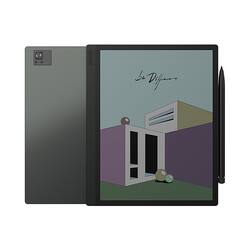
BOOX - 10.3" Tab Ultra C E-Ink Tablet
Model: OPC1075R
SKU: 6547590
This item is no longer available in new condition. See similar items below
The vast majority of our reviews come from verified purchases. Reviews from customers may include My Best Buy members, employees, and Tech Insider Network members (as tagged). Select reviewers may receive discounted products, promotional considerations or entries into drawings for honest, helpful reviews.
Tablet is great, Best Buy delivered quick, good experience. The refresh rate took a little getting used to coming from an iPad Pro for note taking. Ordered the keyboard case from Amazon Boox store. Issue is with the quality of the case, The outer material has a hole in the case after just a few months of use. It appears from the corner of the tablet rubbing against the corner of the case when the case is closed. In communicating with Boox about this issue, they will not provide a replacement due to the fact that I bought the tablet from Best Buy. According to them, not an authorized seller of the Boox tablet I purchased.
Posted by BernieG
Like most, I purchased this tablet specifically for note-taking and under the pretense of potentially using it for reading comics/manga. Prior, I used the Remarkable, but I did not enjoy the locked-down OS, they market it as "fewer distractions", but realistically it's just fewer features. For example, my school requires an App to sign into their WiFi, which the Remarkable, having no access to the Play Store, was unable to retrieve. This led me to the Boox, running a custom version of Android. For the first couple of weeks, I found it to be far superior. The pen, writing experience, and the operating system. Ultimately, where it fell short was the follow-up after taking the notes. It had a LOT of trouble syncing up with Google Drive, where I keep my notes. It took forever to sync even when I initiated a manual sync, and sometimes it simply would not. It required me to download the Google Drive app and upload it through that manually, the built-in Boox OS Google Drive sync simply could not cut it. This is in comparison to the Remarkable, which did a fantastic job syncing to Google Drive or their Remarkable desktop app. It's pretty hard to justify the tablet when a huge function of their note-taking has issues. It may work better for OneDrive or another syncing service, but for me, it was a huge deal breaker when I'm spending ~$550 for an E-Ink tablet, specifically for note-taking. Other negative factors involved the battery life and the lack of a case. The only Ultra C case I found was a ~$100 case on Amazon, the uniqueness of the tablet leads to very little third-party support. Unless a COLORED E-Ink display is absolutely required for you use, I would avoid it entirely and either go for a Remarkable or pivot toward a Galaxy Tab/iPad, the latter having more features than just note-taking after pairing it with a matte screen protector at the trade-off of not having the E-Ink display.
Posted by Sean
The Boox Ultra Tab C is a super cool e-reader and tablet all-in-one that looks and feels amazing. It's really comfy to hold and has a battery that lasts forever, so you can read for hours on end without any worry. One thing that really stands out about the Boox Ultra Tab C is its color screen. It's hands down the best color display you can get on an e-ink device, and it even lets you read comics and stuff like that. The color is super sharp, making everything look really nice and clear. Sure, the software can be a little tricky to figure out sometimes, but it's totally worth it because you can customize just about everything. You can make it look and feel exactly how you want it to. And, it's great for multitasking, which is perfect for getting things done on the go. All in all, the Boox Ultra Tab C is just awesome if you're looking for a device that can be both an e-reader and tablet. It's got a really high-end vibe, and is perfect for anyone who wants to take their reading to the next level.
Posted by PeteL