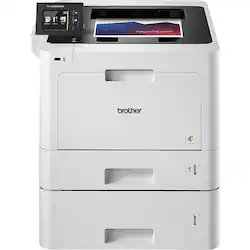
Brother - HL-L8360CDWT Wireless Color Laser Printer - Gray
Customers are saying
Customers highly value the print quality of the HL-L8360CDWT Wireless Color Laser Printer, with many stating that it surpasses the quality of inkjet printers. The convenience of having two paper trays is also a notable advantage mentioned by users.
The vast majority of our reviews come from verified purchases. Reviews from customers may include My Best Buy members, employees, and Tech Insider Network members (as tagged). Select reviewers may receive discounted products, promotional considerations or entries into drawings for honest, helpful reviews.
- Rated 5 out of 5 stars
New amazing printer
This printer comes in a huge box. It looked daunting when it arrived. It came in two boxes one for the printer and the other for the second drawer. It was very easy to assemble and great instructions which was very useful to get all the tape off. The software loaded easily. Of course it came with half filled toner, no surprise. The color and speed is wonderful. The screen is easy to understand and is in a good position. The lower draw holds a full ream of paper, very helpful.
Posted by Headset
- Rated 4 out of 5 stars
Good business printer, not for home use!
Bought this for use in my office where I’m feeding at least a full ream of letter paper per week through it, along with the occasional labels and envelopes, and it’s been great for the most part. However, this thing sucks up power like crazy. You need a beast of a dedicated UPS for this thing. I just put it on an AVR/power conditioner and skipped the UPS, which kicks on constantly but protects everything else on the circuit. Had to find an outlet that it wouldn’t cause a breaker to trip. The lights dim slightly in the whole building when it kicks on. Looking at the specs, this thing uses up to 900-1,000W of peak power, and 500-600W while printing. Definitely make sure your electricity situation can support this thing! It does have a sleep mode where it draws very little power, but it does take some time to wake up when receiving a job. But it’s so loud when it’s running, you definitely want it to sleep when possible. Has a funny smell to it too. Genuine toner replacements are expensive as well, but necessary unfortunately. The cheap off brand cartridges don’t work well, don’t even waste your time and money. Image quality isn’t as good with them, which isn’t a deal breaker, but they tend to leak badly. Genuine Brother cartridges are super expensive, but overall worth the investment. Thought I would save some money going with toner vs ink, but was dead wrong there! That being said, quality and throughput is where this thing shines! Print quality is better than any inkjet I’ve ever tried, period. It prints super SUPER fast, even with full color labels/images on high quality settings, and the extra tray is an absolute lifesaver. Top tray takes half a ream, and bottom tray takes a full ream. I print from the bottom tray by default and just use the top tray for overflow. That way if the bottom tray runs out, it will kick over to the top tray to finish the job until I can grab a ream. So nice being able to just pop a whole ream into the tray once a week or so, rather than constantly topping off with partial reams. The printer firmware and software receives regular updates, and have had no issues with network functionality, connecting, or any other issues. It’s massive, so make sure you have the room for it. If you plan on using the MP tray (for feeding labels and envelopes) you have to open BOTH the front AND the back, which takes up considerable room. It also doesn’t feed from the MP tray very well. I have had a few jams. Have to feed a limited number of labels through little by little and babysit it a bit. Feeding from the normal trays is fine though. All in all, satisfied with the results. It’s a quality printer that does a fantastic job, albeit with a few quirks. This was a learning experience for sure. Definitely a business printer. For general home use...lol don’t even think about it!
Posted by ckg123
- Rated 4 out of 5 stars
Great dual tray business printer
Started out spotty and later found out the driver wasn’t connecting well with my laptop due to not being able to install cd rom since my laptop is not compatible for one. Then went online to download it instead and the printer has worked flawlessly since. Also hooks up easily to my cell phone. My business requires me to print 100-250 page loan documents and also two sets. I go through a ton of paper as well as ink. The ink is a little spendy but it gets the job done!!
Posted by Bnotary