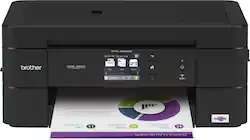
Brother - Work Smart Series MFC-J690DW Wireless All-In-One Inkjet Printer - Black
Model: MFC-J690DW
SKU: 6239804
This item is no longer available in new condition. See similar items below
Customers are delighted by the Work Smart Series MFC-J690DW Wireless All-In-One Inkjet Printer's excellent print quality and ease of use, finding setup and operation straightforward thanks to the intuitive touchscreen. Many appreciate the printer's compact size and wireless capabilities. However, some users expressed concerns about the sturdiness of the paper tray.
The vast majority of our reviews come from verified purchases. Reviews from customers may include My Best Buy members, employees, and Tech Insider Network members (as tagged). Select reviewers may receive discounted products, promotional considerations or entries into drawings for honest, helpful reviews.
Brothers MFC-690DW all in one Scanner/Printer/Fax, will be a good addition for any office or home. The printer itself has a small foot print is not as large as other all in one printer I’ve seen. One thing that help is that is shaped like a square with rounded corners, flat everywhere including the top. Setting up the printer was a breeze once connected to the power it will walk you through the process, you have to install the 4 ink cartridges included in the box and print a test page to complete the process. Connecting the printer to the Wifi was also very easy by using the touch screen on the front. The touch screen is not that big but is very responsive and it was easy to type despite the size. On the front you have access to everything you need from this printer, touch screen, ink slots and USB and SD card slots. Using the touch screen alone you can do pretty much everything without using any app or computer, including the ability to scan directly to USB drive, SD Card and web services which includes the following: Brothers Online, One Note, One Drive, Drop Box, Google Drive, Evernote and Box. You can also print directly from the USB Drive as well. The front panel where the touch screen is located can be position into three different angles. The upper center part of the printer flips over to be use a top feeder for the scanner or fax, even when its open the lid does not protrude outward that much maintaining the small foot print, so this printer can be store in a cabinet. One thing I notice when using the top feeder, the paper will be ejected from the top and not the bottom as most scanner I’ve used, that means you must place the scanning side facing down not upward. Using the flat surface for scanning you must lift the upper part of the device which opens completely parallel with the back of the printer. One thing I did not like when you lift the lid which is the upper feeder, it’s held a by two plastic hinges on the back, I notice the hinge on the right side seems to be very loose, fragile and it wobbles, meaning it could break with long extensive used or miss handle, I’ll rather used the feeder instead more safer, faster and more convenient than the flat surface. I assume the purposed of the hinges are for scanning things such as books because they can be pullout to make the cover flat and higher. In the front you load the paper tray which hold up to 100 sheets according to the manufacture and you can use legal size paper. The paper try seems to be little fragile too especially when you need to switch to legal size, you need to press a little plastic button that if you press it too hard it may break. There is also a slot specifically for picture printing which is cool. I was surprise to find another feeder on the back, that one calls manual feeder and only holds 1 sheet of paper, honestly don’t know what’s the purposed unless for quick print, but hey another added feature. This printer can also be used via USB connection, the connector is hidden under flat scanning surface, meaning you must lift half of the device using the two small handles on each the side. Once lift that upper part will be held by a plastic hinge mechanism which also self-soft closed after giving a little push downward. Using the Brothers iPrint&Scan mobile was also painless finding the printer on the Wifi was quick and easy. You can complete most task from the phone app including sending fax. Printing and scanning pages from the app was easy to use as well. I wasn’t able to try the fax, but it seems to be fairly to use too using the touch screen tap on fax and it will bring up the dialer, and on the phone app it will let you select file from your device or from the scanner. The windows 10 app was easy to use as well but is not as useful as the phone app as it only let you scan and print only. The print quality was pretty good and fast, I used regular paper, the scanning was also fast too. Another thing I didn’t like which this maybe personal preference was the fact that the power cable is attached to the printer is not removable. Overall this is an excellent all in one printer for any office or home, due to the wireless connectivity and ease of use, this thing can be placed in any location without the need to be tether to a computer and works completely independent. In the box it includes the printer, 4 ink cartridges, manual, CD and RJ11 phone cable. I used this all in one printer on Windows 10 and an Android device.
Posted by Wishkid
At my place of work, I have access to two large industrial sized printers. They are great for big jobs, but I spend a lot of time working on layouts so I do a lot of proof printing. The color printer is in a completely different part of the building so it becomes a hassle when I need to print a single proof. So, I was looking for a smaller printer that I could use exclusively for proof printing in color. I’ve always liked Brother printers as the equipment holds up well over time. So, when I was given the option of using this Work Smart Series All-in-One Printer, I jumped at it. The printer itself is the perfect size for a smaller office setting. It measures 15.7 inches wide, which is only a fraction wider than most professional-grade laptops. It fits on the end of my desk really well at work. When it’s not in use, you can fold the paper tray up so that it’s not intruding on your workspace. The printer is designed in such a way that it’s perfect for compact desk spaces. When it prints, it has a minimal shake so your work isn’t disrupted by that printer’s tasks. Set-up of the printer was very simple. I have a real love-hate relationship with office equipment – especially fax machines – but Brother makes the process very simple. Once you connect it to power, the directions on the screen display the start-up instructions. You will be shown how to insert the ink cartridges and how to connect to your WiFi network. This printer is network capable and compatible with Apple AirPrint – both of these are features I was enthused about. Within about 5 minutes, I was ready to start printing. You will likely be instructed to update your device’s firmware once it’s connected to an internet signal and this might take up to 5 minutes on its own. I was impressed by the display’s responsiveness to touch commands. It’s small (2.7 inches), but it works really well. The printer does not have an Ethernet port, but it does connect well to wireless really easily. I’ve never had an issue with it disconnecting once it’s connected. There is one main paper tray that fits letter and legal size sheets of paper and with the bypass tray you can feed 4x6” photos and other specialty paper, which is really good for my purposes. I thought the printer did a good job of printing text documents and images. If you are planning on using this for professional quality graphics, I think that might be a little out of the printer’s reach. While it does a good job with clarity, it’s just not meant for high-quality print jobs. For me, when I print a proof of a layout, I’m mostly looking for reference. So for that, it’s perfect. If you are looking for a good budget-conscience printer, this is a good machine for that type of purpose.
Posted by nickcal
Usually Brother brand printers are looking bulky and mostly a cheap variant of HP. This MFC-J690DW is a good way to go as superior product. Brother made this printer with very responsive and comprehensible touch screen control. Printer is slim (for the options) and has the top completely flat when closed. Looking really sharp. Setting up the printer was very easy thanks to the touch screen display! Connecting it to WIFI was fast. I even tried with a low signal WIFI, the printer did just fine. It is an MFC so there is also a fax machine included. While the FAX should be extincted... Brother fax machine built in this printer is really something different: It allows you to fax directly (through the MFC of course) from your phone, laptop, chromebook... Something that used to require some extra steps in the past. The printing quality of this MFC -J690DW is really above average it exceeded my expectation. Scanning, copying and printing are quite fast (what usually needed for small office or home use). Of course it is not your crazy laser printer... But it is just fine. To my surprise, this printer still has the USB connection. It is kind of buried inside the printer for some reasons! Like Brother is ashamed to having it exposed! Honestly, they should have kept the Ethernet port instead... This is my personal opinion... Maybe some people are still using the USB for printing... Printer has nice features like automatic duplex, back feeder (very important for some organizations and been neglected by other brands), easy ink cartridge loading with transparent level check! Brother is also trying something good and mostly useful for a lot of companies out there: "Refresh by Brother". I like the idea and the concept as I am using it with different brand. Brother has to do better on the pricing though. It is still not very appealing. Over all, I really recommend this printer for what it is delivering and what it is capable of. New and improved MFC from Brother!
Posted by SL7977089