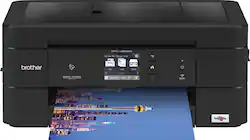
Brother - Work Smart Series MFC-J895DW Wireless All-In-One Inkjet Printer - Black
Model: MFC-J895DW
SKU: 6239805
This item is no longer available in new condition. See similar items below
Customers admire the Work Smart Series MFC-J895DW Wireless All-In-One Inkjet Printer's excellent print quality and speed, along with its ease of setup and use. Many appreciate its compact size and quiet operation, finding it a good value for the price. However, some users experienced challenges with wireless connectivity.
Most of my personal use printer experience has been with HP printers, but after some favorable experiences with Brother printers at work I thought this one would be a good option for the students in our family. Thus far, we have been very satisfied with this Brother Work Smart Series printer. Installation on both a Windows pc and an Apple laptop was a breeze. There is a cd-rom provided for Windows installs, but none is needed for Apple computers. Wireless connectivity was a breeze and we've had no connection issues since. This printer provides some nice features such as the automatic document feeder (20 sheets), duplexer, memory card slot, USB thumb drive port and mobile device printing. It supports AirPrint, Google Cloud Print, Mopria and Wi-Fi Direct (no need for mobile devices to be on same network) and one can use the NFC icon on the printer's control panel to establish a direct wireless connection. There is also Brother's iPrint&Scan that can be used to print attachments from or scanning to a mobile device. We have found the touch screen straight forward and easy to use. Print quality and speed has met our expectation. Photo print quality was also quite good. Color print speeds are listed at 10 ppm and mono print speed is listed at 12ppm. In summary, we've found this printer to be a good option for our family since it takes up limited space, delivers good print quality and speed, offers great mobile connectivity options and more than sufficient features at a good value. This particular model may not be the best option for those with high volume printer needs since there are other Brother models (INKvestment printers) that offer a lower, per page ink cost. However, most students and families should find that this model will suit their needs well. It is also good to know that this Brother printer comes with a two year warranty.
Posted by allib
Brother Work Smart Series MFC-J895DW Wireless All-In-One Printer:: I’m placing this printer alongside my other various Brother printers. My experience tells me that these printers outlast, deliver great photos and documents, and continue to prove themselves for years. This Brother printer delivers lots of features with very low stress. SETUP: Brother Printers work nicely with Mac computers and Windows computers. Software loads easily, behaves. and accesses the printer utilities for printer control. [Download or on CD Disc.] <> All printer control features are also available on the printer’s LCD screen, a nice step saver if the computer is in a different room. <> Wi-Fi connection is quick and easy. (There’s also an ethernet port.) The MFC-J895DW also allows printing from mobile devices via WI-Fi Direct, NFC, Apple AirPrint, USB 2.0, MOPRIA, and Google Cloud Print. It even faxes (send/receive). <> Brother toner cartridges are available individually. (B, C, M, Y) in standard (200pgs) and High Yield (400pgs) sizes. They load easily. <> Scanning is accomplished using Brother’s ControlCenter and there’s OCR software included. You can also scan from the printer, using the LCD to manage scanning and sending it to the computer. <> Brother’s online support is very complete and understandable. Brother anticipates many issues and provided useful answers online. PERFORMANCE: I print lots of family photos, so I focus mostly on color performance, where I’m using glossy paper. These are great looking pictures, easily matching what I get from local processors, but giving me the advantage of on-the-fly corrections. High resolution images make colorful and sharp 8x10” photos. Printing is slow for photos, and the Brother is fairly typical. Text pages are very nice looking, very fast, and I have no trouble using them for everyday projects (even though I’d usually switch to my laser printer for B&W, especially for large tasks). It’s an inkjet, so you need to appreciate long-tern costs for replacement cartridges. SUMMARY: The Brother MFC-J895DW is likely to be a very reliable inkjet if my experience holds for this printer generation. Everything about the Brother works. We love it for family or small work projects, with photos being the specialty.
Posted by TECHBEENGOOD
The installation instructions start off really nice and detailed enough. The only issue I had was that the link to download the software was not valid. I had to just go to the Brother.com website and get the software from the support pages. Actually once you download the software the installation and usage was one of the easiest I have seen. I also felt the software was easy to use. The ability to connect the printer to your PC using wifi, ethernet, or USB was extremely convenient. I liked how the ink cartridges go in and are managed. I like the footprint of the device and how it does not feel cheap. The software for scanning lets you save or open your docs in a variety of applications. You can even scan from your phone and save using the printer software. Printing was fast and the quality was very nice.
Posted by knamed2016
The vast majority of our reviews come from verified purchases. Reviews from customers may include My Best Buy members, employees, and Tech Insider Network members (as tagged). Select reviewers may receive discounted products, promotional considerations or entries into drawings for honest, helpful reviews.