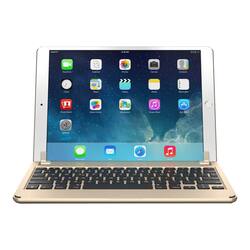
Brydge - 10.5 Wireless Keyboard for Apple® 10.5" iPad® Pro - Gold
Model: 16523VRP
SKU: 6110730
This item is no longer available in new condition. See similar items below
Customers appreciate the excellent build quality and comfortable typing experience of the keyboard, along with its long battery life. The sturdy hinges and ease of use are also frequently praised. However, some customers note compatibility issues, particularly regarding the use of screen protectors or cases with the iPad. The keyboard's weight is mentioned, but opinions vary.
The vast majority of our reviews come from verified purchases. Reviews from customers may include My Best Buy members, employees, and Tech Insider Network members (as tagged). Select reviewers may receive discounted products, promotional considerations or entries into drawings for honest, helpful reviews.
If you're looking to truly replace a traditional laptop with an iPad, the Brydge keyboard may be exactly what you've been hoping for. Other iPad keyboards are bulky and made from plastic. Even Apple's own keyboard sacrifices typing comfort in favor of asthetics. The Brydge keyboard offers an excellent typing experience and a beautiful design, but it comes with some sacrifices of its own. PROS: - The keyboard looks and feels like a natural extension of the iPad Pro. The space grey color is a perfect match. Proportions are perfect. The fit into the hinges is perfect. At first glance, it would be easy for someone to mistake the iPad/Brydge combo for a MacBook. - Great typing comfort. Compared to the Apple Smart Keyboard, the keys on the Brydge have much more travel and are nicely spaced out. After typing several long emails and notes over the past two days, I have no complaints about the Brydge as a keyboard alone. If you've ever typed on a MacBook Pro, you'll feel right at home. - I love the function keys on the top row of the keyboard. You can easily adjust display brightness, volume, keyboard backlight level, and more. - There are three levels of backlight brightness. It doesn't get overly bright, but it's certainly enough to work in a dark room. - The bottom of the keyboard has four rubber feet to keep your iPad in place as you type. - The hinges are very sturdy. You can choose any angle you prefer without worrying about the hinges moving or closing. The iPad fits snugly into the hinges and there is no way the iPad will come out of the hinges as you move it. CONS: - The hinges do not rotate past 180 degrees, so you are essentially forced to use your iPad in "laptop mode." With Apple's Smart Keyboard, you can simply flip the keyboard all the way around and use your iPad as a tablet. Not so with the Brydge -- if you want to use your iPad in portrait mode or use it one-handed, you'll have to remove the iPad from the keyboard. - The Brydge keyboard is heavy. It weighs just as much (if not more) than the iPad itself, so be prepared to double the weight of your iPad. - The back of your iPad will be left exposed when using the Brydge keyboard. You cannot use a back case as it will not fit in the hinges. Brydge has said that they are working on a custom back case to go along with this keyboard, so stay tuned. - In iOS 11, Apple introduced a new dock that allows you to swipe up from the bottom of the screen and switch between apps. Unfortunately, the Brydge keyboard makes it impossible to access the dock using a swipe on the screen. The top of the keyboard blocks the very bottom of the iPad's screen where your finger needs to swipe to bring up the dock. The only way around this is to hit Option + Command + D on the keyboard, which will bring up the dock. If you want to bring up the Control Center view, you'll have to double-click the iPad's home button or the make-shift home button on the top-left of the keyboard. OVERALL: This is a superb keyboard for those who need to do serious typing on their iPad. If you're fine with sacrificing the "tablet" feel of the iPad, the Brydge keyboard will give you a mini laptop/MacBook. And of course, if you want to go back to the traditional iPad experience, just remove your iPad from the keyboard. If the majority of your iPad usage involves typing, then the sacrifices are well worth it -- this is the best iPad keyboard you're going to find.
This review is from Brydge - Wireless Keyboard for Apple® iPad® Air (2019) and 10.5-inch iPad Pro - Space Gray
Posted by ryanmcv
Brydge Bluetooth keyboard for iPad Pro - I’m trying to recall any electronic device I’ve owned that took 90 seconds to get operating. Take the Bridge keyboard out of the box, and slip the iPad Pro (there are several other versions for different models) under the clips. Press the BlueTooth key, upper right of Keyboard. Open iPad SETTINGS, see BRYDGE pairing request, select, and you’re paired. It took longer to write this paragraph. This is a premium, aluminum, solid, rugged keypad loaded with features and specialty keys. The top row of keys place you right into MacBook Pro land. The control panel items are all laid out, all the time. Plus, you now have backlit keys (on/off), the HOME button, battery key, and keyboard power. The rest of the keyboard is nicely weighted, the keys feel great. Hinging of the attached iPad is secure, staying in place at any angle. There’s even a SIRI button, lower left. It all works like it was designed at the same time. My wife found herself accessing features of her iPad that seemed awkward before. And, the iPad is comfortable sitting in a lap with its keyboard/stand. Cool. All very cool. Not sure why we waited to add a keyboard to our iPads.
This review is from Brydge - Wireless Keyboard for Apple® iPad® Air (2019) and 10.5-inch iPad Pro - Space Gray
Posted by TECHBEENGOOD
This is by far one of the best keyboards I have used with my iPad Pro 10.5. It turns it in to a MacBook basically. Giving you all the functionally of the MacBook keyboard. I have a 2017 edition 5k iMac, and this keyboard feels better than that. When I travel, this will be in my bag now, and will really help on flights. It super strong, and feels very premium. The keyboard has GREAT travel and feedback, and will make you think twice about buying any other keyboards one you have this one. The hinge on this keyboard is super strong, and goes all the way flat when using if you want. It has all the commands on a regular Mac keyboard, so trust me...you will not be disappointed. Also, battery can last up to a YEAR on a single charge! WOW. Hurry up and get his one...
This review is from Brydge - Wireless Keyboard for Apple® iPad® Air (2019) and 10.5-inch iPad Pro - Space Gray
Posted by mrjlwilliams