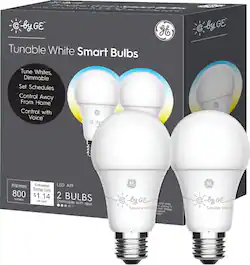
C by GE - A19 Bluetooth Smart LED Bulb with Google Assistant/Alexa/HomeKit (2-Pack) - Adjustable White
Model: 93096308
SKU: 6289101
This item is no longer available in new condition. See similar items below
This thing has so many different lighting options. not like crazy hue blue red purple color changes. but from bright White light that wakes you up all the way down to candlelight that makes you sleepy. The thing that this product doesn't do well is informing you of all the commands that you need to use with your assistant of choice. you'd be wasting it if all you did was ask your assistant to turn it on and off. you can ask for Bright white (super blue ivory color to wake you up), White (the regular daylight at 3k) and then dim also. Which you can control from your phone. Now there are two apps you can use this with. Maybe three since of alexa but I dont have Alexa. They push you to set it up with the google home app and you do. But once you do it doesn't even show you all the color options. nor does the product tell you how to get the color options as well. the phone from the google home app can turn on/off the lghts and dim them as well. but you have to get the color of the lights throgh voice. Using the GE app, you can find 3 options of colors to choose from. Now come the google home hub (with Screen) once I got that, I was presented with 6 color options. Aside that. After learning all the color options. Oh boy, Ivory wakes you up, white is just a nice daylight look, and candlelight put to dim just seriously is perfect for those who want to go to sleep.
Posted by Izhart
Great product! Works great w/ my google home app. It allows you to change light settings/color output through the app. So you can either keep it dim w/ yellow bulb setting, or can change to white if prefered. Very helpful product.
Posted by TuningOutFromTheWorld
The features on the website and packaging can be misleading. The website touts the ability to have the light bulb change colors based on the scene. Which sounds good on paper but it’s not exactly the bill of goods that was sold. Let me further explain. To utilize the full capabilities of these bulbs, you will need to use the GE app found in the iphone app store. This may sound good but the app doesn’t support voice control. This is where Google Home app comes into play. Google home app will let you control the bulbs via voice but the caveat is that you CANNOT setup the bulb to both the GE app and be setup with Google Home app. This is the limitation of Bluetooth. These bulbs are Bluetooth driven and not wifi driven. Google home app vs GE app? That will depend on what you want to do with the bulbs. If you want the bulbs to do everything that’s advertised on their website, then setup with the GE app. The GE app will allow you to set “scenes”. Some examples would be to wakeup in the morning to a 2,000 kelvin color temperature at 25% brightness. Sounds great but no voice control. That means you will need to use the app to turn on and off the bulb in your lamp. Talk about a pain in the rear end. If you want to voice control your lights, you will need to set the bulbs up with the Google Home app. This will allow you to turn the lights on and off by voice. Which is the #1 reason why I got these. The problem is that the google home app doesn’t have the automation or scene choices like you can find in the GE app. The Google home app will allow you to turn on or off and the brightness levels. No color temperature changes within the app. You can however, change the color temperature by saying “hey google, change my lights to soft white” or “hey google, change my lights to 3,000 kelvin” to change the bulb colors. Talk about major confusion! You also can’t setup automation to wake up with a cooler color temp with google home. Sigh. Why can’t I have both? Pros • Can adjust colors from 2000k to 7000k • Voice activated via Google Home/Mini • 65w is great for a lamp • Similar sized to conventional light bulbs Cons • Setup can be tricky • Resetting the bulbs is a tricky process. Did I say TRICKY? • Bluetooth can only connect to GE app or Google Home App. Not both • Not ready for the masses Summary: It’s not easy to setup. I had to do a hard factory reset to get them to work. The factory reset takes a special sequence of on and off to get them to reset. Very complicated! You will have to pick which app to setup the bulbs with. This is determined by which features are important to you. Want all the features and the ability to setup colors and brightness based on your circadian rhythm? Set it up with GE app. Want voice activation? Set it up with the Google Home app. You can’t have both and that’s why im giving it 3 stars out of 5. The bulbs are capable but I believe the app control is lack luster and holds this product back. It could be due to the limitations of Bluetooth. I just expected more.
Posted by TonyMSP
The vast majority of our reviews come from verified purchases. Reviews from customers may include My Best Buy members, employees, and Tech Insider Network members (as tagged). Select reviewers may receive discounted products, promotional considerations or entries into drawings for honest, helpful reviews.
Customers admire the A19 Bluetooth Smart LED Bulb's ease of use, brightness, and affordability. Many appreciate its compatibility with smart home assistants like Google Assistant and Alexa, enabling convenient setup and control. However, some users experienced connectivity issues and challenges with voice control and the app. A few also found the reset process cumbersome.