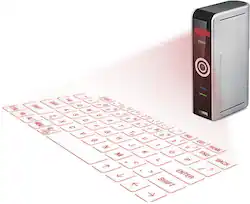
Celluon - Epic Wireless Projection Keyboard - Silver
Model: EPIC
SKU: 6032006
This item is no longer available in new condition. See similar items below
Customers often highlight the Epic Wireless Projection Keyboard's ease of use and compact size. Many appreciate its simple setup and portability, noting that it's convenient for various uses and easy to transport. Positive feedback also mentions the reliable Bluetooth connectivity. However, some users point out that the keyboard's sensitivity could be improved.
The vast majority of our reviews come from verified purchases. Reviews from customers may include My Best Buy members, employees, and Tech Insider Network members (as tagged). Select reviewers may receive discounted products, promotional considerations or entries into drawings for honest, helpful reviews.
Worth trying and can only get better as touch & projection interfaces continue to evolve...
Posted by ltw919
My son wanted this instead of a keyboard. It takes up almost no space and is very convenient. At first I couldn't get it to work at all. Then I realized the sensitivity was set too high. Once I made the proper adjustments it works surprisingly well. Be advised, it has a very small footprint so it works best on a solid surface. On soft areas like beds and some carpets, it tends to fall over. Take a few minutes to read the instructions. It has some very cool shortcuts, especially for turning the keyboard back on. As well as it works, I think a standard keyboard works a bit better. But if space is a problem, this device is the solution.
Posted by Rebound
I was amazed at how accurate the keyboard was I did not expected to do as well as it has been doing I can type at least as fast as I did on my iPad without it. I am going to move it to my surface pro as my keyboard I use on the road I keep it plugged in most of the time the battery does not last very long but it works off of USB for power. It was easy to connect using Bluetooth I take it everywhere the best way to describe it is it turns a flat surface into a touchscreen. It works better on light surfaces dark surfaces makes it hard to see the keyboard. The only thing I would change is the cooking every time you type a letter it clicks for every key hit. I would like that to be an option to turn off it was good in the beginning to help learn to use it it's not necessary once you're used to typing with it. It's loud enough to bother someone if you are in A library or a quiet area
Posted by Technition001