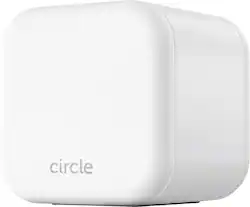
Circle - Home Plus - Parental Controls - Internet & Mobile Devices - Wifi, Android & iOS - Limit Screen Time - 3-mo Subscription
Model: CIR5001
SKU: 6397663
This item is no longer available in new condition. See similar items below
Customers are pleased with the parental control feature as it provides them with great capability to control their children's usage. They also appreciate the time limit feature, which allows them to assign time limits to specific apps. However, some customers have concerns about the monthly subscription fee and connectivity issues at home.
I have been using this for a few days now and this is truly a great tool for parents to monitor and limit device usage time when its able to connect. I'm not sure if it just my Circle thats like that but I had a couple times when my connected devices would disconnect and then I would have to restart the circle to make it work again. When the Circle was connected and working it worked great, I was able to monitor my kids activities on internet, connect their gaming system to it as well and limit their time on that, give out reward time and the best feature of all is that it would even connect to devices on data network and also monitor their location. I'm hoping maybe an update may fix the connectivity issue so that I may continue using this.
Posted by Hmirza
This Circle home plus is a parental control software and hardware use to monitor your kids internet usage. The device is very small and fits in the palm of your hand and is very easy to setup. All you have to do is download the app on your main mobile device, create an account, scan the circle home QR code with the app, then connect the circle home to a router and that's pretty much it. The app is very intuitive and easy to use, and the options available are pretty much self explanatory. This device also works connected via Ethernet or WiFi, you first need to set it up via Ethernet. You can either add a device you want to control manually or you can select them from the device menu in the Circle app as it will automatically scan for devices connected to your Wifi. There are many things you can do such as filter contents, app restrictions, web history, track online usage, location tracking, Limit usage, or create a schedule which in this app is called bedtime. This thing has a lot of features that will definitely give parents lots of control over their kids connected devices. Before I got this I was already doing that with my router as it has some of these features they were not as intuitive and easy to use as the Circle. One feature I kind of like was the Rewards option. That’s definitely super useful, when kids behave or do something good just send a Reward which adds extra time to their schedule. You can also control the amount of time added to their rewards. If you download the app on the kids device they will get notified of their rewards. Some may think this thing goes to the extreme of control, but to be honest this is more like a peace of mind if I didn't do this type of thing with my kids they just be on those devices and won’t disconnect unless there is no internet, plus I don't need to chase them around to lift their devices at night. There's a lot of good things about this device and app but there is also a downside, to use the premium features there's a subscription and the cheapest is about $69 for 3 month, with this home plus that cost $129 you get a year or you can get lifetime for $299. Another thing I like was the new device notification every time a new device was connected to my WiFi I was notified. That is a very helpful feature specially to detect unknown devices connecting to your network. That being said this device will benefit the most for those who use Internet Service Provider (ISP) routers and that’s because they provide limited or non parental control features and their apps are hard to use. If you have an aftermarket router most already come with these features built in they are just not as easy to use as the Circle and they kind of are limited to usage and schedule. If you don’t mind paying a subscription and want to have one of the most beneficial parent control for children connected devices this is definitely an excellent candidate. In the box you get the Circle Home, Ethernet cable, USBC cable with power brick and the instructions.
Posted by Wishkid
I would give it 5 stars but it requires a monthly or yearly subscription for premium featurea depending if you want to save $ to pay for the year or monthly which is more expensive. It does come with a trial period for the premium features. BTW the premium features are basically what you need to be able to set limits and reward kids with screen time etc. The basic function is very limited. Ok. I ranted enough about the subscription. Setup is very particular. It says it needs to be hardwired into the main router of my house. I tried to see if it would allow me to go through my main switch of my house and it did not like that. Also because I am running a mesh type system it did not like that either. So make sure you follow the instructions to a T. After it registered to my network it was a snap to set the rest up. I am on Android and application was easy to use and navigate and control my kids screen time. Restrictions were hit and miss. I think it has to do with the way folks set things up in YouTube. Program restrictions on time allotted is pretty good. This does require that apps are on both parent device and kid device. So if a kid is savy enough and is able to delete the app then poof the restrictions are not there. Which requires you to personally monitor as you should as a parent. For the intent I think this is a good product so long as kids don't try to work around the loopholes. I would recommend this product for busy parents especially during COVID-19 days when parents have to work and want to restrict kids from playing games on there devices instead of doing work.
Posted by PhillipB
The vast majority of our reviews come from verified purchases. Reviews from customers may include My Best Buy members, employees, and Tech Insider Network members (as tagged). Select reviewers may receive discounted products, promotional considerations or entries into drawings for honest, helpful reviews.