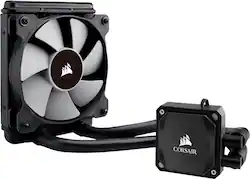
CORSAIR - Hydro Series 120mm Liquid Cooling System - Black
Model: H60
SKU: 5845215
This item is no longer available in new condition. See similar items below
The vast majority of our reviews come from verified purchases. Reviews from customers may include My Best Buy members, employees, and Tech Insider Network members (as tagged). Select reviewers may receive discounted products, promotional considerations or entries into drawings for honest, helpful reviews.
Buying the Corsair Hydro H60 AIO watercooler kit for my HP Omen gaming desktop was a fantastic choice~! The stock Intel fan just wasn't powerful enough to keep the CPU temperature low during long gaming sessions playing Resident Evil 2 Remake, Metro Exodus, and Far Cry 5 New Dawn. With the OEM CPU heatsink and fan, my Core i7 8700 reached temperatures as high as 97 C~! And at that temperature level, the stock fan was spinning so fast, it was very loud and distracting that I had to wear headphones. After installing the Hydro H60 and playing the same games at the same room temperature, my CPU temperature dropped down to 74 C max (when playing Far Cry 5 New Dawn). On certain games, such as Resident Evil 2 Remake, the CPU never became hotter than 66 C. Depending on the game, my max CPU temperature varied. When playing Shadow of the Tomb Raider, for instance, my max CPU temperature was 70 C. My idle temperatures experienced great benefits as well. It went from 48 C on the stock HSF down to 29 C on the Hydro H60. Besides HUGE temperature improvements, I also experienced great acoustic improvements. Although the Hydro H60 radiator fan isn't super quiet at max speed, it was still much quieter than the stock HSF. I made the Hydro H60 even quieter by replacing the stock 120mm Corsair fan with the 120mm Noctua NF-P12 fan. As a result, my system became even quieter and the cooling performance improved by about 2 C. Not a huge difference but still appreciated. All in all, this is a great product with excellent cooling performance and easy installation. _____ *Pros: -Way better than stock Intel heatsink and fan (HSF). 97 C --> 74 C (when playing Far Cry 5 New Dawn). -Way better idle temperatures - 48 C to 29 C. -Easy to install. -Stock 120mm radiator fan is almost as good as a more expensive Noctua NF-P12 fan. -Very quiet operation (when not at full load). -Good size for small & compact PC cases where a HUGE aircooler just won't fit. -Good value. -Easy to replace stock 120mm fan with a different one. -Great warranty period (5- years). _____ *Neutral: -The stock Corsair fan is a bit loud at full speed. _____ *Cons: -None
Posted by optimummind
I have a few big windows in my room that take in sun all day long so my room is normally pretty warm, making my PC run at slightly higher temps than I liked. With that, the fans run high and create quite a bit of noise. This Corsair liquid cooling system was the perfect step up from my previous air cooler. The CPU stays nice and cool and the noise level seems to have almost been cut in half while running under full load, and there's almost no noise while doing simple tasks like browsing the internet or streaming TV/movies. My PC is a pre-built so I had absolutely no prior experience taking apart a PC to any extent. All it took was a short youtube video to explain how to safely remove my motherboard and the rest of the installation was quite simple. Highly recommend for anyone looking for a simple liquid cooling system without breaking the bank.
Posted by Alex
After researching for a new scarcely available PC with a 3080 I was able to get my hands on a new Aurora R12 with a 3080 card that didn't break the bank too much but it came with a fan cooled CPU. I found out many had recommended the H60 which works with the R12 so I went with it. I ran the CPU cooled fan a bit for baseline with Warzone and Halo on max setting and the fans sounded like a turbo prop aircraft on take off and was barely keeping it around 90C and around 50 C while idle or web surfing. Installation wasn't difficult and I'm not a PC builder but am sonewhat familiar with the internal workings of a PC. The instructions included are somewhat inaccurate for this particular setup since you have limited space, mainly the fan configuration and cooling pump plug in location. The cooling pump cable will need to be plugged into the Fan CPU port as shown in my picture, this will avoid BIOS error during boot up. It'll show around 90 to 95% speed on the ACC software which is fairly accurate, the Corsair max is 4000 RPM compared to the 4400 OEM fan. Orientation of the hose worked best for me as shown in the picture with hoses down and swept towards the rear end of the PC. Also will need a VRM heatsink which are readily available online since the MB doesn't come with one if the PC originally came with a CPU fan which performed that duty as well. After installation my temperature runs on average 10 C cooler now at 37 C idle or low usage to 79 C while playing Warzone and Halo on max and my PC doesn't sound like it wants to fly away anymore.
Posted by ChuckB
Customers love the Hydro Series 120mm Liquid Cooling System's excellent cooling performance and ease of installation. Many appreciate its quiet operation and good value for the price. While some users experienced issues with the pump or pre-applied thermal paste, the positive feedback on cooling and ease of use outweighs these concerns. The system's compatibility with various systems is also frequently praised.