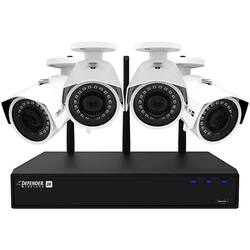
Defender - 4-Channel, 4-Camera Wireless 4.0MP 1TB NVR Surveillance System - Black/White
Model: W2K1T4B4
SKU: 6267101
This item is no longer available in new condition. See similar items below
Customers recognize the 4-Channel, 4-Camera Wireless 4.0MP 1TB NVR Surveillance System for its superb video quality and large on-site storage. They appreciate the easy setup and intuitive operation, as well as the convenience of the mobile app for remote monitoring. While some customers note that the cameras require external power, making some installations challenging, many value the fact that the system does not require monthly fees.
The defender 4-channel, 2-camera wireless surveillance system has many features and is easy to set up despite the lack of instructions that come in the box. You are given a one sheet quick start guide and that is pretty much it, but to be honest, you really don’t need anything to get up and running. Everything is straight forward and the cameras connect automatically once they have power. I was able to install my cameras in less than 20 minutes for each one. I was disappointed in the fact that these cameras are not fully wireless, you have to have at least a power plug near by and you are only given about 15 feet of cable to do so. I had to use an extension cord for the camera that I mounted outside, but the other camera I mounted in my garage near the power plug. You are left with a Ethernet plug that you do have the option to use (not sure if it can be powered by PoE or not, but I don’t have that option) that will dangle down and the install does not look that clean unless you do some cord management. I was very impressed with the video quality and even the night vision is of great quality. You should be able to make out details that will help with identifying a person who comes into view. The base station does have a fan in it that makes some noise and you will notice it at first in a quiet room, but after a while you probably won’t notice it at all. I connected mine up to my 23” HP monitor via the HDMI port, but you also have the option of VGA. Mounting the cameras can be a bit of a pain since you cannot remove the cameras to mount them and you have to angle them to get access to the three holes in the base. Overall I am very happy with the cameras, but I do wish they were truly wireless or had longer power cords that were included and I am not sure about the durability of the cords themselves, they don’t appear to be very thick and not sure about them being rated for being outdoors.
This review is from Defender - 4-Channel, 2-Camera Wireless 4.0MP 1TB NVR Surveillance System - Black/White
Posted by jago
Home security systems are a dime a dozen these days. It is a great time to live if you are interested in investing in a high quality, versatile camera system for your home or business. If you are interested in security cameras, you need to ask yourself how much you are willing to invest to learn how to use it, and ease of installation? At one end of the spectrum, you have Arlo cameras, where the only setup is through an app and installation is as easy as attaching a magnetic mount to the wall. At the other end, you have cameras that are wired to a DVR/NVR where you have to run both power cables and video/audio cables to power outlets and the box itself. Both have their inherent pros/cons. Arlo is easier on the setup, but you're paying (handsomely) to continuously record video and you have to charge the batteries every few months (and more frequently when continuously recording). When installing a wired system, the initial install is quite a bit more challenging, but you generally get ample storage space on the DVR/NVR hard drive to store footage and you never have to recharge the batteries. This Defender system falls somewhere in the middle. It's a tad easier to install than a fully wired system (the cameras connect wirelessly) but you have to bring your own screen to review the stored footage. I must note that mine did not come with ANY instructions. While I don't think the lack of instructions makes it impossible to recommend, it certainly affects any recommendation. While the setup (even for novices) is pretty basic, it takes a lot of trial and error to navigate the confusing user interface on the NVR box itself. SETUP To use this device you have to set it up to a monitor. I used an old computer monitor. I plugged the box into the monitor via HDMI and plugged it in (there's no power button). And it booted up fine. I would recommend a USB keyboard on initial install as you have to create admin password and change the time. You don't need a keyboard, a virtual keyboard pops up and you can use the included computer mouse (that plugs into one of the USB ports in the back) and click on the letters you want to type. The cameras themselves connect directly to the the NVR box through Wi-Fi. So plug in the cameras to a power outlet and they will connect to the NVR box automatically. This of course, is within reason. They can't be miles a part, but I put the box in my basement and they were able to connect outside my front door. So for me, the internal Wi-Fi connection from the cameras between the box and the cameras was pretty solid. I was actually surprised. I thought the cameras would have to connect to the internet, and connect to the NVR box through the internet. But best I can tell (again, no instructions) the box creates a Wi-Fi network and the cameras connect directly to it. So in that regards, set up was dead simple. Now, the trick is hiding the power cable. Whereas the Arlo cameras run on batteries, you gotta plug these bad boys in. If you're okay with simply plugging into an outlet inside/outside your house and leaving an exposed cable to the camera, then installation is simple. But if you're like me, you want a professional look and want that power cable hidden. This is where setup gets tough. If you're installing on the exterior of your house you have to drill a hole through your entire wall and run the power cable inside. The best I could come up with, as a non-electrician is to simply run the cable through the wall and plug into a nearby indoor outlet. While on the outside the camera looks great, now I have a hole in the inside of my house running to a power outlet. Which isn't the best. But it's the best I could come up without hiring an electrician. IMAGE QUALITY This is where this unit shines. It absolutely smokes Arlo in terms of quality. The 2K image is great and allows you to zoom in and retain a lot of information in the image. If your camera is close to your front porch, for example, it might not matter, but if you place it further away from what you are trying to monitor, you don't have to worry about zooming in on the image and still being able to see clearly what you're trying to view. The night vision was pretty good too. I was very impressed with it. CONS If I had to pick a few cons, the main is the interface of the NVR box that I previously mentioned. The other is maybe the size of the cameras. These cameras, while high quality, are pretty bulky. They won't go unnoticed in a residential setting. They are white and stick out like a sore thumb. For me, that doesn't really matter, but that is something to keep in mind. In a professional business setting, I wouldn't think this matters as most people expect security cameras at a business. But the user interface, especially without instructions, is difficult to navigate. You can see the picture below. The network settings are confusing to all but the IT professionals of the world. I don't know what a vast majority of the settings mean. So I don't mess with them. In the professional setting, i.e. someone with expertise in security, this may be a simple interface. But for someone with no experience in security cameras shopping for their home or business, it is extremely confusing. I think if you spend some time with it, and use trial and error, you can learn to change the settings re viewing cameras, and motion detection and recording settings, but that's about it. That's all I personally cared about (i.e. motion settings, when to start recording) so I didn't mess with any other settings. While I don't know it for sure, I would imagine firmware updates are done manually (the NVR box isn't connected to the internet, there might be a way to do so, but I didn't spend the time to figure it out) so the only way I can think to update it is manually. CONCLUSION The video quality truly is great, and is the main reason this unit gets 4 stars. But know that there's a steep learning curve both in installation (at least if you want to hide the power cables) and use of the interface. I recommend it for those interested in continuously recording footage (or at least recording a lot) because it's cheaper than other devices that record to the cloud and those who are open to learning how to use it. If you are someone looking for dead simple setup and dead simple ease of use, this isn't the product for you. That doesn't make it a bad product at all, but it's one of the many things you should consider when deciding what security system fits your needs. This Defender system, once installed, gives you the ability to store vast amounts of high quality footage on the cheap (just have to pay initial purchase price).
This review is from Defender - 4-Channel, 2-Camera Wireless 4.0MP 1TB NVR Surveillance System - Black/White
Posted by callmeageeth
Living in my rural area of North Florida has many pluses and weather-related advantages. But, being out in a secluded, wooded locale also has its disadvantages, especially where home security is concerned. So, I was anxious to review this Defender 4-Channel, 2-Camera Wireless 4.0MP, 1TB, NVR Surveillance System in exchange for the product. Over the past twenty years my home has been burglarized three times. After the second time I installed an indoor, DYI, security system. However, to gain entrance into my home, a window or door has to be broken and damaged to set my self-monitored system off. Additionally, outside garden and recreational equipment has been stolen because I could not extend my indoor system to protect those areas. I was hoping that the Defender Video Surveillance System could help me protect my outdoor areas and compliment my indoor security. After three weeks of trial and error I think I have my outside camera locations pinned down. And, since this system is expandable I have ordered two additional cameras to cover my equipment holding areas. This Defender Camera Surveillance System can be installed by a professional, and, or, any combination of DYI or professional. I recommend visiting the Defender main website and bookmarking, and, or downloading the Defender 2K, Wireless, SmartSignal App Manual. It provided much needed information, details, helpful illustrations and drawings. I chose to install the complete system myself including the hidden and secure electrical power outlets. My cameras and electrical outlets are contained in bird houses approximately 11 feet off the ground mounted on wooden 4” x 4”s. The 120V electrical is run underground in PVC conduit from the nearest outside electrical outlet up the backside of the 4” x 4”s. I have a 120V, weather-proof electrical box mounted in each bird house. The cameras have 120V plugs, which plug into the concealed outlets. This allows me to unscrew the back of the bird house and unplug the camera if needed. If attempting to install the cameras DYI – keep in mind the location of the cameras is not only important, but must they must be secure from being easily vandalized. Securing the electrical outlet is another vital consideration. I experimented with eight locations over two weeks of use before finalizing my camera installations. Another relevant point when installing the cameras is they have to be able to communicate with the NVR. Not sure what the actual physical limit is, but I have my farthest camera over 150 feet away from the NVR, and it still sends sharp, vivid, impressive, live streams and videos. Why do I think this Defender Surveillance Camera System is outstanding? >> Video Quality – For me this is the most important feature of any camera surveillance system. This Defender delivers up to 2k quality color videos (HD), or, I can select (SD, 480P) using the included app. For optimal video performance 2K video setting should be limited to one camera. When I have my four cameras in operation I will set them all to SD (480P). A feature I particularly like is that I can zoom in or out of any live view or recorded video for greater detail using my two fingers pinched and spread across my Smart Phones, Tablet, or my I-Pad. The cameras are IP67 rated and can withstand outdoor wet conditions and operate in weather conditions of -22 degrees F and up to 140 degrees F. The camera housing is made of metal with an adjustable slide-shade, hood at the top, which allows for decreasing the amount of sunlight on the lens. Each camera has an antenna on a swivel ball, which allows me to keep it in the upright position for better communication to the NVR. The cameras have a 2.8mm lens and a 127 degree diagonal field of view. Each camera has 18 Infra Red LEDs for night vision and their range is approximately 100 feet of depth depending on the amount of ambient light available. The cameras also come with a W/P Ethernet connection for even more dependable security. The provided Ethernet connection on each camera may come in handy when the wireless cameras cannot communicate with the NVR because of building interference or distance. However, an Ethernet cable would have to be run with the electrical to those cameras and back to the NVR. Cat5e or Cat6 Ethernet cable are both capable of runs of up to 1,000 feet without any appreciable degradation in bandwidth. However, using Wireless or Ethernet cable the minimum network download speed of 5Mbps is required for optimal video performance. Another important feature is that each camera is equipped with a motion detector for, alarms, and video recording, but it is nonadjustable for sensitivity (more on this later). >> Software Set Up – The Defender Camera Surveillance System provides two options for set up. By directly connecting the NVR to a monitor or TV, and, or through the Free Defender App for Apple or Android devices. Either option the NVR needs to be connected to your home router through the furnished Ethernet cable and plugged in. I set my system up through the Defender SmartSignal App, which I downloaded from both the Apple Store for my I-Pad and Apple Smart Phone and the Google Play Store for My Samsung Smart Phones and Tablet. It was easy to do after registering for an account. My account allows me to use the SmartSignal App on my two Apple devices and three Android devices. WooHoo! The more I used this system the easier it was to learn all the various features. Be aware that only the surveillance cameras are wireless back to the NVR. The NVR has to be connected to your home router by Ethernet cable for access to your home network and over the Internet. It is not wireless. Defender furnishes a Cat5e Patch Cable approximately 40 inches long. However, if you need to locate the NVR elsewhere in your home you can purchase of up to 150 feet of Cat5e cable at Best Buy. If you do not have a monitor or TV near your NVR to view live feed from your cameras or recordings, not to worry. TIP: I use 'Screen Mirroring' on my Android phones and Apple IOS devices to view the Defender live images or recordings on any of my three Smart TVs (Living Room, Family Room, and Bedroom) – Just pair them accordingly – no cables required. At full screen the live image is unbelievable (see attached pic). Great detail and color. I can also do this at the homes of my friends or family using their router and Smart TV. YooHoo! Think thoroughly how you want your schedule for motion detection and notification of Alarms. Just using any of my Smart Phones I can change my 'ON' schedule at any time through the SmartSignal App (see attached pic). For now I have the motion detectors 'ON' from 10:00 PM to 7:00 AM. When I leave during the day I change the schedule accordingly. If I am out longer then I changed the schedule for, it is an easy adjustment through the App over the Internet wherever I am at the time. I set the Alarm in each case to notify me of motion by e-mail. WaHoo! >> Hardware set Up – As I indicated earlier this can be a DYI, professionally installed, or any combination. If your cameras are mounted in an indiscreet location vandalism should not be a factor. The power supply to the cameras can also be an issue. If not sure hire an electrician to secure the 120V power. I notified my Home Insurance company that I now have 24/7 video surveillance and am receiving an additional 5% discount. You may also qualify, which eventually pays for the entire system, or electrician, additional materials,or any other professional needed to get your system up and running. Take your time placing these cameras at various locations around your home. I moved mine around at eight different locations over two weeks. TIP: When moving your cameras around to determine their final location, angle, etc. - Plug the cameras in 'Live' and use the image on your Smart Phone for placement and adjustments at that site. It saved me lots of time and steps from moving around back and forth from my monitor connected to the NVR inside my house. >> Cons – As stated earlier there is no sensitivity adjustment for the motion detectors on the cameras. I live out in the woods. Bats, birds, flying bugs, rain, and racoons set off the motion detectors frequently at night, and during the daytime hours when I am away. And, they send me alarms each and every time. Yikes! >> Conclusion – This Defender 4-Channel, 2-Camera Wireless 4.0MP, 1TB, NVR Surveillance System is outstanding home surveillance. It could also be used in a small business environment also. The system installation may present some challenges, however it will save lots of money and it may even pay for itself if possible Home Insurance discounts and professional, monitoring costs are factored in. I highly recommend this feature packed system for added security for you and your family.
This review is from Defender - 4-Channel, 2-Camera Wireless 4.0MP 1TB NVR Surveillance System - Black/White
Posted by pauldar
The vast majority of our reviews come from verified purchases. Reviews from customers may include My Best Buy members, employees, and Tech Insider Network members (as tagged). Select reviewers may receive discounted products, promotional considerations or entries into drawings for honest, helpful reviews.