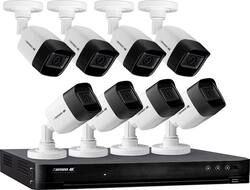
Defender - 4K Security System 8-Channel, 8-Camera Indoor/Outdoor Wired 2160p 2TB DVR Surveillance System
Model: 4K2T8B8
SKU: 6390747
This item is no longer available in new condition. See similar items below
Year-End SaleEnds 1/1/26. Limited quantities. No rainchecks.
Customers are impressed with the 4K Security System's high-quality video, ease of setup and use, and effective night vision capabilities. Many users found the system straightforward to install and operate, praising its intuitive software. The clear picture quality, even at night, was a frequently cited positive. Overall, the system received positive feedback for its performance and user-friendliness.
The vast majority of our reviews come from verified purchases. Reviews from customers may include My Best Buy members, employees, and Tech Insider Network members (as tagged). Select reviewers may receive discounted products, promotional considerations or entries into drawings for honest, helpful reviews.
This is my first time using a Defender brand product and I can say wow, I will definitely look into using more of their products. While these cameras are wired, they are super easy to setup and use with the mobile app for remote viewing of your cameras. The picture quality is great and better than others I have seen. They are 4K rated, 8MP cameras and produce a great image as expected. Since the cameras are IP67 rated, they should also be able to withstand the weather elements (time will tell though). Out of the box the cameras come with everything you need to setup (DVR with 1TB hard drive, cameras, cables for cameras) except for a VGA cable to connect the DVR to a monitor. I only wish there were longer cables for setting up the cameras as well. Extensions are available but to purchase separately. This is still better than having to replace batteries every few months as compared to battery powered cameras! Overall these cameras are great 4K rated cameras and ones you would want for clear video surveillance. The setup is also easy and I always recommend wired security cameras vs wireless. Keep in mind, this is a 4 camera surveillance system and cannot be upgraded beyond 4 cameras.
This review is from Defender - 4K Security System 4-Channel, 4-Camera Indoor/Outdoor Wired 2160p 1TB DVR Surveillance System
Posted by MoGJ
I’ve been using wireless security cameras for a few years now from the original VueZone to the Arlo systems and recently Ring cameras. The limitation to this is that they don’t record all the time, only when they detect motion will they record. Saw there’s a new 4k system on the market and wanted to give the Defender 4k a try. Unboxing: The system came well packaged, everything very neat and organized. The box contains the DVR, 4 4k cameras, video cables “60’ ea”, mouse, power supplies for the DVR and the cameras, mounting screws and paperwork. Installation: First off this is a wired system so you need to do a lot of planning on where you want the cameras, and a location for the DVR unit “preferably near a monitor or TV”, I’ve set it up on a shelf above my home office computer so that I can connect it directly to my computers monitor since it has multiple source inputs. Now running the cables is probably the most time consuming and difficult part. Luckily I was having a 220v outlet installed in our garage and the electrician ran the cables for just a little more, he also helped figure out the best location for the cameras. After getting the cables run, setting up wasn’t near as bad, it’s pretty much the same as all the other wired security camera systems to set up. The yellow BNC connector plugs into the BNC jack on the DVR and one of the 4 plugs on the power adapter goes to the power jack on the other part of the cable. Plugged the included Ethernet cable into my router, and then attached the power cable. I have the power adapters for the system and cameras plugged into a UPS so they won’t abruptly loose power during an outage. Setting up: After all the hardware is mounted and everything plugged in I powered up the system. The first time set up is a little tedious and you may need some help if you aren’t computer and networking savvy. There’s a lot of set up options that aren’t easy to understand for the layman, but after setting up my admin account and activating the remote access for the app we were off and running. There are actually a lot of settings in the menus dealing with the system setup and reading through the main manual is a big help. The company also has some instructional videos on their website that are also very helpful; I would definitely watch these if you are setting this up yourself. You’ll also want to use a thumb drive to back up the systems log in information just in case you lose or forget it, it’s the only way to get into the system if you do. I really like that you can set up motion detection with custom zones so you can actually mask out high traffic areas if you set up the system to record by motion. I have one camera recording all the time, the rest are set up for motion detection, this save on drive space as the 4k video does eat up space really quickly. Video Quality: This is where the system really shines. The 4k video quality is outstanding, a lot better than I ever expected. While we were setting up the system I had temporarily mounted one camera pointing at our Hummingbird feeder, and my wife was amazed at the quality of the video, “it was like watching something on Nat Geo in 4k” she commented. Conclusion: Although the setup way more complicated “especially when you have to hard wire cameras”, compared to the Arlo and Ring systems I’ve used lately, the video quality is just outstanding. I also like that I can have the cameras record 24-7 if I wish and don’t have to worry about missing anything “happened often with the battery operated, motion detecting cameras”. I have the system set up to access from our phones remotely so we can view from anywhere. I also have motion alerts set up to email us whenever motion is detected. Opening up the DVR is easy and they are using a Toshiba 3.5” desktop hard drive, so replacing or upgrading it will be simple if it ever goes out. The only negatives I see to the system is the time it takes to set it up, and there’s a lot of settings in the software that may not be that easy to understand for the home user. Also, the 4 camera system only supports 4 cameras, you cannot add any more if you decide to expand the system. If you are looking for a security camera system with outstanding video quality with a lot of custom user configurable settings then this would be the one to get.
This review is from Defender - 4K Security System 4-Channel, 4-Camera Indoor/Outdoor Wired 2160p 1TB DVR Surveillance System
Posted by SteveC
This was easy to use and set up was simple. I downloaded the phone app so I was able to see who is outside when the door rings. I install the app for my parents too and they will be able to see who is outside without opening the door
Posted by Ryan