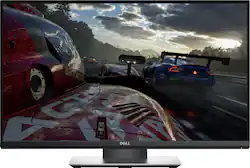
Dell - 24" LED QHD G-SYNC Monitor
- Key Specs
- Refresh Rate: 165Hz (The number of frames per second the device can produce natively without enhancement. Higher rates help produce smooth, seamless pictures.)
- Maximum Resolution: 2560 x 1440 (Maximum resolution refers to the highest number of pixels that a screen can process and display. Higher resolution signals produce more detailed images.)
- Response Time: 1 milliseconds (The speed at which pixels can change colors is called response time. It is measured in milliseconds (ms).)
- Panel Type: TN (Technology that affects response time and image quality.)
- Synchronization Technology: G-SYNC (NVIDIA Adaptive Sync) (Generally, these technologies allow syncing between a computer/console game's frame rate and the device's refresh rate for a smoother display without tearing.)
- Screen Size: 24 inches (Size of the screen, measured diagonally from corner to corner.)
- General
- Product Name: 24" LED QHD G-SYNC Monitor
- Brand: Dell
- Operating System Compatibility: Windows
- Model Number: S2417DG
- Display
- Refresh Rate: 165Hz (The number of frames per second the device can produce natively without enhancement. Higher rates help produce smooth, seamless pictures.)
- Maximum Resolution: 2560 x 1440 (Maximum resolution refers to the highest number of pixels that a screen can process and display. Higher resolution signals produce more detailed images.)
- Contrast Ratio: 1000:1 (Measured difference between a displayed image's brightest whites and darkest blacks. The larger the first number, the more detail and color that can be displayed.)
- Response Time: 1 milliseconds (The speed at which pixels can change colors is called response time. It is measured in milliseconds (ms).)
- Display Type: LED
- Panel Type: TN (Technology that affects response time and image quality.)
- Synchronization Technology: G-SYNC (NVIDIA Adaptive Sync) (Generally, these technologies allow syncing between a computer/console game's frame rate and the device's refresh rate for a smoother display without tearing.)
- Aspect Ratio: 16:9 (The measurement of the width of a screen compared to the height of a screen, expressed as a ratio.)
- Brightness: 350 candela per square meter (A measure of the total light output.)
- Screen Size: 24 inches (Size of the screen, measured diagonally from corner to corner.)
- Horizontal Frequency: 240 kilohertz (Also known as "horizontal scan rate," this measurement describes the number of horizontal lines displayed per second and is used to calculate a screen's refresh rate.)
- Horizontal Viewing Angle: 170 degrees (The maximum angle at which the display can be viewed with acceptable visual performance from either side.)
- Vertical Viewing Angle: 160 degrees (The maximum angle at which the display can be viewed with acceptable visual performance from above or below.)
- Touch Screen: false (Touch-screen devices make navigating more intuitive. Using a touch-screen display, you can do things such as tap to select, hold and drag to move items, swipe to scroll, and pinch to zoom.)
- Compatibility
- Wall Mountable: true (The product is able to be secured to a wall. Some products are designed ready to mount, while others may require additional hardware/accessories for installation.)
- VESA Wall Mount Standard: 100mm x 100mm (VESA wall mount standards refer to the spacing of screw holes built into a TV in order to fit with standard TV wall mounts. These standards are implemented into most TVs and monitors.)
- Features
- Anti-Glare: true (Product has features, such as a matte finish, that reduce the likelihood for screen glare.)
- Built-In Webcam: false
- Dimensions
- Product Width: 21.3 inches (The out of box width of the item. Width is measured as the horizontal distance from one side of the item to the other as it would be primarily used or placed.)
- Product Weight: 12.72 pounds (The out of box weight of the item.)
- Product Depth (With Stand): 7.1 inches
- Stand Width: 9.55 inches (The horizontal measurement of the stand/base, or the distance from the outside of one leg to the outside of the opposite leg, as it is attached to the product.)
- Power
- Power Consumption: 33 watts
- Power Saving/Off Mode: 0.5 watts (This mode will turn the display and/or the device off, or into a standby mode, after a preset length of time with no activity to conserve power.)
- Certifications Listings & Approvals
- ENERGY STAR Certified: false (Devices carrying the ENERGY STAR service mark, such as computer products and peripherals, kitchen appliances, and other products, generally use 20% to 30% less energy than required by federal standards.)
- EPEAT Qualified: false (The Electronic Product Environmental Assessment Tool (EPEAT) was designed to provide an environmental assessment tool for purchasers. In order to qualify for EPEAT, a product must meet all 23 required criteria.)
- Other
- UPC: 884116234494
Discover the power of extreme detail with this Dell 24-inch monitor. The 1440p resolution is ideal for high-intensity gaming, where that little bit of extra detail can make the difference between a win and a loss. 
- 2560 x 1440 maximum resolution with 16:9 aspect ratio: Offers detailed, precise image quality.
- Ultrafast 1 ms response time: Allows pixels to change colors quickly to avoid streaking, blurring and ghosting in fast-moving scenes and video games.
- 165Hz refresh rate: This monitor delivers greater visual fluidity and awesome graphics no matter how quickly the in-game action unfolds.
- 24" widescreen flat-panel LED monitor: Provides a large viewing area and clear images.
- G-SYNC technology for smooth gameplay: NVIDIA G-SYNC synchronizes the refresh rates between the GPU and display, eliminating screen tearing and minimizing display stutter and input lag.
- HDMI and DisplayPort inputs: Allow you to set up DVD players and other AV sources for a clear, high quality audio and video signal.
- 170° horizontal and 160° vertical viewing angles: Ensure a clear view of the monitor from multiple vantage points.
- 1000:1 contrast ratio: Provides a high number of shades between black and white. This range enables accurate color reproduction when displaying images with extreme differences between light and dark for the excellent picture quality.
- 350 cd/m² brightness: Offers an enhanced view, even in low lighting.
- Preset modes for RPG, FPS or RTS: Let you find the optimal visual setting and customize with a click. Plus, with such an easy setup, you can spend more time gaming and less time reconfiguring your settings.
- ENERGY STAR certified: Designed to use less energy and meets strict energy efficiency guidelines set by the Environmental Protection Agency and U.S. Department of Energy.
Whats Included
- Dell 24" LED QHD G-SYNC Monitor
- Power cable
- Display Port Cable
- USB Upstream Cable
- Stand
- Owner's manual
A: This panel is NOT IPS, it is TN.
Q: Is this monitor 144hz? Just wanted to know.
A: its 165
Q: Can anyone tell me what the overall height is when it is at the lowest height setting?
A: A little under 14 1/2 inches my friend
A: I don’t think you’d get the benefits of the nvidia g-sync or 3d out of it. As far as I know consoles can’t run higher than 60hz refresh. So unless you intend on building a gaming pc, this is more than you need.
A: They change it on a 2-week cycle. For 2 weeks it's $500, then for two it's $400. Idk why, just wait until it is $400 to buy.
Q: does this have built in speakers?
A: No, the monitor does not have built in speakers.
Q: Does this monitor have tilt, height, and swivel adjustments?
A: Yes, you can adjust the tilt, height and swivel.
A: If you have sensitive eyes like I do, upgrading the hz will make a difference on eye fatigue. This monitor also has great input lag. So if you play games that require fast twitch reactions you will notice a slight improvement in response time. However, if you are primarily concerned with how it looks, I would say the colors look a little washed out, even after calibrating. In fact before calibrating the colors are horrible. Part of the color issues stem from the fact that its a TN panel. I personally kept the monitor since I can tell the input lag difference over my old monitor and I do get less eye fatigue due to the high refresh rate. It all depends on what things you are really looking for.