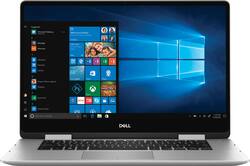
Dell - Inspiron 2-in-1 15.6" Touch-Screen Laptop - Intel Core i7 with 8GB Memory - 512GB SSD - Silver
Model: I7586-5502SLV-PUS
SKU: 6299543
This item is no longer available in new condition. See similar items below
Customers love the Inspiron 2-in-1 laptop's touchscreen and its ease of use, praising its performance and fast SSD. Many appreciate the lightweight design and long battery life. While some find the price a bit high, and others experienced minor issues with the fingerprint reader, the overall feedback is overwhelmingly positive.
BUILD QUALITY (3/5): Among other 2-in-1’s that I’ve tried, this one is not marketed as a ‘premium’ 2-in-1. The lid and hinges are metal, but the rest of the machine is basically plastic. That being said, the plastic material feels good and doesn’t attract fingerprints like other glossy plastics. When closed shut, the display is not flush to the surface where the keyboard is. Whether you look from the left side, right side, front or back, the display looks slightly concave down—leaving gaps open for dust, debris and liquids to climb in. To be completely fair, plenty of other laptops have visible gaps between their displays and the keyboard surface, but most of the laptops I’ve reviewed (even from Dell) had displays that were parallel to the keyboard surface. To me, this seems like a Quality Assurance issue, which is a shame. To add insult to injury, the keyboard is also not level. Many keyboards on devices at this price (or even cheaper) have straight keyboards, but this one skews from the ‘D’ key all the way to the right side of the keyboard. I don’t want to exaggerate and say that it’s a dramatic decline, but the right side of the keyboard is slightly lower than the left side of the keyboard, and that’s annoying and leads to a less consistent feel and typing experience. Lastly, the hinges where the display rotates are not perfectly aligned (see pictures). This is another quality control issue that I don’t think should be overlooked at this price point. DISPLAY QUALITY (4/5): This Inspiron 2-in-1 uses a 1080p IPS display from LG—specifically, the LG D05C4. Unfortunately, there aren’t listed specs out there, but Dell calls it their “Truelife Touch Narrow Border IPS Display with Active Pen support”. From my experience, it gets very bright with vibrant colors, but in the dark with a completely black image, it’s obvious that the display suffers from uneven backlighting along the edges. That being said, unless you’re viewing content with black boxes (such as 18:9 or 21:9 aspect ratio movies), you probably won’t really notice this very often. And although this is an IPS panel, I did notice that viewing angles are not as great as other IPS displays. There is a slight decrease in perceived brightness when viewing from a 45 degree angle. Aside from that, the display quality is otherwise decent and lent to an enjoyable experience with full-screen content. Additionally, the thin bezels around the display lend to a more immersive experience for content-viewing. It’s surprising that there are still laptops more expensive than this that have bigger bezels. Good choice, Dell. TOUCH SCREEN INPUT (5/5): Touch Screen input has been very reliable, in my experience—exceeding the reliability of some premium 2-in-1 devices, which is impressive. I have not had issues with accidental touches or anything of that sort. If you plan to use the touch screen functionality with this Inspiron 2-in-1, I think you’ll be happy with the experience. PEN SUPPORT (5/5): Regarding Active Pen support, take this with a grain of salt. Unfortunately, I did not have access to one of Dell’s own Pens, but I did have access to the HP Pen. My HP Pen worked with this Dell, out of box without any configuration. And even more so, it worked on the Dell way more reliably than the premium 2-in-1 the HP Pen was made for. Seldom did I encounter missed strokes. This probably means that Dell is using better touch screen firmware. I can’t attest to Dell’s own Pens, but this has been one of my most reliable pen experiences on a 2-in-1. KEYBOARD (3.5/5): The keyboard on this Dell lacks tactility and feels slightly mushy for my personal tastes. Given the price that you’re paying, I think Dell could have done better. Not to mention the declination from the ‘D’ key all the way to the right side of the keyboard. It’s not a bad keyboard, as I’ve tried much worse, but I can’t help but feel a bit cheated, considering the price. This isn’t touted as a premium 2-in-1, but I’d expect a bit more quality control than this. I don’t think there are excusable reasons for this keyboard lacking the quality control at this price. TOUCHPAD (5/5): Dell is using the Precision touchpad drivers from Microsoft, and thank goodness they are. The experience is snappy, gestures are responsive and reliable. The touchpad has a slight grain texture to it that is unobtrusive. Some might prefer a smoother surface, but I don’t mind this implementation. You can’t left and right click simultaneously on these touchpads, but that’s usually not a problem for me. Regardless, the surface is large and makes it easy to navigate your cursor across the whole display without issue. SOUND (3/5): The sound of these speakers is unfortunately average/cheap. They’re only bottom-firing, and the sound is rather tinny and lacks bass, but is otherwise loud. No real tangible improvements in tent mode. While there is Waves MaxxAudio Software for you to tweak the EQ and such, I found that doing so didn’t really improve the experience. Would definitely love to see more care put into the speakers on a computer of this price point. I/O (4/5): The Inspiron 2-in-1 has a decent selection of ports for your convenience. Firstly, has a DC powecalcr jack for charging, but also has a USB 3.1 Gen 1 Type C port with Power Delivery & DisplayPort. Additionaly, there are 2 USB 3.1 Gen 1 ports, an HDMI 2.0 port, headphone/microphone combo jack, and a full-size SD Card reader. Unfortunately, there is no Thunderbolt 3 support even though the processor supports it, but most people will be fine without it. PERFORMANCE (4/5): This Dell Inspiron 2-in-1 is equipped with a quad-core Intel Core i7-8565U with 8 logical threads, 8GB RAM and a SK Hynix BC501 512GB NVMe SSD with up to 1600MB/s read and 860 MB/s write. This Dell delivers excellent performance that many people will be happy with. Given that it only uses Intel UHD Graphics 620, you won’t be doing much in the way of gaming on this machine. 2D titles may fair well, but many modern titles will certainly struggle. That being said, it should handle viewing 4K videos, although the display is only 1080p. Using an external display that supports 4K should not be an issue. BIOMETRICS (5/5): The fingerprint sensor on this Dell is made by Goodix. From my experience, this fingerprint sensor is as reliable as the fingerprint sensor you’d find on a modern smartphone—and that’s actually amazing. Some so-called ‘premium’ 2-in-1 laptops use fingerprint sensors from Synaptics, which are unreliable and sometimes don’t even register touches. This Goodix fingerprint sensor has yet to fail on me. Using this fingerprint sensor, I can very reliably unlock the computer with Windows Hello. This is the best fingerprint sensor I’ve used on a laptop, and I hope that other manufacturers will follow suit in ensuring a reliability like Dell has. BATTERY (5/5): The Inspiron’s battery should get most people through a full day under lighter workloads. With mixed usage and pushing the display brightness and speaker volume up, your results may vary more, depending on your usage patterns. Heavy video viewing will likely require charging. The device charges via the DC power adapter OR through the USB-C port. I’ve used third-party USB-C chargers as well as USB-C docks to charge this laptop. I do like that you have the choice between DC or USB-C charging, unlike some laptops which only charge through one or the other. Having more options is better! CONCLUSION (3/5): All things considered, this machine functions as a 2-in-1 in that it reliably serves its purpose. Its display is decent and bright with a responsive touch screen, and the pen input is reliable. Build quality is not premium, but is sturdy enough that I wouldn’t expect it to break on me too easily. That being said, I feel as this product’s price should change to reflect the lack of quality control. While it functions as a reliable machine, there are many 2-in-1 laptops that are cheaper with similar specs and build quality. The fact that this Inspiron’s price is nearing that of premium notebooks with better quality control is unsettling for me. As a result, I recommend you save a couple hundred dollars and look elsewhere.
Posted by Xephyroth
This is a great laptop to have whether for your personal use or for school. I like that it’s a tablet and a laptop in one, especially the touchscreen. This is my third in the past several years and the only issue I have is that I wish I could get something to protect the screens. That’s the reason why I had to upgrade each time I did. The screens cracked and I wanted to upgrade even though they were still functioning great. It’s a little on the expensive side but worth it.
Posted by Keki
There is a lot to dive into in my days of testing this ultrabook. This is perhaps Dell's best attempt to bring back life into the Inspiron's life. Have they succeeded in doing that to me? Yes. I really do applaud Dell for actually excelling in design and performance in such a small and thin 15-inch package. I was previously using a Dell XPS 2-in-1 13" laptop, This Inspiron 7000 series is miles better than the XPS in so many ways from I/O ports to the design. In fact, let's talk about that for a second. Design: First off the design is just downright gorgeous. No, seriously I am attracted to the design of the ultrabook and Dell stepping up their game to make something much better. it's like having a windows version of a MacBook in a way, closer in design with a MacBook than an XPS but it works. Dell has crushed it again, I love how it feels thin and the premium it is while keeping all the important I/O ports as is. on the left side is an HDMI, USB-C (for power and video out), headphone port while on the right is two full-sized USB 3.0 ports and a (full-sized) SD card slot. There is a fingerprint reader for the power button and I'll get more into that later. The trackpad feels perfect to the touch when using windows. The keyboard has decent travel and it feels good to type on. Great distance is fine with me and I'm writing this review on the ultrabook. The keyboard is also backlit with 3 levels (off, low, and high) when powered on. There are silver accents around the trackpad and fingerprint reader that adds that elegant design element. This Inspiron has strong hinges for the laptop screen and feels like they are well constructed to last. The vents are at the bottom but there are vents near the screen's hinges. Airflow is fine. Dell didn't play around with the build quality and I'm shocked. Display: The display is beautiful at 1080p but the borders around it are three-sided that almost give it that edge to edge feel. It's not infinity edge display dell has but its good. Plus the controversy placement on the XPS camera put some people off but here on the Inspiron the camera is at the top just smaller. I have to say the screen doesn't get that bright even at the highest levels. I have seen somewhere that it was 200 nits but that seems to be true and the glossiness of the screen reflects light. Keep that in mind when buying this. I will say that the screen is vibrant and colorful, I guess one of the big things here is Dell's new "CinemaScreen" which changes the profiles of colors on the screen. There are 4 modes of position you can place the laptop into since this is a 2-in-1. Laptop mode, Tablet mode, Tent mode, and Presentation mode. Laptop Mode: Standard mode you and most likely other people will use. Nothing special here, This mode makes it look like a basic laptop and the mode Dell clearly designed this machine to be. Its lightweight enough. Tablet Mode: Turns the laptop into a full windows tablet. The basic task is great for the tablet mode and The keys on the keyboard deactivate in this mode. Here though if you manually want to put the tablet in sleep you have to press the power button/fingerprint. It's placed on the right side near the keyboard so you can easily lock/unlock the device. Tent Mode: This makes the laptop pop up into tent mode so you can watch or play your Media, Music, or even play some old school games in a "Nintendo Switch" fashion. it's nice to just pop it up and watch Hulu like an HDTV. I use PS4 remote play/Xbox Streaming to this PC in this mode. Presentation Mode: Same like tent mode this pretty much make your screen more accessible. Allows easy touch for the screen and showcasing what you have on screen to friends/family/Co-workers. Also might be the mode you would use to draw on screen if you have the optional Dell stylus (which I don't have.) The speakers are on the bottom of the laptop... Sound:...And it couldn't be a better place for what this laptop can do. since in presentation mode it would be covering up sound it was a smart move by Dell to do. also in laptop mode, they don't get covered up, combine the "MaxxAudioPro" in the laptop software and you would have a full ranging sound that you can hear across the room in the house. Battery life: Dell 2-in-1 Ultrabook last with my task about 8-10 hours doing just day to day tasks such as checking Emails, News, Youtube, Netflix, Apple Music, Hulu, and Pandora. I love the battery life especially if you turn down the brightness a little you can made it a whole day but your task my very. Dell's power management software gives you a range of options to optimize battery life and see some stats about the health of the battery. Dell even added a quick charge option for people who need to charge up their laptop fast. Performance: Is there such a thing as too fast? because the speed of this ultrabook is super insane. The Intel Core i7-8565U Whisky lake, 8GB (upgradeable!) and 512 SSD combined.... let's just say you don't have to worry about this thing slowing down at all. The ultrabook is fast and speedy. its rapid boot times are insane. Day to day tasks just open up with ease and it's not a headache to wait for things. Chrome opens up within a blink of an eye as soon as you turn on the PC. The fingerprint scanner is blazing fast. Long gone are the days waiting for the PC to boot-up killing your battery. I love it, I have never experienced anything is fast. I have no complaints about performance at all and certainly going to move away from a Chromebook. Windows 10 / Windows Hello / Voice Assistance: Windows 10 Home helps this laptop to feel even more premium. One of the most productive and versatile electronics I've used in my lifetime. As for Windows hello the IR camera update is inbound for the summer but the fingerprint scanner is flawless and works as good as any modern fingerprint unlocker on cell phones. No Issues when signing in. Cortana comes standard on the laptop but NOW you can download Amazon Alexa from the Windows store and use it. It works as expected you on a Windows PC. More improvements will come over time. Dell Pen / Windows Ink Workspace: This also works with Dell's very on stylus/pen but have yet to try it. I also heard that the Windows Surface pen works on these displays but again I don't have the tools to test these things. Cons: No Nvidia/AMD GPU: Good ol' Intel UHD Graphics are here. I am aware you can get a model with a GPU but that's all that is missing even for just some light gaming. It would have nice to throw into this model but I know this is a Best Buy issue, not a Dell one. Plus I'm sure its also to save battery. No Intel Optane Memory: Its configured for it but it's not in this laptop. BSOD: As awesome as this laptop is and its blazing fast, but you not everything is perfect. I have already had one blue screen of death. I have to call this out as it is an expensive laptop and it only happens once. (in pictures) but I have to inform you guys that it has happened. Maybe because I was updating everything and restarting. (which I recommend you doing as soon as you get the ultrabook is updated it completely.) Arrow keys need space from PgUP / PgDn: They are way too close to the arrow keys to the PgUP/PgDn. You may end up hitting these way more then expected. Fun mentions: I love using the Dell Software "Mobile Connect" I can have my iPhone or Android connected to the PC to make calls. While this isn't a big Dell to Android users, You can send messages and make calls with an iOS device. Finally, a way for iOS users to have an easy way to do this with PC. While you can't mirror your phone full display like on Android. You can do the basic normal task you don't have to pick up your phone for. You have to download the app from Apple's App store and it works just fine. make sure you update as well. THANK YOU DELL. In the end, I still love this product. I love it much more than I do the XPS 13 which had a ton of design problems for me. The Inspiron 7000 15" 2-in-1 has all the I/O ports you would want in a modern laptop. The display is wonderful, the sound is loud, The performance is BLAZING. Its extremely versatile and a phenomenal productivity tool Dell has produced. I wish there was a better-dedicated GPU but it's still fast on its own. I would certainly recommend this to Students/Co-Workers and family/friends. Dell is bringing in a new era for themselves and pushing their limits of design each year. It clearly shows here they care to listen to their customers.
Posted by CrysisComplex
The vast majority of our reviews come from verified purchases. Reviews from customers may include My Best Buy members, employees, and Tech Insider Network members (as tagged). Select reviewers may receive discounted products, promotional considerations or entries into drawings for honest, helpful reviews.