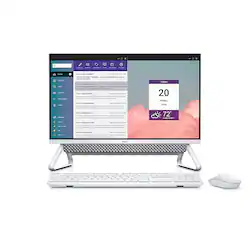
Dell - Inspiron 24" Touch-Screen All-In-One - Intel Core i7 - 16GB Memory - 512GB SSD
Model: i5400-7880SLV-PUS
SKU: 6440595
This item is no longer available in new condition. See similar items below
Customers are delighted by the Inspiron 24" All-in-One's ease of use, large screen size perfect for multitasking, and impressive sound quality. Many appreciate the fast SSD and sleek design, while the touchscreen functionality is also frequently praised. However, some users express concern about the limited port selection, particularly the placement of all ports on the back of the unit.
The vast majority of our reviews come from verified purchases. Reviews from customers may include My Best Buy members, employees, and Tech Insider Network members (as tagged). Select reviewers may receive discounted products, promotional considerations or entries into drawings for honest, helpful reviews.
I am loving my new All-In-One, I actually went in looking for a laptop but they all had screens too small for me. When I was shown this I was like a space saver and a huge screen yes please! It has been so easy to use, I literally took it out of the box, plugged it in and was ready to go. The set up was very user friendly and you can also tilt the touch screen back for easier use when needed/wanted. Overall I am very impressed!
Posted by Eklypze79
This Dell AIO is a great mid level computer that is perfect for daily tasks. It’s not a full on gaming PC (but you’d be surprised how well it does), but for everyday workflow (i.e. virtual meetings, sending emails, creating documents, etc.) it does extremely well. Especially if you’re upgrading from a laptop, you’ll love the larger screen. It has a sharp design with a small footprint and plenty of ports. I don’t generally use a touchscreen on a desktop, but it certainly has its uses. All-in-all, if you are in need of a basic computer with a large screen, you can’t go wrong. Plus it’s a Dell, so you know you have a quality computer with good support. IN THE BOX The box is pretty minimalist (a good thing). You get the computer, a mouse and full size keyboard with a 9 button number pad to the right. Also, the power cable. SETUP If you’ve ever set up a Windows PC in the last few years, this will be familiar territory. And even if you haven’t, it’s still dead simple. You simply plug the power source in, put the batteries in the wireless mouse and keyboard, turn it on (I will admit, the power button is difficult to find, but it’s underneath the built in speaker bar to the right). From there you follow the steps of connecting to Wi-Fi, creating or logging into your Microsoft account and you should be off and running. I was surprised, but not really because it is a Dell, that it came with limited bloatware (i.e. extra programs you’ll never use). It came with the standard Dell assistant software (not smart assistant, but software to help troubleshoot and upgrade your firmware, etc.), Office 365 and McAfee virus protection. Compared to most PC manufacturers, including Alienware (owned by Dell) there was very minimal bloatware. I did delete McAfee, which came with a free trial, but I knew I wasn’t going to purchase. Other than deleting that program, the computer was basically a clean slate of base software. GENERAL USAGE AND PERFORMANCE Briefly, I’ll cover the main specs of this computer (not going into much detail since they’re listed on the website). It has a full HD screen, which frankly, at 24 inches is all you need. Anything that’s QHD or 4K, really needs a bigger screen (i.e. TV size) to really get the benefits). Full HD is more than adequate for this computer and frankly, text and icons look sharp and detailed. I have zero qualms with the quality of the screen. There’s 16 GB of RAM (random access memory) which, generally speaking, allows you to have more programs and browser windows open without sacrificing performance. There’s a 512 GB SSD which is frankly, big enough for the vast majority of people. On the back there are three USB 3.0 inputs (think faster USB transfer speeds) and one USB 2.0 speed (slower USB transfer speeds, best for printers or controllers or USB headphones that aren’t transferring data). There’s only one USB-C type port (which is super speed). I wish it had more of those since most electronics are moving to the USB-C standard, albeit, it will take a while to be universal. There’s even an HDMI out port and HDMI in port. These HDMI ports can be extremely useful. You can plug in a second monitor or a projector into the HDMI out, and you can use the HDMI in to plug in, say, a video game console (for those in a small room) to act as a screen. There’s even a full SD card slot on the back which is extremely helpful in transferring photos from my DSLR, but I do wish it was on the side or front. There’s also an ethernet port which I recommend using for internet stability if you can run a cable from your router to it. One of the cooler features is the webcam. It’s hidden at the top of the screen. To access it, you simply push down and it pops up. If you want a physical privacy screen (so you know no one has hacked it and is looking at you) you can pop it back down out of sight. I found the general performance to be good, not great. But I’m talking in degrees. If you’ve never used a high end gaming PC with top of the line parts, this computer will seem blazingly fast. If you have used a higher end PC, some actions will seem a bit slower than others, but not my much. Nothing that will cause you frustration to the point of wanting to throw your computer, but it slows down a bit on occasion. For example, when turning the PC on, it gets to the login screen quickly, but it takes a few extra beats to get running so to speak after logging in. Again, I’m not talking minutes, but I also use an Alienware desktop that puts most computers to shame, so I’m a bit spoiled in that regard. In terms of real word usage, I rely on Outlook, Chrome, Word, Excel, and Zoom on a daily basis. After everything was installed and I signed into each respective program, I was off and running without any issues. And the 24 inch screen was a pleasure. I use a 34 inch widescreen monitor at work, and while I wish I had one at home, the 24 inch screen is SOOO much better than working off a 15 inch laptop. I love the extra real estate and it’s plenty to get my work done. The monitor is a touch screen, which I appreciate, but for my workflow and usage, I rarely use it. My kids did use it with the Paint 3D program and loved digital finger painting. I mention this because I found the screen to be pretty responsive, although it doesn’t seem to be multitouch. What I mean by that is, yes, you can use two fingers to pinch and zoom (like your phone), but you couldn’t use two fingers to “paint” two different lines at the same time. Not sure if that matters to anyone, I can’t think of an application where I would need to do that, but wanted to mention it. OTHER TIDBITS The webcam quality, like virtually every other built in webcam in a computer, is of “blah” quality. Sure, it looks ok, and will perform admirably for family Zoom/Skype/Google Meetings calls, but in my profession, I prefer higher resolution with the ability to digitally zoom in and out. Point being, when I use this computer I use a separate webcam. But unless you have to have, or really want, a higher end webcam, this one is perfectly fine. What I did like about it was the WIndows Hello, which I’ve known about for a long time, but finally tried it out (think facial recognition like in an Apple phone) that unlocks your computer. That feature performed remarkable well and I want to set that up in all of my computers. Gaming. I said earlier this isn’t a gaming PC, but it performs pretty well for what it is. It has a built in, or “integrated” graphics card. Generally speaking, integrated graphics cards won’t run high end games (at least not at the graphical fidelity seen in gaming PCs and consoles). And I don’t know much about Intel Iris Xe graphics, and won’t reveal my ignorance talking about it on a technological level, but I can speak to its general performance. My kids mostly play Lego games (think Batman LEGO, Marvel Lego, etc.). We played together and while these aren’t graphics intensive games, they looked pretty darn good. There was no visual screen tearing and no slowdowns whatsoever. I tried out Anno 1800 (a real time strategy game) which is slow paced but has a lot of detailed graphics, and it too, performed really well. I didn’t experience any slowdowns and was pleasantly surprised with the performance. I didn’t try out any fast and furious first person shooters, but I would expect them to play reasonably well, with the graphics settings, set to somewhat minimum standards. I also want to mention the sound. I was not only pleasantly surprised, but frankly, blown away by the sound from the built in soundbar. There’s no deep base that you would get from a subwoofer, but the speaker gets extremely loud and sounds really crisp. It’s not going to do surround sound, but watching movies, playing games and video conference calls all sounded better than you would expect. So high marks there. My only real gripe is the keyboard and mouse. They’re wireless, which is great, but for someone who types almost everyday, I prefer the “clickiness” that a mechanical keyboard provides. This is a complaint with every computer you buy as they all seemingly come with cheap keyboards. I would recommend looking into upgrading the keyboard and mouse at some point, although there’s nothing wrong with the one in the box. It does at least come with a full number keypad to the right and in terms of the stability of the connection between the computer and mouse and keyboard, I had no issues. CONCLUSION This is a terrific all-in-one computer that can do a lot. It performs basic computer tasks really well, and is good enough to watch movies, and play games. It’s like a swiss army knife, doing a lot of things well, but not necessarily excelling in any one area, which is okay. For most people that’s all you need. Especially if you want or need a computer with a bigger screen than what a laptop can offer. And the simplicity of having everything built in is a big plus for those that don’t want to deal with a separate computer tower and monitor.
Posted by callmeageeth
As someone who regularly needs to work from home, so I needed a computer to utilize at home. As desk space is something very important to me, I needed a device that takes up as minimal space as possible. Seeing this Dell 5000-series All-In-One it seemed to check off all of the boxes that I need to work with. I was surprised at how slim and how light this computer is (close to 11 lbs). I've had a few weeks to work on this computer and have come up with the following pros and cons. Pros: Appearance: Immediately you are presented with a very modern-looking, sleek, AIO computer. Again, desk footprint is very important for me and our family as I would need as much space on my desk as possible for my computer and work material. The Inspiron 5000 is raised via a A-frame easel-like stand (that can adjust the angle) with the speaker system perched at the bottom of the screen. I’ve noticed that this stand design is more stable than back holding displays. Keeping with the minimalistic appearance, all inputs are at the back which is both good and bad (more on it later). Ease of Set-up: I was pleasantly surprised at the ease of set up required. Just plug the device in and turn it on, the Dell Inspiron 5000 began the Window's set up. This was very effortless and was able to easily set up from my LG Laptop. All of my files were immediately available to download directly to the computer. Setting up Windows Hello was also very easy and the camera quickly recognizes me. Speaking of the camera, I love how it pops up and can be easily hidden/turned off when not in use. Display: Let’s talk about the Display in everyday use: you are presented with a 23.8 inch Full HD display touch and 1920x1080 screen. The screen is labeled as an InfintiyEdge display, as there are minimal bezels all around measuring around 8mm providing you with vivid visuals. The touchscreen has been a very welcomed addition, but realistically, I have not been using it as much since I utilize the mouse and keyboard. Internal Specs: Internal specs include Intel Core i7, 16GB RAM and 512 GB SSD at 2.80 GHz. The Inspiron also comes with Intel’s Iris Xe graphics, a graphics processor not on par with typical gaming processors, but performs similarly to entry-level dedicated video cards. As it is integrated, along with the i7 processor and that 16GB RAM, you notice just how smooth and fast this computer is. Ports: As the new designs for AIO’s are now, all of your ports are hidden in the bottom back. You have both HDMI input and output, USB 3.1 Gen 2 Type C, USB 2.0 Type A, USB 3.1 Gen 1 Type A x3, headphone jack and SDCard Reader 3.0. Again, minimalistic approach and I like the look. Unfortunately, I wished there were some available ports to the side for easier access. Accessories: Of course no AIO would not be complete without a mouse and keyboard. All are Bluetooth, and the mouse was amazingly light weight. The keyboard has good key travel and compact enough where it doesn’t take too much space on our desktop. Included are 1 AA and 2AAA Duracell batteries. Cons: The camera, to my surprise was not as clear as I would have expected. You are met with a 0.92 megapixel front facing camera with 720p resolution. During my Zoom sessions, I was semi-disappointed with the quality. I guess I have been spoiled with my tablet’s front facing camera, and would have hoped that computers would be including higher quality front facing cameras. Also, as mentioned earlier the location of the ports. Overall, I have been thoroughly impressed with the Inspiron 5000 AIO. A very fast, snappy computer with really good internals that give me that much needed boost in my productivity at home. A welcomed addition to my home office.
Posted by APFLORES413