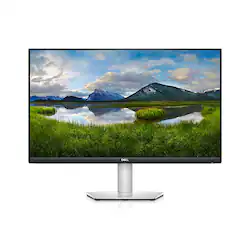
Dell - S2721QS 27" IPS - 4K UHD FreeSync Monitor with HDR playback (DisplayPort, HDMI) - Gray
Model: S2721QS
SKU: 6425892
This item is no longer available in new condition. See similar items below
Customers admire the S2721QS monitor's superb picture quality and sharp pixels, praising its versatile stand with extensive adjustability options including height, swivel, and rotation. The availability of multiple HDMI ports and a DisplayPort connector for easy connectivity is also frequently highlighted. Many appreciate the inclusion of built-in speakers and the monitor's high resolution, enhancing the overall viewing experience.
This is my second Dell desktop monitor I’ve owned. First of which was/is a 1440p HDR 75hz monitor. Which we love still. We wanted to step it up to a 4K high quality monitor from a trusted brand such as dell. So we chose this one. And wow. We are all used to 4K TVs. But when you shrink the size down to that of a 27 inch monitor. You increase the PPI exponentially. This panel is super dense with super sharp pixels. You see every little detail in videos and especially video games compared to 1440p which I also have. The hdr feature is amazing as well. Super bright and clear dark scenes look beautiful. Viewing angle is solid as well. Tho not perfect in my opinion. But this panel is super bright so that’s fine with me. This unit has built in speakers ,which almost 75% of monitors DO NOT include speakers and that is another reason to choose this model. They aren’t very loud but clear and loud enough for our needs. The design is nice as well. Tho the back is white and the stand/base is a nice metal. A little odd to me but does not matter as it is the back. Who looks back there anyway right? Monitor tilts, height adjust, swivels and even goes into a vertical position if you want to do video or photo work. No complaints here. This dell 4K just works. As dell is a leader in this area and you can’t go wrong at this price point. Please note: as you can see I am gaming. I hit 60 FPS on hard to run games. But I have a beefy gaming pc set up with an rx5700xt. So you will need a decent gpu to push this monitor. But yes I highly recommend. We love it. Well built and just the most amazing picture quality! See my pictures!
Posted by BestbuyGuy210
The Dell S2721QS and S2721Q are the same display 4K panels with different stands. The QS has a 6-way adjustable stand, up/down, left/right and tilt while the Q version is a single-height stand with swivel and tilt. These are Dell’s entry-level 4K monitor options and unless you needed a professional monitor with exacting colors and whatever else the professional monitors have , I don't see any reason why the Dell S2721QS shouldnt be your go-to 4K monitor. The monitor is an LED edge-lit LCD panel that just looks great from any angle. I would have preferred an array backlight but I haven't noticed any halo effect around the edges on this one. The bezels are minimal and don't distract from the overall beauty of this monitor. The thin bezels do present one problem however, I have a video camera that sits on the top of the monitor and the clip that holds it up is wider than the bezel so it covers about a quarter inch of the display. There are two HDMI ports and a Displayport connector along with a line-out plug for speakers. There are no USB ports on this monitor like there are on the U Series monitors. There is also no USB-C connectivity on this monitor either, for this you also have to go to the U Series. The monitor has all the usual color and brightness adjustments in an easy to use menu so you can adjust the color to your individual liking. There are several pre-sets plus full custom control. If you don't like messing with the little buttons, download the Dell Display Manager from the Dell site and you can control many of the settings like color presets and brightness through the app. Dell also offers an optional display driver for this model however, while trying to download it, the file was flagged as a trojan virus so i've not been successful at installing it yet. Windows does recognize the monitor as plug and play so I don't see this as a major flaw. I’ve connected the S2721QS to an iMac, Chromebox and Windows PC and it works beautifly with all 3. The colors are rich and vibrant, the brightness was set to 75 out of the box and I haven't needed to change it yet. While this is a 4K monitor, at full resolution, text is just a tad small for me so I have the Windows scaling at the recommended 150%.. At 100% scaling (full 4K resolution) you can do two full-size word documents or web browsers side by side and it is readable but for me just a bit uncomfortable. This monitor will be generally connected to a Windows PC and occasionally be used with my iMac as a second screen. One of the cool features of the Dell S2721QS is the Picture-in-Picture and Picture-by-Picture mode that splits the screen between two seperate inputs so you can use multiple computers or have a video input on one side and PC on the other. There are two 3 watt down-firing speakers on the monitor which are loud enough to watch an occasional video or hear a new message in your inbox. Perfect for in my home office, loud enough to hear, not loud enough to disturb the rest of the family. You can control the volume with the under screen buttons or as I’ve done, just max it out and let the PC control it. There are no extra cables to connect for the sound, it's carried via the HTML or Displayport cables Speaking of video, 4K video on this monitor is nothing less than stunning. The crisp in-your-face color and detail will blow your mind. The display has an anti-glare coating on it which keeps reflections down as well. I’m not one to generally gush over a monitor but in my opinion, this monitor is just right. The right size for your desktop, the right resolution for stunning images and the right price for a 4K display of this size. Yes, I have absolutely recommended this monitor to all of my work-at-home friends!
Posted by RonH
I am very pleased with this monitor. I've been using it for movies, lite gaming and some photo editing. The display is crisp and clean, with super fine detail. Running it at 3840x2160 resolution. Has a thin bezel with an modern look. And come with a very neat stand that is adjustable to your needs. It can pivot, tilt, swivel, and you can adjust the height of the monitor also. As for ports you will find two HDMI 2.0 ports one displayport. Great for having multiple devices hooked up to it. And if you don't have external speakers no worries you will find two 3 watt built-in speakers on the bottom on the monitor. If you made it this far I think you should give this monitor a try and you won't be disappointed.
Posted by JustCuz
The vast majority of our reviews come from verified purchases. Reviews from customers may include My Best Buy members, employees, and Tech Insider Network members (as tagged). Select reviewers may receive discounted products, promotional considerations or entries into drawings for honest, helpful reviews.