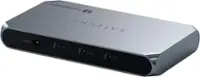
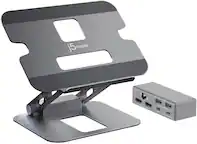
Dell - WD19TBS Thunderbolt 130w Power Delivery Docking Station, Black
FREE shipping to
More Buying Options
Related Item

About This Item
- Key Specs
- Maximum Number of Displays Supported: 6
- Number of DisplayPort Outputs (Total): 2
- General
- Brand: Dell
- Product Name: Dell WD19TBS Thunderbolt 130w Power Delivery Docking Station, Black
- Display
- Maximum Number of Displays Supported: 6
- Ports
- Display Connector(s): 1 x Thunderbolt, 1 x HDMI (The number and type of connectors used to connect to an external display.)
- Number of DisplayPort Outputs (Total): 2
- Number of HDMI Ports (Total): 1
- Number of VGA Ports: 0 (VGA (Video Graphics Adapter or Video Graphics Array) is a display standard that transmits via analog signals. This type of interface is typically used to connect a computer to a display device such as a monitor, projector, or TV.)
- USB Ports: 2 x USB-C, 3 x USB-A 3.0 (The number and type of USB ports the product has.)
- Power
- Powered: true
- Compatibility
- Brand Compatibility: Dell
- Model Compatibility: Universal
- Dimensions
- Product Height: 1.14 inches (The out of box height of the item. Height is measured as the vertical distance from the bottom of the item to the top as it would be primarily used or placed.)
- Product Length: 3.54 inches (The out of box length of the item. Length is measured as the longest dimension of the item.)
- Product Width: 1.14 inches (The out of box width of the item. Width is measured as the horizontal distance from one side of the item to the other as it would be primarily used or placed.)
- Product Weight: 1.29 ounces (The out of box weight of the item.)
- Warranty
- Warranty - Parts: The warranty is through us for 60 days.
- Warranty - Labor: The warranty is through us for 60 days.
- Other
- UPC: 884116398356
Connect multiple displays, external storage drives, Gigabit Ethernet, and more, all by running a single cable to your computer's Thunderbolt 3 port with the Thunderbolt Dock WD19TBS from Dell. This dock connects to your host system using an integrated 2.6' Thunderbolt 3 cable and comes equipped with one 40 Gb/s Thunderbolt 3 port, two 10 Gb/s USB 3.1 Gen 2 Type-C ports, one of which supports DisplayPort, three 5 Gb/s USB 3.1 Gen 1 Type-A ports, one of which has PowerShare, one HDMI 2.0b port, two DisplayPort 1.4 ports, a Gigabit Ethernet port, a Noble Wedge security slot, and a Kensington security slot.
- 2 x USB 3.1 Gen 2 Type-C Ports: 2 x USB 3.1 Gen 2 Type-C Ports
- Integrated Thunderbolt 3 Cable (2.6'): Integrated Thunderbolt 3 Cable (2.6')
- Provides up to 130W of Power Delivery: Provides up to 130W of Power Delivery
- 1 x Thunderbolt 3 Port: 1 x Thunderbolt 3 Port
- 2 x USB 3.1 Gen 2 Type-C Ports: 2 x USB 3.1 Gen 2 Type-C Ports
- Integrated Thunderbolt 3 Cable (2.6'): Integrated Thunderbolt 3 Cable (2.6')
- Provides up to 130W of Power Delivery: Provides up to 130W of Power Delivery
- 1 x Thunderbolt 3 Port: 1 x Thunderbolt 3 Port
Whats Included
- power adapter and documentation.
- power adapter and documentation.
A: Yes, the Dell WD19TBS Thunderbolt Docking Station is compatible with newer MacBook Pro models, including those with Thunderbolt 3 or Thunderbolt 4 ports.
Reviews
The vast majority of our reviews come from verified purchases. Reviews from customers may include My Best Buy members, employees, and Tech Insider Network members (as tagged). Select reviewers may receive discounted products, promotional considerations or entries into drawings for honest, helpful reviews.
Compare similar products

Connect multiple displays, external storage drives, Gigabit Ethernet, and more, all by running a single cable to your computer's Thunderbolt 3 port with the Thunderbolt Dock WD19TBS from Dell. This dock connects to your host system using an integrated 2.6' Thunderbolt 3 cable and comes equipped with one 40 Gb/s Thunderbolt 3 port, two 10 Gb/s USB 3.1 Gen 2 Type-C ports, one of which supports DisplayPort, three 5 Gb/s USB 3.1 Gen 1 Type-A ports, one of which has PowerShare, one HDMI 2.0b port, two DisplayPort 1.4 ports, a Gigabit Ethernet port, a Noble Wedge security slot, and a Kensington security slot.

Connect to just about any device you have, wherever you are. Featuring a wide variety of ports available, the smallest and lightest 6-in-1 adapter offers video, network, data connectivity, and up to 90W power pass-through for your laptop.

A smarter workspace. Gain the versatility to create your ideal workspace and boost your AI PC productivity with support for up to 4 displays, up to 130W power delivery, and multiple ports to connect all your peripherals. Most manageable. Elevate the IT management experience with no software or PC connection required, allowing you to remotely manage all your Dell Pro Smart Docks. Most manageable. Remotely manage your smart docks without end-user presence from the Dell Device Management Console - the industry's first holistic peripheral management solution[2] that configures, deploys, and updates smart docks over Wi-Fi. Work securely. Keep users working confidently with enterprise-grade WPA-3 192-bit encryption for secure Wi-Fi communication. Safeguard your sensitive data with tamper-resistant, hardware-based encryption built into your Dell Pro Smart Dock. Effortless maintenance. Reduce IT efforts by scheduling updates during off-hours, while ensuring fleetwide firmware compliance and eliminating end user interruptions. Connect your way. Configure your workspace to your liking with an ambidextrous USB-C cable[4] that can be routed left or right. Designed for sustainability. The Dell Pro Smart Dock is built with at least 65% post-consumer recycled materials[5] and packaged with 100% recycled or renewable packaging.
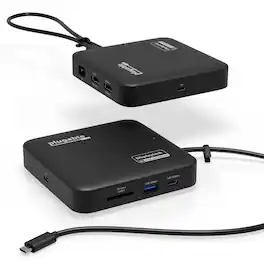
Don’t let the size fool you, while the Plugable USB-C Dual HDMI Docking Station (USBC-6950PDZ) may look like a compact USB-C travel hub, it delivers the full functionality of a desktop docking station. With dual HDMI ports, Gigabit Ethernet, USB-A and USB-C ports, SD card slot, and support for 82W pass-through charging, this small form factor dock is built to extend your laptop’s capabilities whether you're at home, at the office, or on the go. One of the standout features is its ability to support two 4K 60Hz extended HDMI displays, even on laptops that don’t support native dual video output. That’s thanks to DisplayLink technology, which offloads video processing to the dock itself. Whether you’re using a Windows machine or an Apple Silicon MacBook (M1, M2, M3), this docking station enables a seamless dual display setup. DisplayLink Driver Required: Windows users will receive the driver automatically via Windows Update. For macOS users, the DisplayLink Manager application must be downloaded and installed manually (admin rights required). Power Delivery Simplified: This dock does not include its own power supply but is designed to work with your existing USB-C laptop charger. It accepts up to 100W input, delivering up to 82W to your host system while reserving 18W for dock operation. Your laptop must support USB-C Power Delivery (PD) for charging to work properly. Charging performance may be slightly reduced when compared to direct power connection. Compatibility: The USBC-6950PDZ is compatible with Windows 10+, macOS 11+, and laptops equipped with USB-C, USB4, or Thunderbolt 3/4 ports. Full support is available for Apple Silicon MacBooks with DisplayLink driver installation. HDCP Content Limitation: This docking station does not support playback of HDCP-encrypted content. Streaming services such as Netflix, Hulu, Disney+, and others may be blocked or fail to display through external monitors connected via the dock. Lightweight yet durable, the USBC-6950PDZ is ideal for hybrid work setups, mobile professionals, and anyone looking to expand screen space and peripheral access – all without sacrificing portability or power efficiency. Upgrade your workflow with a hub that truly docks – wherever work takes you.
| Pros for Dell - WD19TBS Thunderbolt 130w Power Delivery Docking Station, Black | |||
|---|---|---|---|
| There were no pros for this product— | Portability, Overall Performance, Connectivity, Ports, Size | There were no pros for this product— | There were no pros for this product— |
| Cons for Dell - WD19TBS Thunderbolt 130w Power Delivery Docking Station, Black | |||
| There were no cons for this product— | Cable Length | There were no cons for this product— | There were no cons for this product— |