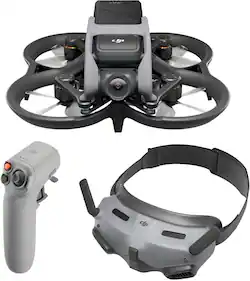
DJI - Avata Pro-View Combo Drone with Motion Controller (Goggles 2 and RC Motion 2) - Gray
Model: CP.FP.00000129.01
SKU: 6540208
This item is no longer available in new condition. See similar items below
Customers highly value the Avata Pro-View Combo Drone's superior video quality and ease of use, finding the motion controller and goggles enhance the immersive flight experience. However, some users express concerns regarding the battery life and the drone's relatively high price point. The placement of the USB-C port is also cited as a minor inconvenience by some users.
I took out for a test flight at a nearby park. My first battery did well, I returned to home and replaced battery for a second flight. During this second flight, the battery showed low battery and auto return to home. I let the avata return on its own but it never made it back and once battery was critical, it didnt let me take control. Avata crash landed about a mile away and was damaged. Now getting a downward sensor error ao I sent in for repairs. I hope DJI doesnt claim I caused the crash. Well see what they say, but ive only had my avata for a week and its already on its way for repairs. Bottom line is it needs longer battery life, to allow a safe return to home
Posted by JUAN
If you crash it, it will not be broken just dents, and easy to use
Posted by KatErin
The Avata is a drone that every drone enthusiast needs in their collection. The FPV goggles makes it feel like I’m in a fighter pilot cockpit. While the Avata is definitely up there in the fun factor, it’s not for the faint of heart or first time drone operators as there is zero crash avoidance systems. Pros: * Super fun to fly * Easy learning curve and intuitive controls * FPV Goggles high def and adjustable optics Cons: * Battery life is 15m or less * No carrying case * Memory card slot is poorly planned location * Phone hard connection is required for Remote ID * NO Crash sensors This “Pro-View Combo” may sound confusing but its essentially last year’s Avata packaged with the the latest Motion controller 2 and with the new DJI Goggles 2. The actual drone itself has left unchanged from its first release. The Motion Controller 2 is a great update as it now includes a “backward” trigger so you’re not limited to just flying forward. The other note worthy update is the inclusion of the thumb joystick so you can fly straight up or strafe left/right with more precision. The Goggles 2 update is a huge improvement over the older “Integration” model. The most notable update is the adjustable diopters so you can fully adjust the lenses for a super clear and sharp image no matter how bad your vision is. The DJI Mavic 3 has been the gold standard in drones. The Avata serves a totally different purpose. If you’re looking for aerial photography or smart drone tech like follow and tracking modes, this Avata isn’t it. The camera sensor isn’t the largest for good photography but the video is great but limited to only 1 axis gimbal. The Avata is small with zero crash sensors. Any light wind will make stationary hovers a challenge. What the Avata is for is for those wanting to fly a drone low to the ground and zipping in, around and under things. The Avata is an excellent addition to your drone collection but shouldn’t be your first or only drone. Out of the box, you will need to charge the battery and link all 3 components to each other. The included paper manual or phone app walks you through the process. Be prepared to have a bunch of updates that you will need to download and load via the app. Once you link the drone to the app and do all the necessary updates, the new USA rules requires your phone to be physically tethered to your goggles for the Remote ID to work. Just another cord that’s dangling off your goggles along with the cord to the goggles battery. The goggles battery can easily run 3 drone sessions before needing a charge. The drone battery has been averaging 15 minutes of run time for me so I would suggest picking up more batteries to keep you out in the field. Once you have your googles dialed in to your eye sight, the picture is phenomenal and the most immersive experience similar to VR. The touchpad to navigate all the menus is tricky to master. I would have preferred a physical d-pad than the touchy touchpad. The fun part of the Avata is the ability to use the Motion 2 controller. It’s essentially like a control stick found in an airplane. The learning curve is super easy. Aim down to dive, pull up to climb and left and right to bank. The motion controller is what makes this drone super fun to use. Sometimes I just fly around without even recording to just fly as it’s that much fun. I don’t see myself ever needing to add the traditional RC controller to the Avata. Somethings that keeps the Avata from being perfect are the following: The memory card slot is inconveniently located in the prop-well. The battery life is abysmal. No proximity sensors so be prepared to crash and crash a lot. I wish the goggles battery was attached to the googles itself so I don’t have a corded battery. And I also wish you didn’t need to have your phone physically tethered to your goggles. Why can’t the “Remote ID” be blue toothed or WiFi to your phone? In summary, this Avata has been a blast to use and I do feel like I’m a fighter jet pilot with the maneuvers you can pull off with the Motion 2 controller. FPV drone is a class in itself and wouldn’t replace my traditional Mavic 3. I find myself just wanting to pilot around for the joy of flying in a way a traditional drone couldn’t. But be warned that you will probably crash a fair share of times and the 2 extra props that the kit includes is not nearly enough.
Posted by TonyMSP
The vast majority of our reviews come from verified purchases. Reviews from customers may include My Best Buy members, employees, and Tech Insider Network members (as tagged). Select reviewers may receive discounted products, promotional considerations or entries into drawings for honest, helpful reviews.