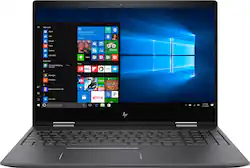
Envy x360 2-in-1 15.6" Touch-Screen Laptop - AMD FX - 8GB Memory - AMD Radeon R7 - 1TB Hard Drive - HP finish in dark ash silver
Model: 15M-BQ021DX
SKU: 5873906
This item is no longer available in new condition. See similar items below
Customers love the Envy x360 2-in-1 laptop for its fast performance, reasonable price, and lightweight design. Many users appreciate the smooth transition to tablet mode and find the touchscreen very responsive. However, some customers have concerns about the laptop's battery life, noisy fan, and slow boot time.
The vast majority of our reviews come from verified purchases. Reviews from customers may include My Best Buy members, employees, and Tech Insider Network members (as tagged). Select reviewers may receive discounted products, promotional considerations or entries into drawings for honest, helpful reviews.
It is perfect. I will definitely recommend it to my friend.
Posted by xiaoshan
Have had this laptop for about 3 years now with minimal to regular usage and 2 days ago randomly the screen literally popped out of the body. Looked it up on hp forums and a lot of people have this same problem. Seems to be a manufacture defect but with no acknowledgement or support outside of the warranty window. From the very beginning laptop has not performed great for simple things, on startup sometimes the screen does not turn on and is unresponsive. I thought it would be nice but everywhere I look people are saying to avoid HP, will probably be going with samsung or windows laptop.
Posted by Kenny
I got this laptop for college I'm getting my Systems Administrations degree (IT) with emphasis on Cisco networking - so I knew a few things... Im going to cut to the chase about a lot of features - firstly the CPU. Its FAST, very fast! I do 3D modeling & printing as a hobby and was able to render/slice objects pretty fast on this little laptop! Tested a little gaming and was able to get Battlefield 4 to hit 90fps (low settings) @ 720p - not bad for an integrated GPU. The Vega graphics put any intel IGPU to shame. ANd thats what y9ou need to remember overall that this is an IGPU (APU) thats $750... Some of the other reviwes have their expectations on a $1500 laptop level. Fit and finish - the laptop feels like its all metal, very smooth overall feeling with the neutral grey. The keyboard key-play dosent have quite as much travel as a toshiba or apple laptop - it just take some slight getting used to.The track pad does what its supposed to. If you get a Wacom Bamboo Ink yiou can take advantage of the windows ink feature. At first I wasent interested in this but after messing with it at Bestbuy I kinda fell in love... It workd - GOOD. Interfaces - you have 2 USB ports, one will have active charging enabled all the time (USB on the right) this DOES fast charge apple devices and plays friendly with my iPhone7p. You have a USB-C on the right had as well - wish I oculd test it but I dont have any devices that use this. IMPORTANT: HEADPHONE JACK - this jack IS compatible with gaming headsets that use a single connector for headphones & mic - it works REALLY good. Battery life - this is kinda interesting because I think the firmware is still adjusting to the the capacity. Its good practice to charge it up all the way and use your laptop until it almost dies a few times so the firmware can see the actual battery range. I havent discharged it completely yet but Im guessing about 5-6 hours on normal use but I could be incorrect. The CPU does throttle off really fast to save power. Some users complained about the bloatware on the laptop - this is NOT HP's fault but Microsofts. Even if you buy windows off the shelf and install it - it will have all the useless candy crush stuff. This is not HP's fault. ALso - prepare to have about 4-6 hours of downloads from microsoft the first night you use the laptop. So if its running slow INITIALLY!!! Its not permanent. Let it get ALL the updates, because the windows updates will thrash the hard drive and - yes the hard drive is flipping slow. Word through the grape vine is that there is a M.2 slot open on the mobo waiting for an SSD to be added ;D RAM is also upgradeable in 2 slots up to I believe 32GB on this platform. The Display - IMPORTANT! - The display is sharp and moderately bright. I did see some reviews where users have said the display has a dingy brownish hue to it. At first glance you wont see it - but I own color calibration hardware and calibrated the monitor and - OH WOW. Yeah HP used a basic windows sRGB profile and not a generalized one they create at the factory. Attached images show the difference and its huge. If your display is brownish I attached a link (hopefully bestbuy dosent block it) to the ICM profile I created using a Spyder4 Elite for this specific model laptop. Just add it to your color profiles in the control panel - all monitors are slightly different but this should be about 98% accurate to the majority and better than anything that was included. Would I buy this laptop again? OH YEAH! OHHhh Yeah! Im defently going to be putting the m.2 drive in and maybe bumping the ram up in the future. I thought 8gb would be enough but if you game, the ram is shared with the GPU. The GPU only has 256MB of actual dedicated VRAM so games dip into a lot more ram than normal. BTW Battlefront 2 is playable @ 50fps! But like I said earlier I was able to run BF4 and I didnt run out of ram. Link to corrected color profile for display: (your welcome!) https://www.dropbox.com/s/5myoaxtc9ws41ns/HP%20Envy%20Profile.icm?dl=0
Posted by Spooky