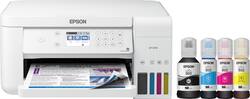
Epson - EcoTank ET-3710 Wireless All-In-One Inkjet Printer - White
Model: EPSON ECOTANK ET-3710 C11CG21
SKU: 6347459
This item is no longer available in new condition. See similar items below
Customers recognize the EcoTank ET-3710's excellent print quality and ease of use, frequently praising its straightforward setup and compact size. The wireless functionality is also a highlight for many users, who appreciate its convenience. While some experienced occasional paper jams, the printer's generally positive reception outweighs this minor drawback.
The vast majority of our reviews come from verified purchases. Reviews from customers may include My Best Buy members, employees, and Tech Insider Network members (as tagged). Select reviewers may receive discounted products, promotional considerations or entries into drawings for honest, helpful reviews.
I have had this printer for 7 months now and love it. I can print directly from my phone, I can choose via my computer to scan a document on my scanner. My ink so far is good and pretty easy to install. It did give me some message about how important it is to keep the ink full so no issues occur. Not sure what that means as my ink is still more 3/4 full. My last printer, I ran out of ink every three months or so. I don't usually use the printer functions, but have had to a couple of times. Things I don't like...1) the paper tray. Its under the paper catch tray. So I have to push in the catch tray to get to the paper tray under it. You pull down the door of the paper tray and pull it out to load paper. My last printer had a flat catch plate and a small pull out extender on one end (to keep paper from falling to the ground). You had to raise up the catch plate and put paper into the paper feed tray. So much easier. 2) The display on the printer/printer buttons are annoying. You have to use the arrow buttons to the right of the display to navigate around the display. Arrowing over left, right, up or down to get over to the close or copy button is annoying. I wish it was touch screen. 3) The scanning software. Its just a plain white box that pops up on your PC screen that shows your main settings and advanced settings. Down at the bottom is the format (PNG, Jpeg, etc), then the file name. The file name is a long string of numbers which you cannot change. You can not give the file your own unique name. Once it downloads to your PC, then you have to go to the file location and search for the file and rename it there. So annoying. You can choose where the scan goes on your PC. My last printer had a really pretty box that popped up. It asked what we wanted to do as there was a list to select from, then the next page allowed you to crop the image if you needed to and the next allowed you to choose the file location to save it to and give it a unique name. There were also other creative options as well. 4) It only comes in white. I wanted a black printer, but white was the only color choice.
Posted by MeMeMe
Excellent home printer and utility that comes with it. The print quality super good. I can print stuff through my wifi network and use my computers and phones to print stuff. I can even print stuff when I'm away from home with the internet. Took a while to set up but it's worth it if you take the time to set up and align your printer properly. I got some ultra premium glossy paper to test out photos, they turned out amazing.
Posted by lolb4udie
This printer is life changing if that’s possible. I bought this about 2 yrs ago- and it still works perfectly and I still have 1/2 of all the color ink and 1/3 of the black ink that it came with when I purchased. That’s 2 years of moderate amounts of printing and it’s only used HALF the ink it came with. It’s a little expensive but it’s worth every penny and more. It has a really cool app too that can make stationary with any picture you want and lots of other stuff.this deserves 20 stars!
Posted by AllisonF