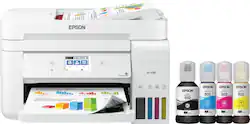
Epson - EcoTank ET-4760 Wireless All-In-One Inkjet Printer
Model: 4760
SKU: 6347467
This item is no longer available in new condition. See similar items below
Customers often highlight the excellent print quality and ease of use of the EcoTank ET-4760 Wireless All-In-One Inkjet Printer. Many appreciate its compact size and straightforward setup process. While some users mention occasional noise and a higher price point, the positive feedback on printing and scanning capabilities is prominent.
We’ve had many sub-$200 ink jet printers over the years. I bet we have 20-30 old ink cartridges that don’t fit anything. I am done with that! The Epson ET-4760 is our first “tank” printer, and we are very happy so far. It was relatively easy to set up, directions were clear and complete. The print quality set-up does take some time, but is very important and really not difficult. There is a FULL set of ink bottles included that I’m sure will last us over a year, perhaps two as advertised. The tanks actually hold that much. We have been able to scan to and print from HP laptop, iPhone, iPad, and MacBook, all through our household WiFi. Print quality is excellent. Scanning is quick for normal resolutions. It is smaller than I expected (this is a good thing) and holds a lot of paper. Powering up and down is very fast. Many of the printers we’ve had would clunk, chug, grind and bang for what seemed like minutes before they would perform the requested task. I hope the honeymoon with our new Epson lasts a long time!
Posted by HomeOffice
Easy to set up and prints nicely. It’s light weight and doesn’t take up a lot of space compared to others. Mobile printing is nice and easy. Loading the ink is easy and let’s face it the best perk of this printer is it holds a lot of ink and it won’t break your budget when you have to repurchase it.
Posted by Kathy1482
I have had this printer for 4 months and really enjoy it. It was a bit more than I usually spend but I decided to upgrade, and I also made sure I bought the Geek Squad Product Replacement plan, which I do for all electronics. I have yet to have to use one, but it feels good knowing that it will be there when I need it. IT ONLY COMES IN WHITE? At first I was bummed that it was only available in white and not the shiny black like my last printer. There is a premium model in black but that was a bit too much for my needs. Once home, it blends in well after all and doesn't show the smudges, dust and cat hair like my last machine. So that's a plus after all lol. HOW LONG DOES THE INK LAST? (standard home printer) I use it for home printing and scanning, I do not fax so I cannot comment on that feature. After the 4 months, the ink is about where it was after setup. I do not print photos but on occasion, so this printer has only printed documents, mostly in color but that is usually just a logo in a header etc. I print in standard quality and high quality. When printing in draft quality, it is extremely light, which I guess is a good thing and something I will learn to get used to, but will probably rarely use since I don't see the need to, having a good supply of ink like it does. INK WELL AND BOTTLES vs CARTRIDGES I love, love, love the ink wells and hope this feature is on all my future printers. Really, look at all the ink in that bottle and compare it to the tiny ink wells inside normal printer cartridges. It's a no brainer when which you'd be happiest with. And SUPER easy to do, it was kind of fun actually. SCANS TO THE CLOUD! This feature I somehow overlooked when buying this machine. But once I tried it out, I use it for all my scans as I am a big Google Drive user. The Google Drive folder on my pc has basically replaced "My Computer". ALL my files sync to the cloud, so I really don’t have to worry about a computer crash anymore. It allows me to easily share all the docs I scan for my genealogy research, which is my main hobby. So this printer/scanner fits right in like it's part of the pc family lol. TINY TOUCH SCREEN The only thing that I am not crazy about is the tiny touch screen. I like the fact that it comes with a touch screen, but it's just a pain to use when navigating through the menus. Hopefully they will enlarge it just a bit in future models. But I would definitely not let this deter me in choosing this machine again or suggesting it to others. Maybe I'll just keep a touch pen near it to make it easier, but it's not needed too much because I have yet to do it. NO USB OR CARD READER? Lastly, no it does not have a card reader or USB port, which is a bit of a concern for most, at first. But with everything being digital, wireless etc it's really not necessary. Laptops are no longer coming with DVD drives, most tv is streamed now, music is now downloaded. This is just one of those things that is also now on the back burner. Wifi and cloud is taking control and so far for me it hasn't been an issue. If I have things on a card or usb, I just load it into my pc and print from there. Also, I can send anything to a special email address and the printer will print whatever is in that email, so I can print from anywhere in the world. That is pretty cool. So don't let this be something that stops you from considering this printer.
Posted by Figi419
The vast majority of our reviews come from verified purchases. Reviews from customers may include My Best Buy members, employees, and Tech Insider Network members (as tagged). Select reviewers may receive discounted products, promotional considerations or entries into drawings for honest, helpful reviews.