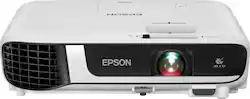
Epson - EX5280 3LCD XGA Projector with Built-in Speaker - White
Model: V11H976020
SKU: 6457640
This item is no longer available in new condition. See similar items below
Customers are positive about the EX5280 3LCD XGA Projector with Built-in Speaker, frequently praising its brightness, picture quality, and ease of use. Many appreciate its compact size and the inclusion of convenient features like HDMI connectivity and a built-in speaker. The user-friendly remote control also receives positive feedback. Overall, the projector is lauded for its performance and portability.
The Epson EX5280 is an amazing projector that produces some of the best images I’ve seen from a projector. The projector comes packed with a full fledged remote, power cable and a nice carrying case. There are many different ways to connect to it such as USB, HDMI, VGA and RCA. The built-in auto image adjust works great and is able to correct the image almost instantly. There are also manual controls on the device as well, such as zoom ring, focus ring and horizontal keystone. Unfortunately, there is no built-in WiFi, but Epson does offer an optional wireless LAN module. There is also a built-in speaker which gets pretty loud. The projector is very easy to set up and takes almost no effort, thanks to the auto image correction. It can project on almost any flat surface from 30” up to 300”. In Addition, because it’s so light and easy to carry around, this makes for the perfect presentation tool. Not only can it connect to your computer via HDMI or VGA, but it can also connect and play video sources such as Roku, Apple TV, Blu-Ray etc. Once I got everything set up, I ran it through a couple of tests to see how well the projector performed. First, I connected my Windows laptop to mirror my screen, I was blown away by how bright and crisp the image was. The projector has some really nice features that are awesome and are pivotal for any presentation. For example, the split screen function lets you display 2 windows side by side and have 2 different images that you can use as a comparison tool. This is easily accomplished by a push of a button on the remote control. There is also a zoom feature which lets you zoom in on a specific part of an object. The next thing I tried out was the ability to play movies, so I connected my Apple TV and played a couple of movies. The image quality was amazing! The picture is very bright, with vivid colors and the motion is super smooth. There is no rainbow affect, flickering, or any other sort of picture distortion – it looked perfect. With the option to connect to other audio equipment, I decided to use an audio cable to run to my receiver so I could enjoy surround sound. This experience has turned my living room into an actual movie theater. Overall, I am very impressed with how the Epson EX5280 functions. It is so easy to set up and use, it really is a true plug and play. With the built-in auto key stabilizer, it instantly fixes the screen to make it look crystal clear. The image is bright enough to see perfectly during daytime, or a brightly lit room. The options and tools it provides you with to present images and videos are incredible, combined with the portability - it becomes the perfect presentation tool. I would definitely recommend this to anyone looking for a new projector.
Posted by Ace254687
Clear and sharp image. It was on sale, i Like it a lot. I use it on my school.
Posted by appleloverec
This is a capable all around projector, and perfect for business presentations. Even in less than optimal conditions. You can use this, obviously, to watch TV, etc. and it would work just fine, but it’s more geared for work/school presentations and the like. I say this because of the limited ports (which aren’t particularly conducive to home theater setups and lack of “smart” TV functionality. IN THE BOX It’s pretty barebones. You get the projector, power cord, remote and 2 double AA batteries. I wish it came with an HDMI cable, but I expect most people have some hanging around the house/office. It also includes a convenient carrying bag, but it’s softshell, so don’t plan on throwing it around or placing heavy things on top of it. The projector isn’t super tiny, but it’s much smaller than older projectors. I wouldn’t call this travel size, since they make projectors the size of soda cans, but it’s certainly small and light enough to the point where it’s not a burden to take with you when you need it. PROJECTOR PORTS There aren’t many ports in the back of the projector. And to my surprise, it seems geared to cover old and new technology. It has an old school VGA port, composite cables, and HDMI port. It also has a USB-B input, which I guess is for connecting a computer, but I don’t really know. It has a USB-A port, which I’m guessing allows you to play files directly from a thumb drive. But honestly I didn’t test it. HDMI is really all I need, but having VGA is nice, if I ever run into an issue and need it (which is still unlikely). IMAGE QUALITY I must say, the brightness of the projector is pretty spectacular. Our office has an open conference room with lots of windows. Our old projector required us to close the shades and turn off all the lights. The Epson projector is so bright we didn’t have to close the shades or turn off the lights. While turning off lights and closing shades is generally an option, it’s really nice to have the flexibility of being able to project something in the middle of the day, in bright conditions. Obviously, the image looks better in the dark, but this is seemingly as bright as an LCD TV. The image quality itself is high def, so the image quality looks good, but make no mistake, this is no 4K image quality. Which frankly is fine, since what I use this for is PowerPoint presentations. Which is why I said you may not want to purchase this projector as a “home theater” projector. While not image related, I’ll go ahead and mention the built-in speaker. This projector has a built-in speaker, which is useful in a pinch, but the audio quality is teeny. It’s better than most laptops’ speakers, but it will not replace a quality Bluetooth or dedicated speaker when playing audio. FEATURES Like I mentioned previously, one of the boons of this projector is its flexibility. What I mean by that is, flexibility in the types of rooms where you can use it. I’m guessing other projectors have it, but you can adjust the keystone of the image depending on the limitations of the room where you are using the projector. Say you are giving a presentation in a room where you’ve never been before; say the space is crowded or you don’t really have an option to place the projector directly in front of the screen. You can use the slider on top of the projector near the zoom and focus rings to angle the screen to the side. So, imagine placing the projector at an angle (not directly in front of a screen), you can slide the slider to compensate. So in effect, you can have the projector to the side of the screen and still have an image that looks like the projector is directly in front of the screen. Same goes for the vertical keystone. Say the table where you place the projector is lower than the screen and you don’t have anything to raise the height of the projector. You can use hte buttons on top of the projector to angle the picture up or down. Again, imagine the projector being lower than your screen. You can adjust the picture on the fly so the image is directly square (vs. the bottom corners being wider than the top). Another BIG thing to add is the “zoom” feature. IF you’ve ever used a projector before, the farther away it is from the screen, the bigger the picture. The closer you move it to the screen the smaller the screen gets. Sometimes you don’t have enough space in your room to get it just right. You can use the zoom ring next to the autofocus to “widen” or “tighten” the image. I don’t know the specs of the “throw” capabilities, but the range is enough that you should be good. We presented in a smallish room and were able to widen the image to fill the screen. The remote also has some nifty features that you can’t downplay. No there’s no buttons to flip through your presentation, but say you want to blow up some text that isn’t quite as big as you hoped when making your powerpoint. You can digitally zoom in on the screen and use the arrows on the remote to move the zoomed in portion to where you want it to be. It can feel a little clunky if you’re trying to put on a smooth presentation to impress people, but being able to zoom in on portions of a presentation to highlight something is a nice thing to have. It also has the ability to mute the screen, basically making everything black. This is perfect as it allows you to get your presentation ready, then you hit the mute button which kind of turns off the screen, but upon reactivation, you’re ready to go. In other words, you don’t have to wait for the projector to warm up or anything like that. You can even split the screen if you have two inputs. This is one of those “cool” features, without much practical use. But it’s there. You can plug in a computer using the HDMI port and the VGA port and have the screens side-by-side. CONCLUSION This projector is pretty no frills, it does exactly what it does, pretty darn well. The image quality is bright enough for well lit rooms, and the keystone options and throw distances give you plenty of flexibility when using it in unfamiliar rooms. I highly recommend it for anyone who gives frequent presentations, whether in your own office or someone else’s.
Posted by callmeageeth
The vast majority of our reviews come from verified purchases. Reviews from customers may include My Best Buy members, employees, and Tech Insider Network members (as tagged). Select reviewers may receive discounted products, promotional considerations or entries into drawings for honest, helpful reviews.