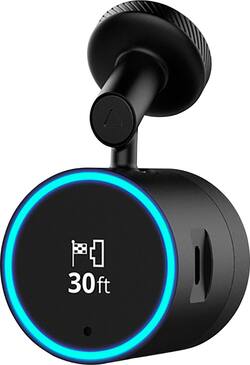
Garmin - Speak Plus with Amazon Alexa and Built-In Dash Camera
Model: 010-01862-00
SKU: 6145004
This item is no longer available in new condition. See similar items below
Last-Minute SavingsLimited quantities.Shop now
Customers enjoy the built-in dash camera, Alexa integration, and GPS navigation features of the Speak Plus. Many appreciate the ease of use and compact size, along with the good video quality and lane departure warnings. However, some users experienced connectivity issues and concerns about battery life and compatibility with certain devices. The navigation directions and overall functionality were generally well-received.
The vast majority of our reviews come from verified purchases. Reviews from customers may include My Best Buy members, employees, and Tech Insider Network members (as tagged). Select reviewers may receive discounted products, promotional considerations or entries into drawings for honest, helpful reviews.
I'm a huge home automation fan, so when I saw that Garmin was bringing out a GPS with Amazon Alexa built in, I was really excited, and then to have the dash cam in there sealed the deal for me. Upon receiving the Garmin Speak Plus, with Dash Cam and Amazon Alexa, I was surprised to see just how small it is. The round face of it is right at 1.5" in diameter, so when it's on the windshield, it is really unobtrusive, and I love that. I really, really wanted to love all of this product from the first day I saw it. It had everything I wanted in something aftermarket I wanted in my vehicle. Being able to speak to Alexa when a weird question arose or to add things to my Amazon shopping cart on the move, or to control the lights in my house BEFORE I got home, (without using GeoFencing) would be great. Out of the box, you get very little instructions, a nice long power cord with a 12V adapter on the end, the unit and two sticky magnetic mounts. Installation is a breeze. You stick the mount where you want to (I chose the center of my windshield up high, to the left of my rear view mirror). I ran the power cable straight up and into the headliner, all the way along the front of the windshield, down the A pillar and then in behind the rubber of the door seal on my Camaro. You can only see about 3" of cable, all of the rest is hidden. Looks perfect! Download the Garmin Speak App and connect to Bluetooth. Now this is where I have some issues. On day one, I connected and it found my Garmin Speak Plus. Was able to play around with it in the car that evening. I was excited to use the GPS in the morning. Started my drive to work the following day and on my 17 mile commute to work, my iPhone and Garmin Speak Plus disconnected from Bluetooth 8 times. My phone never moved and was only 24" away from the Garmin Speak Plus. This was infuriating. I use Bluetooth all the time in my car, as I walk up to the car, it automatically connects to my Camaro and I've used it like this for almost 8 years now, but in one day with the Garmin Speak Plus, it disconnected over and over and over again. It rendered the product almost useless at all to me, being as I couldn't use the GPS, or use Alexa, and couldn't review any of the dash cam footage that had been recorded. I was incredibly disappointed. This was on Feb 10th. I did some searching and investigation online to find out that Garmin was releasing an update for the Garmin Speak Plus software and also an app update around Feb 12th. Feb 12th came and went, I was still having connectivity issues, but the dash cam was working and actually a lot better than I was expecting. I posted a recording online and my friends were very impressed with the quality of it! So instead of removing the Garmin Speak Plus, I decided to keep it in the car and use it for the dash cam. A couple of days later, while driving home, the Garmin Speak Plus turned itself off and did the software update (mid navigation, which was a tad inconvenient!). And then that evening, the Garmin Speak app updated as well. Since then, the connectivity issues have been fewer, and now my phone and the Garmin Speak Plus reconnect fairly seamlessly, meaning that I can complete a navigation route, however, it does still disconnect about 4 times in a trip. And every time it connects back up, you get the 'welcome sound'. Which you can turn off, but I kind of like having it on so that I know that it has initially connected. Just gets a little annoying by the fourth or fifth time of connecting on the journey. The GPS doesn't appear to be particularly dynamic, unlike Google Maps. There are times that Google Maps has taken me to work 5 different ways on 5 different days, in order to avoid delays, traffic, wrecks etc, whereas the Garmin Speak Plus has taken me the same way to work, every single day. There doesn't appear to be any algorithm to take account of the traffic. I do like that the ring around the Garmin Speak Plus lights up in green at the bottom and builds around the whole ring as you get closer to your desired junction. That is very useful and a nice feature. Something that would be nice to have is to be able to click on the map in the app, and see real time your position on the map, again, as a visual cue, if you have your phone mounted in the car. I've tried tapping on the map in the app to no avail. I do like the forward collision warning, and the lane departure warnings, both the audible and visual cues (ring turn yellow in the direction of the obstacle). The sensitivity can be adjusted and it works very well indeed. My Amazon Alexa account linked quickly and cleanly, and works reall well, when the bluetooth connection is available. I'm able to control my lights, thermostat etc as I am driving, so that my house is how I want it when I get home. I also find myself asking random questions, which passes the time on the commute. The Garmin Speak Plus also lowers the volume of what ever you are listening to when asking questions or receiving information. The dash cam is really, really good. Nice and smooth, nice high definition and a good frame rate. The Garmin VIRB app doesn't seem to work well. I couldn't get it to work as requested in the user guide. Instead, if you click on 'Gallery' in the Garmin Speak app, you are able to connect to the dash cam footage a lot easier. And easier still is to connect your dash cam direct to your PC. You can simply drag and drop your footage that way. It would be nice if the power cord was also a USB cord, so you could just plug it into a USB outlet in the car (most cars have them now a days) and then you could also use it with your PC to download your video footage. The Garmin Speak Plus is a fantastic product with so much potential. It has a nice small footprint, unobtrusive, pleasing to the eye and useful. The caveat is 'when it works'. The bluetooth connectivity issue is so frustrating. I use bluetooth headphones with my phone at work, they never disconnect. I use the bluetooth in my car, and it never disconnects, I use bluetooth to connect to my media center at home, and again it doesn't disconnect, so I don't quite understand why the Garmin Speak Plus continually disconnects from the bluetooth on my phone. I'd happily give this product 5 stars, if there wasn't such a connectivity issue. I can recommend this product as a dash cam, as it does record even when the bluetooth isn't connected. Outside of that, it's a tough sell.
Posted by Cupra
The built in camera is very nice. It produces a clear picture and has a wide enough angle to show the entire road in front of the vehicle. The mount allows easy adjustments to line the camera straight ahead. I used some of the footage for a safety briefing and was able to blow it up with a projector onto an approximately 8’ screen with satisfactory clarity. My only issue with the camera is the mount cannot be moved to another vehicle without losing it’s adhesive. I read a couple reviews from people placing this in the top right corner and having difficulties with driver alerts and cable placement. Mine is placed in the top center just under the mirror. With it’s small size, it doesn’t interfere with visibility and I was able to easily hid the cable down the passenger side trim. The GPS functions exactly as advertised but doesn’t have all the capabilities of a standard Garmin or build-in GPS system. Being such a small device (which I do see as a perk), the display only provides left, right, and straight as well as driver alerts (lane departures and front collision detection). I like to see a layout of the roads in the area I’m driving and trip information. I love the driver alerts. It takes a few initial adjustments to get the lanes “calibrated” but, once set, accurately helps keep you aware of drifts. I installed this in a heavily modified vehicle with a very soft suspension so stopping on a dime is not always a luxury. The front collision indication works far enough ahead that I have plenty of time to stop (even tested last night in the dark). For a regular vehicle, this should give ample time to respond in order to avoid accidents. Though others may not have an issue with it, I do not personally like the apps Garmin Speak and Garmin VIRB. It takes a bit of use to even become familiar with it and then you need to leave power to the Garmin speak to use it. Amazon Alexa integrated into the unit is it’s saving grace for my opinion of this device. The option for hands free control is more flexible than and more accurate than my Garmin GPS system. Since I installed this in an older vehicle, it’s nice to have the hands free calling. Something I miss when not driving my second (newer) vehicle. My last drawback to the Garmin Speak is the volume. After extensive research, I can’t determine how to increase the volume. The included manual only shows installation. With the radio on, I can’t hear any directions. Bottom line, is this is a nice unit for all it comes with but I’ll only be using this for the built-in dash camera and lane departure warnings. I’ll stick with my GPS unit for directions.
Posted by antosc
Design: The sleek and cylindrical design of the Garmin Speak Plus minimizes windshield space that is taken up, and the display is just large enough to easily see directions that are displayed. With this being a dashcam, GPS and voice assistant all in one, I am impressed by the small size. What I dislike about the design is the power cord. It plugs into the right side of the Garmin Speak and you must route the cord along the edge of your windshield down to wherever your car’s power supply is. I would recommend putting some thought into where you place the Garmin Speak because, unfortunately, the power cord is quite noticeable. I wish the Garmin Speak could be wireless, but I understand that all the active features would quickly deplete a battery. On the other hand, I do like that you do not have to worry about ever charging it, so the power cord is not all that bad. Overall, the Garmin Speak Plus is a well-designed product that is sleek and practical for a windshield but keep in mind that a power cord will need to be routed to it. Alexa Voice Assistant: I quickly realized how beneficial having the Alexa voice assistant in a car could be. Alexa picks up my voice easily and responds quickly. I primarily request directions, additions to my to-do list or shopping list, weather forecasts, and sports scores. Like the in-home version, there is obviously a lot more that Alexa can do. Asking questions and playing games like trivia make extended drives more enjoyable. So far, I have not had any connectivity issues that would inhibit Alexa from responding to my requests. Dashcam: The Garmin Speak Plus has impressive video quality and additional features that set it apart from other dashcams. If your windshield is relatively clean, you can expect video clarity, as well as a wide viewing angle. Video is recorded continuously, so it will not miss anything, and I have found that reviewing the video is quite simple thanks to the date and time labels. Not only do the Alexa voice assistant and GPS features set the Garmin Speak Plus apart from other dashcams, there is also driver alerts that include lane departure warnings, forward collision detection, and “Go” alerts that notify you when stopped cars in front of you start moving again. Thankfully I have not had a collision warning occur yet, so I can only speak to the lane departure warnings and “Go” alerts. I would say that they work most of the time. Unfortunately, these alerts are not perfect, but I would rather have the imperfect features than not have the features at all. Despite its imperfections, I think that the dashcam on the Garmin Speak Plus is one of the best on the market. Garmin GPS: The Garmin GPS navigation is up to date and accurate. Now that I have the Garmin Speak Plus, I prefer getting directions on the Garmin rather than using my phone. The turn-by-turn directions are spoken clearly, and the minimalist display is easy to read. A subtle feature that I like is that the illuminated ring around the Garmin Speak’s display starts to turn greener as you approach an upcoming turn. I have not had any occurrences of inaccurate directions, so the GPS is very effective. Verdict: I am excited about the future of car technology because I have realized the benefits that devices, such as the Garmin Speak Plus can provide. Thanks to the Garmin Peak Plus, I feel less distracted by my phone and can have productive commutes, since I can perform actions with my voice and ask questions that are on my mind. Some of the features have imperfections, but the benefits and enjoyable overall experience far outweigh those minor imperfections.
Posted by Kelby