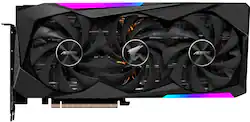
GIGABYTE - NVIDIA GeForce RTX 3070 AORUS MASTER 8GB GDDR6 PCI Express 4.0 Graphics Card
Model: GV-N3070AORUS M-8GD
SKU: 6439384
This item is no longer available in new condition. See similar items below
The vast majority of our reviews come from verified purchases. Reviews from customers may include My Best Buy members, employees, and Tech Insider Network members (as tagged). Select reviewers may receive discounted products, promotional considerations or entries into drawings for honest, helpful reviews.
The performance of this card is outstanding. I am able to play recent AAA games like COD:CW and CP2077 with DLSS at 4K at around 60 fps. Plays older games like Star Wars Battlefront 2, Borderlands 3, Just Cause 4, and FarCry 5 at 4k at ultra-settings above 60 fps. The 8GB of VRAM is rather limiting for future games at 4k but would be plenty for 1440p and 1080p for a long time. Temps are around 65C at max load and the fans are not that loud at all. The screen is a nice feature it is able to display your current temps, clock speed, etc. However, the default setting is their “Chibi Mode” and if you do not like that you have to change it with Gigabyte’s own RGBFusion2.0. RGBFusion2.0 has a reputation of being buggy and broken. It took a while for Gigabyte to release a version that would run on my computer. I eventually got it working but your millage may vary. Overall great card if you are able to get one at MSRP.
Posted by Mike
This is the second one if these I've had and I love it. Very powerful, stays cool and has the cool factor with the lcd screen on the front. I just wish the second I bought was the same price as the first one. $650 vs $799. The RGB Fusion 2.0 software is terrible as it doesn't play well with other software. All in all, great card, terrible software.
Posted by kagato82
When I got this card, I really couldn’t believe I got the 3070 that I wanted. Call it superficial, but I was hooked on getting the little screen. However, upon attempting to set up the card, I get errors with the screen where it gets stuck either on the little metal eagle egg or the aorus logo and you can’t change any LCD options after that, as Gigabyte’s RGB software is... well, a pile of crap. If you attempt to use some of the features of the LCD (i.e. uploading a gif or custom text) it does that eagle egg thing and Gigabyte’s software STOPS DETECTING ITS OWN CARD. The solution? Well after hours across days and many experiments with resets and deleting certain files and uninstalling and reinstalling... I finally found a helpful reddit comment in some obscure post. Combining what that person said with that I had been doing works. (I will put the method at the bottom for those interested). Their most recent Aorus Experience update got the LCD panel working for me for a while, but if you have any other graphics cards going through the system for any reason, it completely screws over the software and you get the infuriating little metal egg. HORRIBLE SOFTWARE ASIDE (when you get the gif feature working it’s super cool and having a temps/fans/other stats monitor panel is nice): the actual card ROCKS. It runs a bit toasty compared to other aftermarket cards, as the Gigabyte aftermarkets tend to (buyer beware GB’s thermal pads are low quality) but the temps still stay well within ideal. I have an airflow case though, so do pay attention. The fan mechanism on this is an absolute beast and looks like one too, but you do have to give it air and understand where the 3070 cards in general spit out their hot air. Overclocking is absolutely unnecessary but as a hobbyist I’m finding that you can crank out amazing performance AND undervolt to save a buck on electricity and spare some heat. On top of that, IIRC this card is one of the best two or three cards in terms of aftermarket base/boost clock speeds right out of the box, blowing the FE out of the water. I don’t play the eye candy games (ahem cyberpunk) that most people use as judgement, but this beast of a card EASILY achieves max settings on Overwatch 1440p, staying above 144fps. Overwatch is well optimized, sure, but I still achieve 144+ fps on mostly cranked settings WHILE HAVING OTHER GPU-DEMANDING PROCESSES GOING. ** To fix the eagle egg of doom: - first off, HAVE A BACKUP when messing with stuff like this - cleanly uninstall all Gigabyte software including all the leftover files (I use Revo Uninstaller). (Some of the software is sneaky like the Patriot SSD software, which is downloaded with the Aorus suite even without a Patriot SSD) and get rid of their RGB Fusion software too - download DDU and most recent working Aorus Engine. You MAY also have to roll back to comparable Nvidia drivers and keep it from updating... I didn’t have to do that this time. I kept these files on my desktop to make safe mode easier. - Restart, booting into safe mode. - Run DDU and select the “nvidia GPU” options and the “turn off computer as if installing a new GPU option”. The computer will shut itself off when the process is over. - Boot up once more. (No nvidia drivers so your monitor may act weird and lower quality. All is fine.) - Install Aorus Engine using the file you downloaded. Open it and click the RGB GPU button in the lower right. it will prompt you to download RGB Fusion 2.0, and possibly update the firmware. Do both of those things. (DO NOT try to attempt RGB Fusion by itself. Always use Aorus Engine to do it. I had horrible crashes and some people (not me) reported data loss from trying RGB fusion alone.) - Let it do its installs, then try clicking the RGB GPU button again. - All features on the LCD should work! I’m still afraid of getting the software “stuck” again, so I like to set it to the system monitor in a tasteful white scheme and just leave it alone. ** **** ANYWAY, TLDR: The guts of this card are great, with some of the best clock speeds and a really well engineered cooler (minus thermal pads). This card is more power than most gamers need and then some! However, Gigabyte’s software needs some SERIOUS help and had me even thinking about returning the card once or twice. Yes... even in this GPU shortage. If you’re not comfortable troubleshooting software stuff, tread carefully with this one until they give a better update. ****
Posted by Greyson
Customers recognize the NVIDIA GeForce RTX 3070 AORUS MASTER 8GB GDDR6 graphics card's excellent performance and impressive cooling capabilities, frequently praising its attractive design and the unique LCD screen. However, some users find the price point to be high and express concerns about the software's usability and the card's large size. The card's RGB lighting features also receive positive feedback.