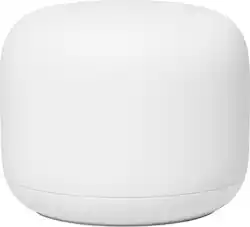
Google - Nest Wifi - Mesh Router (AC2200) - Snow
Model: GA00595-US
SKU: 6382499
This item is no longer available in new condition. See similar items below
Customers highly value the Nest Wifi's ease of use, extensive coverage, and strong signal, with many praising its simple setup and improved performance. Positive feedback frequently highlights the system's reliable connectivity and extended range. While some find the price to be a drawback, the majority of users report a positive experience. A few users experienced compatibility issues or lag, but these were less frequently reported than the positive aspects.
Very reliable coverage and fast speed. The setup was so easy. And if you have other Google smart home devices, you can your network in the same Google app. I don’t think I want to go back to a regular Wi-Fi router after using a mesh network.
Posted by HungerArrow
The Google Nest WIFI AC2200 Router was super easy to set up with the Google Home app. The Google Home app walks you through the installation process with ease. I did have an issue with it connecting to my WIFI smart outlets that run on 2.4GHz. I called up Google and they provided me a workaround to get them set up. (it will require a secondary phone with hotspot capabilities). I am paying for 200 Mbps internet and when I perform the speed test I hit 207 Mbps on Ookla's speedtest. On top of the performance and ease of setup, I put this router ontop of our floating TV console in our living room and it is aesthetically pleasing to look at. My GF did not like our old router with the antennas sticking out. 1. Setup a secondary phone hotspot with the same SSID and password as you configured for your Google Nest WIFI Router 2. Turn on secondary phone hotspot 3. Connect your Phone to the secondary hotspot a. Ensure that you see the blue banner on secondary phone b. Ensure that you see the hotspot symbol on your phone 4. Using the specific WIFI smart app, enter in the same SSID and password as in step 1 5. Once you walk through the steps on the smart app and it successfully connects 6. You can now turn off the hotspot and rename the secondary phone back to its original name 7. On your phone now you can connect back to the Google Nest WIFI 8. Verify controls to WIFI outlets while on the Google Nest WIFI This is to trick your WIFI outlets to thinking its connecting to a 2.4GHz router, this is because the Google Nest WIFI router does not have dedicated WIFI SSID's for 2.4GHz and 5Ghz. (Both channels are rolled up into one SSID) I hope this help others!
Posted by m0nkey
This router can handle blazing fast speed. I have Fios 1 GB connection, which with old Google wifi hub could only support upto 500 mbps. But this newer model can carry upto 900 mbps. The range is also much powerful than previous version. As I was moving from old google wifi to this new model, I had to recreate my network and reconnect all my devices. I also had to factory reset my old google wifi hubs to connect them to this router as wifi point. Its an hour worth of effort, but very rewarding. This router only works with google home app, but you can still see the network information in google wifi app.
Posted by Nehal
The vast majority of our reviews come from verified purchases. Reviews from customers may include My Best Buy members, employees, and Tech Insider Network members (as tagged). Select reviewers may receive discounted products, promotional considerations or entries into drawings for honest, helpful reviews.