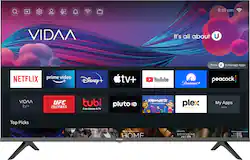
The Hisense A4 Series HD Smart TV is an entertainment must-have that features tons of built-in apps via the Hisense Smart Platform (VIDAA OS), making it easier than ever to personalize your entertainment experience. Other details include DTS Virtual X for crisp audio, and Motion Rate 120 keeps up with the fastest sports, movies and gaming. The screen size also makes it ideal for smaller rooms and budgets.
Q: What apps can you get on this tv?
A: That would be a long list, but it has all the common apps like tubi, pluto, Disney+, peacock, VUDU, Paramount+, Amazon Prime Video, YouTube, Netflix. Vevo, Pandora, etc. It does NOT have Sling, Hulu, Fox News.
A: Go to settings and there you will find configure network. advice, this brand of tv is the worst that can exist in the market and the customer service is terrible, I lost my money buying this TV lísense
Q: Does this TV work with Spectrum TV app?
A: No, no it doesn’t and i am mad…..
A: Hi Ricky, thank you for your interest in the Hisense 40A4G. Yes you can use the TV like a computer monitor, however connected via a HDMI. If you have any further questions or concerns, please give us a call at 1-888-935-8880 or email us at [email protected]. Thanks again, Harley with the Hisense Support Team.
A: Hi John, thank you for your interest in the Hisense 40A4GV. In APP STORE select the app you want to add and then select Install. If you have any further questions or concerns, please give us a call at 1-888-935-8880 or email us at [email protected]. Thanks again, Harley with the Hisense Support Team.
A: You will need at least a 32" wide surface or table for the two base stands (legs) to sit on. The TV itself is 35.25" wide.
A: No, it doesn’t and it isn’t available to add. So mad!!!
Q: does hisense 40" class a4g led tv have sleep mode? If so, how is it activated?
A: Yes it does, up to 2 hours and is accessed in the settings under the system menu.