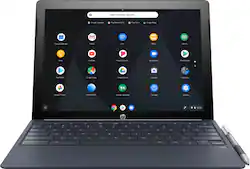
HP - 2-in-1 12.3" Touch-Screen Chromebook - Intel Core M - 4GB Memory - 32GB eMMC Flash Memory
Model: X2 12-F014DX
SKU: 6240850
This item is no longer available in new condition. See similar items below
Customers commend the keyboard quality, battery life, and ease of use of the 2-in-1 12.3" Touch-Screen Chromebook. The tablet mode and included pen also receive positive feedback. However, some customers express concerns about the device's weight and limited storage capacity. A few also mention that the RAM and price could be improved.
I was looking for a Chromebook for my casual home and school use, and this device had been under my radar for a while. I would like to think of myself as a tech enthusiast, and this was under my radar for a reason, it checks every mark for today's casual computing needs, and makes a whole lot more sense than getting anything else for the $400 that I was able to get it in the President's day. Awesome screen, perfect performance for online needs, media consumption, and grad school needs, awesome battery (11-12 hours), very good keyboard, and on top of being a laptop, I can use this as a tablet for YouTube, movies and reading, plus it runs Linux and Android apps too. If the Linux part could feel more at home than it currently is, which I hope will be true with future updates, I would have rated it 5.
Posted by metalbox
HP Chromebook X2 12-F014DX The HP Chromebook X2 is the first Chromebook with a detachable keyboard that also runs Android apps enabling it to function both as a Chrome OS laptop and as a high end Android tablet. My initial impression of the hardware was that it felt like a high end device with premium build quality. The tablet itself was made of aluminum and felt solid. The screen was super sharp with rich and vibrant colors. The touchpad was responsive and had a nice click to it. Being new to Chrome OS, I had to learn how it responds to touch gestures using the touchpad. Once I got used to the basics, I was able to use two fingers to scroll around documents, three fingers to move around tabs, and two fingers (instead of one finger) to tap/click the touchpad to bring up the context menu. The touchpad easily and correctly distinguish all my gestures. The keyboard felt good (although the smaller sized layout makes some compromises compared to a full-sized keyboard causing me to type the wrong character more than I would like). The leather-like texture on the keyboard was a nice touch. Setting up was extremely easy. Just connect to my home network and log into my Google account and all my bookmarks and passwords were migrated so my browsing experience was exactly the same as on my Windows desktop. Since Chrome OS boots so much faster than Windows, this makes it the ideal machine to use if you just want to quickly get on the internet to browse around. When I first set it up, it immediately found an update. The update actually took a little longer to finish than what I expected it to take but it was still orders of magnitude faster than updates on a Windows machine. Another update on a later date was even faster. Since I’m new to Chrome OS, I’m still trying to figure things out. I’m using Google Docs to write this review to see if Chrome OS could be viable as a main computer. Instead of Google Docs, we also have the choice of using Microsoft Office 365 as either a Chrome Extension (which is called Office Online) or by using the Android Apps version available on the Google Play Store. It’s a little bit confusing since the HP Chromebook X2 can run both. Which version of a program should we install if there is both a Chromebook and an Android version available? Right now, if there is both a Chromebook and Android version, I will favor installing the Chromebook version. There are two USB-C ports that can be used for data transfer, charging and display (I only tested the charging part) as well as a Micro SD slot that accepted my Sandisk 128 GB card with no problems. I’m not sure how external memory is handled in Chrome OS. Is this memory available for installing more apps? On some of my Android phones, I would run out of memory for installing or updating apps even when I had a large SD memory card installed. Android would not let me install apps on my SD card and would only let me use it to store music or picture files. I don’t know if Chrome OS has the same limitations. With 32GB of internal storage, I probably won’t run out of memory for apps but it would be nice if I knew that external memory is also available for installing applications. The HP Chromebook X2 also comes bundled with HP’s Active Pen that supposedly uses Wacom AES technology. From briefly playing around with the pen, I think it’s good enough for artists who want to use it for drawings or sketching. Android apps start in a smaller window with the option of running in full screen. The Chromebook version of Netflix ran perfectly with great video quality. The Android app version of Amazon Prime Video did not run well and had lots of stuttering. The SiliconDust HDHomerun Android app sometimes had trouble finding my HDHomerun tuner on the network. But when it did find it, it ran great. Sound from the front side speakers was capable of filling the room with clear and crisp sound but felt a little tinny to me. My favorite Android app for the HP Chromebook X2 was Comixology! Comics look absolutely beautiful on that large super sharp screen! With the keyboard detached and running in full tablet mode, the HP Chromebook X2 is a gorgeous comic book reader. It might be a little too large to hold comfortably for long periods but the screen is just gorgeous for reading comic books. Battery life has been excellent. With light use, I was able to get about 5 days of use without needing to charge. The HP Chromebook X2 in laptop mode is perfect for web browsing, email, and other light desktop usage (such as word processing and spreadsheets). It’s also a fantastic media consumption device (Youtube, Netflix and Comixology etc.). With its ability to run Android apps it can also function as a high end Android tablet. I think HP hit a home run with the HP Chromebook X2.
Posted by DoctorHoo
This little thing is surprisingly poppy. I never really had an interest in Chromebooks as I always thought of them as cheap laptops just for browsing the web and email. However, the X2 has really changed my opinion on them and even convinced a co-worker to get one. The X2 is a essentially a decent sized tablet with an attachable keyboard. The keyboard itself is very responsive and the leather like texture is soft and makes it look like some designer style bag. The touchpad is nicely set in the center making it easy to use with either hand and is as responsive as touching the screen. There are no function keys (F1-12) but a whole row of keys assigned specific functions, such as brightness and volume, making it easy for quick adjustments. As far as treating it as a tablet, it easily detaches from the keyboard and instantly recognizes that it is no longer attached showing the on screen keyboard for applications that require it. The screen itself feels very sturdy, however where the front facing speakers are it feels like a slight weak point and tends to scare me when squeezing those edges. There is a fairly large bezel around the screen, ⅝” all the way around. However, this gives plenty of room for a thumb to be holding the tablet without touching the screen. As far as the screen I am truly surprised at the resolution. This screen is sharp, clear and bright. When I first received it I started playing 4K videos on Youtube and could have sworn it was a 4K screen. However, the specs state it is only 2400 x 1600, which is still impressive considering my 17” laptop still only does 1920x1080. The most common use I have had for my Chromebook has been watching videos, from Youtube and Netflix mostly. With the front facing stereo speakers audio is pretty decent, however I mostly use headphones. When attached to the keyboard the hinge keeps the screen at the desired angle and is surprisingly balanced for how far back it can tilt. An active stylus and AAA battery is also included, as well as a tip tool and 3 additional tips. There are two tips that a more pointed, to give a pen type feel, and two that are more rounded, to give a pencil type feel. The tips are more of a personal feel as far as fine tip and broad tip but do not have much more of a difference to them that I noticed. However, using the stylus to draw on the Chromebook felt really satisfying and really inspired me to want to draw more. As many Android applications are supported through the Google Play store you have plenty of drawing options. As for applications, there is the Chrome Web Store and the Google Play store. The Chrome store had most essentials but having been used to Google Play store from my Android devices I felt like it was missing some common applications. However, for the most part many of the applications through the Play store are supported with a few quirks here and there. For instance, some applications responded weird to the on screen keyboard by capitalizing every word I typed while not providing any auto features when I used the keyboard. As for the surprisingly poppy portion, it is really noticable when opening web pages. I use Chrome on my Windows laptop yet it feels faster while using it on the Chromebook. Pages just seem to load faster in general. The same is true for when you open and close the device and the Wi-Fi connection as it is put to sleep to conserve battery but quickly reconnects to the network when opened up or pressing the power button. As for battery life it gets me through the day if actively using it. As for the past 2 weeks I have only briefly used it to check email and light browsing in the afternoon and have yet to charge it again. So, the standby function is doing really well at conserving the battery. I forgot my charger one day that I let it run dead and used my cell phone USB-C charger instead. Though it recognized it as a slow-charger, it managed to get me through the rest of the day. Upon setting the device up for the first time I noticed it used Google Docs online and I thought for sure that meant I could only use it when online. However, once you have logged into your Google account it retains a cache of documents created through Google Docs and you can later access other items once back online if you have not downloaded them to your device. Having been a primarily Windows PC user the Chrome OS was a bit different, however, having used Android based phones for some time now there are plenty of similarities. Using this Chromebook is very much like a blend between the styles of devices. Also, with this Chromebook having an Intel chipset you can enable developer mode and run Linux if you want to try something a little more technical. Once installed, swapping between the two operating systems is seamless. I’d say my only real complaint about this HP Chromebook X2 is the white surface on the back of the screen is making it look like I abuse the poor thing, collecting every little bit of a scuff mark.
Posted by DavidJr
The vast majority of our reviews come from verified purchases. Reviews from customers may include My Best Buy members, employees, and Tech Insider Network members (as tagged). Select reviewers may receive discounted products, promotional considerations or entries into drawings for honest, helpful reviews.