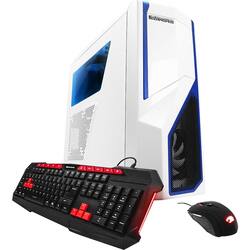
iBUYPOWER - Desktop - AMD FX 4300 - 16GB Memory - NVIDIA GeForce GT 710 - 2TB Hard Drive - White
Model: BB752
SKU: 5600300
This item is no longer available in new condition. See similar items below
Customers consistently note the excellent performance and gaming capabilities of the Desktop - AMD FX 4300 - 16GB Memory - NVIDIA GeForce GT 710 - 2TB Hard Drive. Many appreciate its ease of setup and the ample RAM. However, some users found the graphics card inadequate for demanding games and needed an upgrade. The overall experience is largely positive, with many expressing satisfaction with the computer's speed and functionality.
The vast majority of our reviews come from verified purchases. Reviews from customers may include My Best Buy members, employees, and Tech Insider Network members (as tagged). Select reviewers may receive discounted products, promotional considerations or entries into drawings for honest, helpful reviews.
Pc is superb right out of the box. Delivery was faster then was shown. Plays games on high settings with ease. Love this pc. Quiet too
Posted by Kjt86
So far I'm enjoying this PC. It is very fast and has 2 TB of storage which is plenty for me. One problem that I ran into was the audio output setting, but after some research it was an easy fix. The Nvidia graphics card/drivers have the default audio output as Nvidia HD. I believe this means that the audio output is being fed through the HDMI from the graphics card rather than the audio jack. My monitor doesn't have any speakers, so this was a problem for me. I need the audio jacks to work, to listen to any media on my PC. I tried installing the RealTek drivers and resetting the computer for the driver changes to take effect, but the RealTek driver wasn't popping up in the device manager. I found that the only way to enable the audio jacks was to enable it in the BIOS. Here is how to make your audio jacks work. Step 1: Restart the computer. Step 2: While on reboot (The black screens) hit "delete" on the keyboard so the BIOS screen pops up. (If you missed it restart the computer and try again) Step 3: Once on the BIOS screen Goto "Integrated Peripherals" and select it. Step 4: Goto "HD Audio Controller" and "enable " it. Step 5: Save your changes (F10) Then let the system boot up normally. The audio jacks should now work and RealTek drivers should automatically install.
Posted by Zealot
This desktop is fast, has the memory that I need. And this desktop has extra memory to add.
Posted by Sherocky