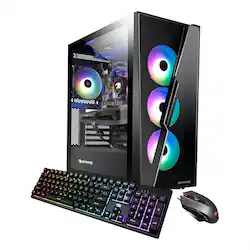
iBUYPOWER - SlateHAKO Gaming Desktop - Intel i3-12100 - 8GB DDR4 Memory - Intel Arc A380 6GB Graphics - 500GB NVMe SSD - Black
Model: SlateHako2110
SKU: 6515190
This item is no longer available in new condition. See similar items below
Customers admire the SlateHAKO Gaming Desktop's RAM, upgradability, and ease of setup, praising its build quality and included keyboard and RGB lighting. However, some users express concerns regarding the GPU's performance, particularly in demanding games, and the limited storage capacity. The system's suitability as a gaming PC is a point of contention among customers.
The vast majority of our reviews come from verified purchases. Reviews from customers may include My Best Buy members, employees, and Tech Insider Network members (as tagged). Select reviewers may receive discounted products, promotional considerations or entries into drawings for honest, helpful reviews.
This computer was a great choice for my 7 year old that wants to be a youtuber. He had an old pc and after getting this one he doesn’t have the problem of lagging. He is so happy with this.
Posted by NelsonG
This is my first purpose-built gaming computer. I have had prior computers that can play some games but nothing special. I was a little hesitant with this computer as the specs seemed on the lower side of a gaming PC. While this is true, this computer played everything I threw at it (mostly racing games). The computer did not have any hiccups, overheating, or even slowing down. Some games I was not able to have at the max graphics settings. This computer also seems to be easily upgradable so swapping out a video card at a later date should be pretty simple. The computer looks great in my office and the LEDs really make it shine. I like that you can adjust them or even turn them off. I do wish there was a way to put them on a schedule so overnight they would turn off. It's not that hard to open the application and just click them off. The mouse and keyboard also light up and look great as well. The keyboard is very comfortable to type on. The included mouse is one of the best I have used. It is very comfortable for playing games or browsing the internet. This computer also has lots of room inside to customize and add a better graphics card, more memory, etc. I was thinking an I3 and only 8 gigs of ram this computer would struggle with games or even task. I was so wrong; applications and games open very quickly. I even tried to purposely slow it down by opening many different applications and web tabs, it didn't affect it at all. When you turn it on and type in your password the computer is fully ready to go and use applications. The intel video card seems to handle games with ease. The video card also has three display port inputs and one HDMI. I currently have two monitors setup on the computer, one on HDMI and the other on display port. I was unable to test if I could add additional monitors, but I would assume you could. There is also a decent amount of USB ports, and microphone and speaker inputs. The wifi card has two adjustable antennas and I was able to get very fast internet speeds. This computer does not have a DVD/CD rom drive. This computer is great for someone who wants to play some games, do work/school, and just have a good powerful computer. If you are strictly playing games, I would look at one of the higher end Ibuypower PC's. Their build quality is really great along with pricing. To me this computer will be great to play games and also use for work applications. Knowing the computers limitations, it is a great computer.
Posted by apalmo
This is a decent Windows machine for basic tasks. The Intel Core i3 chip is a good processor for everyday computing tasks and with 8GB of RAM, this system should run most productivity applications with no issues. That said, do not expect that this system can handle heavy content creation or video work. If you want to do some light gaming on this machine, it could probably handle Minecraft ok, but games with more demanding specs, such as Call of Duty: Modern Warfare will not be able to work with this system. The computer was well-packaged with plastic wrap and styrofoam. It is a heavy PC so it getting it out of the box is a little difficult because it’s hard to get a grip on the PC case. If you are familiar with connecting PCs to external devices, getting it set up is no problem. There is a sticker on the back of the case that tell the user to utilize the video ports below the fan assembly. When you remove this sticker you will reveal another set of ports that include several USB-A ports, an HDMI port, a DisplayPort, a USB-C port, a PS/2 port, wireless antennae connectors, an Ethernet port, and a microphone port, and a line in/line out port. I’m not 100% sure what the HDMI and DisplayPort in the main section of ports is used for since I followed the instructions of the sticker and used the HDMI port below that main section. According to the specs of this unit, there should be only one of each type of video port, but that’s not the case. After connecting the PC to an external monitor, its keyboard and mouse, and attaching the wireless antennas, I plugged in the power and turned the unit on. It started up pretty quickly and seemed to be quite responsive to keystrokes and mouse clicks. The computer is very nice to look at. The case features glass panels so you can view the internals at work. The fans have RGB lighting built in, which is bright and colorful. As PC cases go, this one has a sleek, modern design to it. As far as performance goes, I want to break this into two categories — standard use and gaming. Standard Use The computer set-up process went smoothly. Once I got Wi-Fi connected, updates were completed within just a few minutes. I did some basic housekeeping tasks with it including downloading gaming software. All of this went smoothly. It seems as though the system build can tolerate basic use just fine. The system was responsive when it came to opening and closing applications, browsing the internet, and reviewing system preferences. I didn’t not have Microsoft Office installed, but opening documents in Google Docs seemed to go smoothly, too. The Intel 12th Generation Core i3 is rated as ‘low’ performance, which is between ‘budget’ and ‘medium.’ Supposedly, that means it will be good as an entry-level processor for everyday tasks. It will also support music and video playback just fine. I can concur that this is a good summary of the processor’s capabilities with this pre-built machine. With its 8GB of RAM, the machine should also be able to handle heavy applications and gaming activities. I would agree with that with one big caveat — Windows 11 requires 4 GB to work smoothly. Therefore, you do not have the full 8GB of RAM to dedicate to gaming or other performance-driven tasks. The system comes with 500GB of SSD storage, which should be enough for most computing activities. While 500GB sounds like plenty, there are a couple of things to consider. First, the operating system (Windows 11) is going to eat up 64GB of that storage space and popular PC games are going to require anywhere from 25GB-80GB of storage space, too. If you never loaded any other programs onto this machine, that initial storage pool might be just fine. But, computers’ performance will slow down as their hard drive fills up since computers need empty storage space for virtual memory. Fortunately, there is an additional M.2 slot so users can add an additional SSD to increase the total amount of storage this system has. Gaming Use As a gaming computer, I just don’t see this system being viable. I loaded an emulator onto the system so that I could play Call of Duty: Mobile on the PC. The game loaded and I did play a few rounds, but I found the gameplay to be less fluid than it is on my mobile devices. I considered loading other games onto the system, but started to find that most modern/recently released games required at least an Intel i5 processor to operate. When I found this out, I decided to look at three popular PC games and review their minimum requirements to see if this system met any of them. I looked at Call of Duty: Modern Warfare II, Elden Ring, and God of War. Each of these games were or are going to be released this year. In order to be as accurate as possible with the specs I sought out, I pulled them all from the same source (System Requirements Lab). Call of Duty: Modern Warfare II (first-person shooter game); release date October 28, 2022 CPU: Intel Core i5-3570 RAM: 8 GB VIDEO CARD: NVIDIA GeForce GTX 960 or AMD Radeon RX 470 FREE DISK SPACE: 25 GB DEDICATED VIDEO RAM: 2GB Elden Ring (action role-playing game); release date February 25, 2022 CPU: Intel Core i5-8400 RAM: 12 GB VIDEO CARD: Nvidia GeForce GTX 1060, 3GB | AMD Radeon RX 580, 4GB FREE DISK SPACE: 60 GB DEDICATED VIDEO RAM: 3 GB (4GB AMD) God of War (action-adventure); release date January 14, 2022 CPU: Intel i5-2500k (4 core 3.3 GHz) RAM: 8 GB VIDEO CARD: NVIDIA GTX 960 (4 GB) or AMD R9 290X (4 GB) FREE DISK SPACE: 70 GB DEDICATED VIDEO RAM: 4 GB One of the first things I noticed was that the processor on the SlateHako2110 does not meet the minimum requirements for any of these games. In addition to that, the SlateHako2110 system only has 8GB of RAM to run its operating system as well as any other active tasks. Each of these games needs at least 8GB of RAM (Elden Ring needs 12GB) to run properly. I also used UserBenchmark to compare the specs of the video cards required for each of these games against what is included in the SlateHAKO Gaming Desktop. For the most part, the required GPUs had higher performance ratings than the Intel Arc A380 that is in the SlateHAKO desktop. In fact, the only spec that the A380 had that beat out the specs for the games was its age. The A380 was released this year and the other GPUs are well-established in the market. Summary This isn’t a bad PC, but I think it’s a stretch to call it a ‘gaming’ PC. I believe that this system needs some upgrades to be completed before it will provide a smooth gaming experience for any user. This would be a good system for an entry-level user who need something for basic tasks.
Posted by nickcal